





Key takeaways
- Slow approvals are one of the biggest concerns for corporate legal teams, according to Thomson Reuters 2024 State of the Corporate Law Department Report.
- A contract approval workflow fixes this with six steps: intake, routing, review, escalation, execution, and archiving.
- The routing and escalation steps are where most workflows tend to fail. To mitigate this, escalation triggers at 24, 48, and 72 hours, automatically reassigning contracts when an approver doesn’t respond.
- To avoid excessive automation, begin with one high-volume contract type and run the workflow for 14 days before applying it to additional types.
- Docupilot connects template-level conditional logic directly to eSignature tools like DocuSign and HelloSign. That’s how Morristown Beard School automated 160-plus employment contracts per year and sent seven for signature in 30 minutes.
What if a $140,000 deal didn’t get held up for days just because a contract approval was delayed?
In many corporate environments, slow contract approvals are a common issue.
Your sales rep might be asking, for the third time this week, “Where’s the contract?” The deal is already beyond the quarter's end, and the approval spreadsheet hasn't been updated in days. Worse yet, no one knows who has the contract. Sales thinks it is legal. Legal thinks finance has it. Finance thinks someone else has it.
This confusion typically arises from an unclear approval process. A contract approval workflow should define who reviews the contract, in what order, and what happens if someone misses a deadline. Right now, without a clear system, the process is left to memory, causing delays.
Some think a better template is the solution. Others suggest hiring someone to chase approvals.
But the real fix is creating clear routing logic. This ensures the workflow isn’t dependent on memory but is instead clear and structured, followed by everyone involved.
This article provides a comprehensive guide to understanding what a contract approval workflow is, the six key steps to create a workflow, the escalation rules involved, and a checklist to ensure you successfully implement the process.
What is a contract approval workflow?
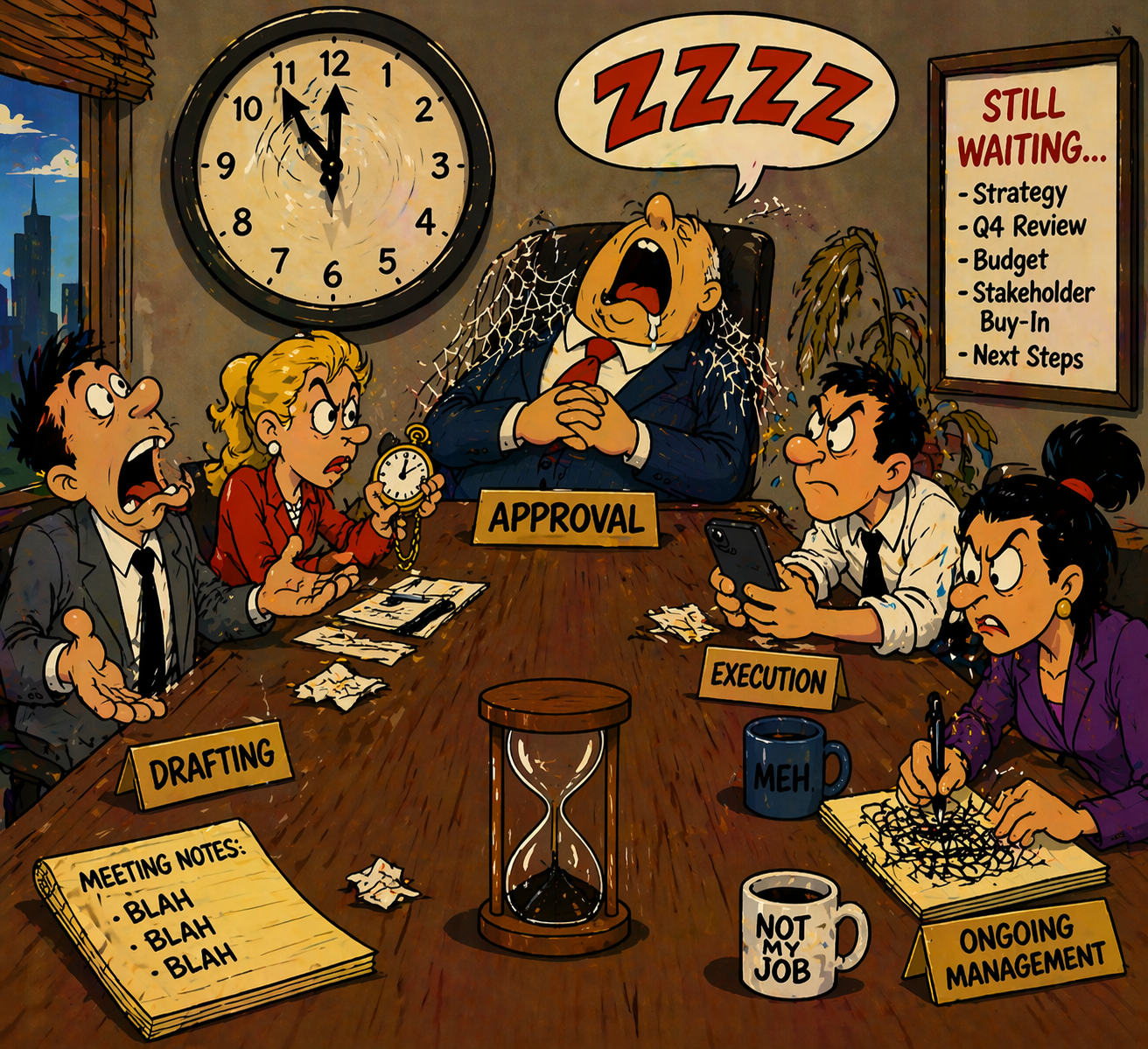
A contract approval workflow is the series of steps that a contract goes through before it gets signed. It defines:
- Who reviews the contract
- In what order should the review take place
- What happens if someone misses their deadline
A clear workflow ensures that every contract follows the same process, regardless of who requested it or which approver is available. This includes defining who is responsible for review, their level of authority, the approval timeline, and the actions taken if a deadline is missed.
The contract approval process is part of a bigger contract lifecycle that includes four phases:
- Drafting
- Approval
- Execution
- Ongoing management.
Of these, the approval phase is where most delays happen. The approval process is critical in determining how quickly a contract progresses. According to the Thomson Reuters 2024 State of the Corporate Law Department Report, inefficiencies in this phase are a major concern for legal teams. It can either move forward in a timely manner or be delayed for weeks, depending on how efficiently the approval steps are followed.
The next steps focus on improving the approval phase to eliminate delays.
6 Key steps in a contract approval workflow
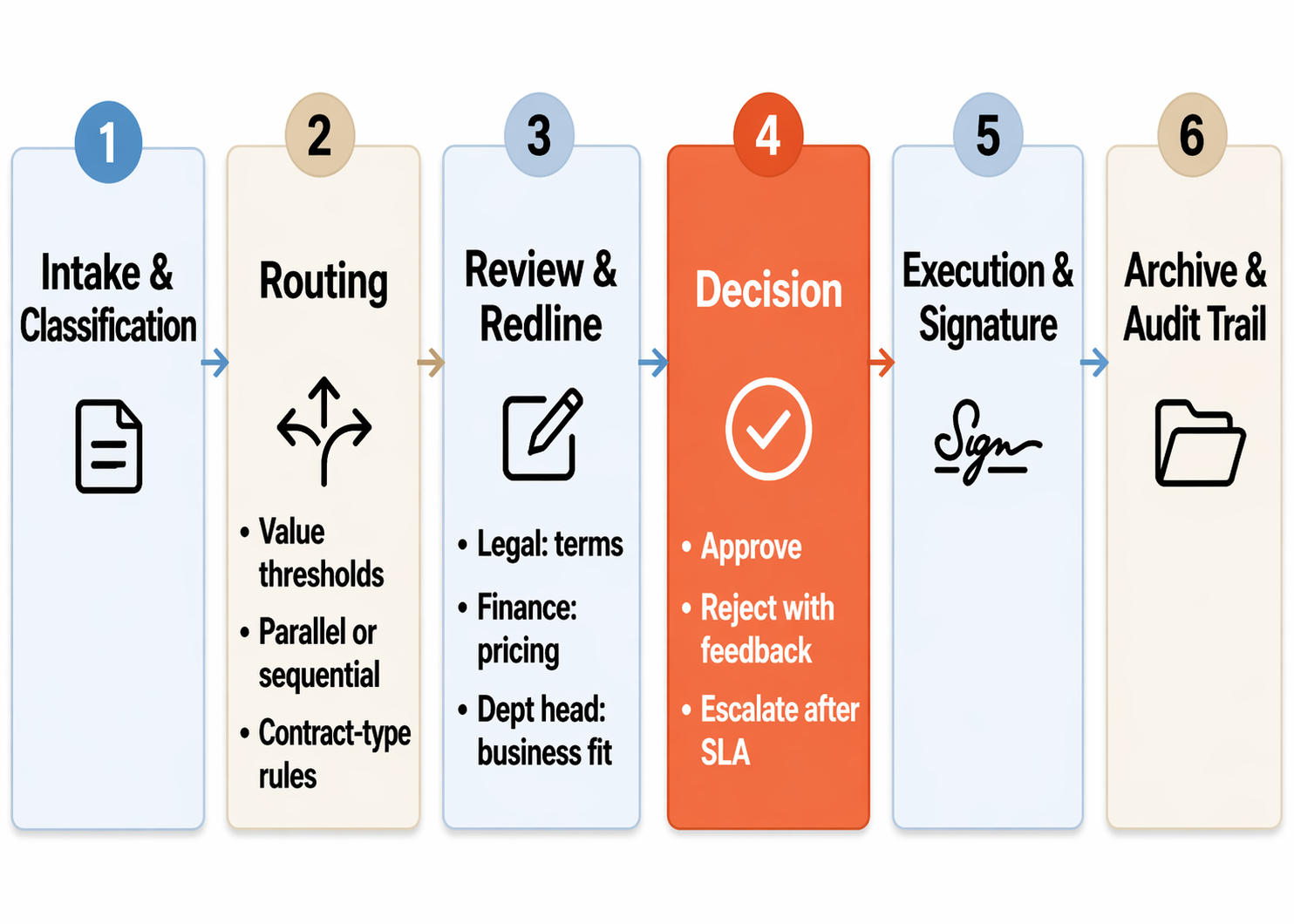
Every contract approval workflow follows six essential steps. While the specifics may vary by company and contract type, the overall process remains the same.
- Contract Intake and Classification
- Routing to the Right Approver
- Review and Redlining
- Approval, Rejection, or Escalation
- Execution and Signature
- Archiving and Audit Trail
The details of each step (like routing rules and approval timelines) can be tailored to your company’s needs, based on factors like contract value or the counterparty's status.
Step 1: Contract intake and classification
Every contract entering the approval process needs to be classified.
- First, identify the contract type. Whether it is an NDA, service agreement, vendor contract, or employment contract.
- Next, record the contract value, whether it's the annual value or total amount.
- Lastly, assess the risk level based on whether the contract uses standard or custom terms, and whether the counterparty is new or existing.
For example, consider two contracts: a $15,000 vendor renewal with standard terms and a $200,000 custom service agreement with a new client. These contracts will follow different approval paths based on factors like contract value, terms complexity, and the nature of the client relationship.
The intake process can be triggered automatically when a CRM deal reaches a certain stage or when a team member submits a contract request. The classification data collected here determines the next steps in the approval process.
Step 2: Routing to the right approver
Routing is the decision layer of the contract approval process. The classification data from Step 1 directly influences the rules that determine who reviews the contract. Your team needs to set routing logic for these key decisions:
- Value-threshold routing: Set dollar limits for the approval chain. It could be something like contracts under $25K go to the department head, those between $25K and $100K add legal review, and contracts over $100K require CFO's sign-off.
These thresholds ensure the appropriate level of scrutiny.
- Parallel vs. sequential approvals: Use parallel approvals when different aspects are reviewed at the same time (for example, legal reviews terms, while finance looks at pricing)
Sequential approvals are used when one review must happen before the next. For example, legal must approve terms before finance can calculate final pricing.
- Rules-based routing by contract type: NDAs follow a fast-track route with a single approver and a 24-hour SLA. Custom service agreements require full review, with legal, finance, and the department head all involved.
Docupilot offers automation tools like Zapier and Make that can enforce these routing rules, ensuring the workflow follows defined logic.
Step 3: Review and redlining
Once the contract reaches your reviewers, each one must have a clear scope.
- Legal reviews terms, liability, and compliance language.
- Finance checks pricing, payment terms, and budget alignment.
- The department head reviews business fit and strategic alignment.
All redlines should happen in a single document to avoid version control issues. When reviewers work on separate copies, version control quickly collapses. A shared version keeps all markups visible to the full team.
Pre-approved templates reduce redlines by ensuring the right clauses are included. Platforms like Docupilot use conditional logic to automatically insert the correct clauses based on contract type and jurisdiction. This lets reviewers focus on deal-specific terms and counterparty provisions, reducing the number of redline rounds before approval.
Step 4: Approval, rejection, or escalation
Each review must end with one of three outcomes: approved, rejected with feedback, or escalated. The workflow you build should be able to handle these cases.
- Approved: The contract moves directly to execution. The approver confirms that the terms are acceptable, and the workflow advances to Step 5.
- Rejected with feedback: The contract is returned to the requester with specific redlines or comments attached.
The requester revises the document and resubmits it, re-entering the workflow at the routing step. Every rejection includes documented feedback so the requester knows exactly what to fix.
- Escalated: If the primary approver misses the response deadline, the contract is reassigned to a backup approver or elevated to a senior reviewer. The backup approver receives the full contract with all review context attached, ensuring the review continues smoothly.
Escalation triggers should be set at specific time thresholds. An automatic reminder goes out at 24 hours, a second reminder at 48 hours, and a third after 72 hours. If it is still not approved, then the contract auto-escalates to a backup approver.
Adjust these timeframes based on contract priority. High-priority contracts escalate at 24 hours, while standard contracts escalate at 72 hours. Clearly document these thresholds so everyone knows the expectations.
For example, if the VP of Sales is the primary approver for enterprise deals and doesn’t respond within 48 hours, the contract automatically routes to the CRO.
Step 5. Execution and signature
Approval and execution are two separate steps, and reducing the time between them saves your team the most time.
Approval confirms that the contract terms are acceptable.
Execution occurs when the contract is signed and becomes legally binding. Once the final approver signs off, the contract should automatically move to eSignature. Any manual step between approval and signature creates delays and increases the risk of version errors.
Document generation can be sent directly to Docusign and HelloSign. You can do this with Docupilot and ensure that the approved contract is sent for signature immediately after the last approver clicks "approve."
Multi-party signing workflows, whether sequential or parallel, should follow the same pattern set in Step 2.
Step 6. Archiving and audit trail
Once the contract is signed, it needs a permanent home. The record of every action taken during the approval process should also be saved permanently.
Every signed contract should be automatically stored in a designated cloud location. A simple folder structure, like /clients/{{client_name}}/contracts/{{date}}.pdf, makes it easy to find documents later.
Dynamic folder paths automatically ensure each contract is saved in the right spot based on its details.
The audit trail should capture:
- Who requested the contract
- Who reviewed it
- Who approved it
- When each action happened
- What changes were made during the review
Document automation tools can handle this automatically, saving signed documents in the correct folder as soon as signing is complete. This archive becomes your go-to source during compliance audits, contract disputes, or renewal deadlines.
Contract approval workflow checklist
This checklist helps you infer the key steps when creating a contract approval workflow. Make sure these actions are included to ensure a smooth, organized process.
- Define contract types and classification criteria
- Set value thresholds for routing tiers
- Map approval chains for each contract type
- Decide parallel vs. sequential review per contract type
- Configure rules-based routing in your automation tool
- Define review scope for each reviewer role
- Build or select contract templates with pre-approved clauses
- Configure escalation triggers and timeout rules
- Assign backup approvers for every primary approver
- Connect document generation to eSignature
- Define folder structure for signed contract storage
- Specify audit trail data points and retention policy
Start with your highest-volume contract type. Build the workflow for that one type and run it for 14 days before expanding to additional contract types.
4 Common mistakes that break contract approval workflows
Automating contract approval is a key priority for legal teams through 2026, according to Gartner's 2025 Predicts report. However, the risk increases when teams rush to implement automation before finalizing the workflow design.
The four mistakes below are the most common reasons this process breaks down.
A workflow that runs without chasing approvers
A contract approval workflow runs reliably when routing logic and escalation rules are defined before you configure any tool. Start with your highest-volume contract type, build the workflow for that type alone, and run it for 14 days.
Measure the average approval cycle time for that contract type before you start, then compare it after 14 days of running the new workflow. That single metric will tell you whether the routing rules, escalation triggers, and tool connections are doing what they should.
With Docupilot, you can handle two segments of this workflow:
- Document generation with conditional clause logic
- Routing approved contracts to eSignature tools like DocuSign and HelloSign the moment the final approver signs off.
Morristown Beard School already uses this setup to automate 160+ employment contracts a year.
Book a demo to see the generation-to-signature chain in one workflow.
FAQs
What happens if an approver is on vacation or leave?
Assign a named backup approver for every primary approver before the workflow goes live. When the primary is marked out of office on their calendar, routing rules should automatically send contracts to the backup without waiting for an escalation timer. This is different from escalation, which handles silence. Out-of-office handling prevents the silence from starting in the first place.
Do small businesses need a contract approval workflow, or is it only for enterprises?
Any business signing more than ten contracts a month benefits from a defined workflow. Below that volume, a shared spreadsheet and clear handoff rules are usually enough. Above that, manual coordination starts consuming more time than the contracts themselves. The workflow doesn't need to be complex; it just needs to be documented and consistent, so every contract follows the same path.
How does this work for contracts sent by the other party instead of being drafted in-house?
Inbound contracts skip the drafting phase but still enter the workflow at intake and classification. Record the contract type, value, and risk level the same way. The key difference is during review: reviewers check the counterparty's language against your internal playbook instead of confirming your own clauses. Flag non-standard terms early and route them to legal before other reviewers to avoid rework.
How does a contract approval workflow fit with an existing CLM platform?
Most CLM platforms handle storage, negotiation, and signature tracking but rely on separate tools for document generation and workflow automation. Your approval workflow sits upstream of the CLM, generating the contract, routing it through approval, and handing off the signed document to the CLM for post-execution management. The two systems complement each other when connected through an integration or middleware like Zapier or Make.
Can Docupilot generate multiple contracts at once from a spreadsheet?
Yes. Docupilot's bulk create feature generates contracts in batches from a CSV, Google Sheet, or Airtable base. Upload the data, map the columns to your template fields, and Docupilot creates one contract per row. This is useful for annual renewals, employee onboarding, and vendor contracts where the template stays the same but the details change per record.
Learn how to automate document creation with Docupilot


Contents
Stop rebuilding the same document by hand.

Generate and sign in one workflow.
Fifteen minutes back, per application.