




Key takeaways
- Healthcare document generation replaces manual drafting with structured workflows, improving visibility, consistency, and documentation control.
- Prioritize EHR integration, centralized templates, workflow automation, and secure access controls to ensure accuracy, compliance, and scalability.
- Docupilot enables compliant document generation from system data, centralized template management, and secure workflow scaling.
Studies show that documentation burden remains a major operational challenge, with nearly 75% of healthcare professionals reporting that documentation tasks impede patient care and extend work beyond regular hours.
If your hospital or clinic is still preparing discharge summaries, consent forms, and insurance paperwork manually, you’ve likely seen how quickly administrative effort scales as patient intake increases.
This process should be standardized and automated so that, instead of assembling each document by hand, a structured template automatically generates consistent output.
This article breaks down what healthcare document generation involves, how it is used in healthcare workflows, and the factors to consider when selecting secure, reliable, and compliant software.
What exactly is a healthcare document generation?
Healthcare document generation is the process of creating discharge summaries, consent forms, or insurance paperwork directly from Electronic Health Record (EHR) and operational data through standardized templates.
But, how exactly does healthcare document automation work?
When a physician completes notes in the EHR, details on diagnosis codes, treatments, medications, and follow-up instructions are already stored as structured data.
Then, using a healthcare document automation platform, you generate a discharge summary template with sections such as patient personal information, medication changes and instructions, medical diagnosis of the condition, key lab and imaging results, and procedures and treatments performed. As data is stored in EHRs, billing platforms, or internal databases, it works by linking document templates to structured data stored in systems.
During discharge preparation, instead of opening a separate template and copying information manually, the system pulls required fields directly from the EHR.
Issues with manual healthcare documentation
Incomplete or inaccurate clinical documentation can result in rejected insurance claims and substantial revenue leakage for healthcare organizations.
When teams scale while still relying on manual documentation processes, issues such as limited visibility into document status, inconsistent standards across departments, and dependence on individual staff knowledge become more common. The following sections examine each of these issues in detail.
Limited visibility into document progress
A healthcare document often moves through multiple steps before completion. For example, a discharge summary begins with the physician completing clinical details. It then moves to the billing team to add insurance and coding information. After billing review, the reception team may perform a final check before the patient is formally discharged.
If the document is delayed at any stage, the discharge process is delayed, even when the patient is medically ready to leave.
In manual workflows, teams coordinate these steps through emails, shared files, or verbal follow-ups. There is no built-in system that clearly shows whether a document is drafted, reviewed, approved, or ready for the next stage.
The limitation is the absence of structured progress tracking across the document lifecycle. Without automated routing and status visibility, coordination depends on manual follow-ups.
Inconsistent documentation standards across departments
When documentation is managed manually, each department maintains its own version of templates.
For example, one team may update consent language to reflect a new internal policy, while another continues using an older version. This would lead to issues like:
- Complex compliance: Teams must verify which template was used and whether the correct language was included during documentation.
- Additional effort for audit preparation: Inconsistent templates make it harder to demonstrate standardized documentation practices across departments.
- Slower coordination between teams: Documents must be manually moved from the clinical team → billing team → administrative team, with rework required for mismatched formats and missing sections.
Difficulty adapting to regulatory or policy changes
Applying internal policy updates, regulatory changes, and revised insurance requirements across all templates requires coordinated edits across departments.
This results in implementation delays, temporary workflow disruption, and uneven adoption across teams, especially when changes are communicated and executed manually rather than enforced at the system level.
Dependence on individual staff knowledge
In manual documentation workflows, consistency in how documents are created and structured often depends on the knowledge of individual staff members. This includes decisions such as which template to use and which sections must be included.
For example, experienced staff may know the specific disclosure requirements for certain procedures or insurance categories. When new team members join, they often rely on verbal guidance from senior staff. If key personnel leave the organization, that process knowledge may not be formally documented or enforced.
Some challenges include:
- Inconsistent document quality: Variations in staff knowledge lead to differences in how documents are prepared and reviewed.
- Longer onboarding periods: New team members must learn documentation standards through manual training, observation, and informal guidance.
- Operational risk during staff absence: When processes are not system-enforced, document accuracy may depend on the availability of specific individuals.
Benefits of automating healthcare document generation
If these challenges exist in your workflow, they result from manual processes. With automation, documents move through defined stages and are automatically assigned to the next team.
The benefits below show how automation improves workflow consistency and document handling.
- Workflow-level control and accountability: Every document follows a defined lifecycle with assignees to each stage. Teams gain visibility into progress without relying on informal follow-ups.
- Organization-wide documentation governance: Templates are managed centrally, ensuring uniform structure and approved language across departments and facilities.
- Controlled and immediate change implementation: Policy or regulatory updates can be applied at the template level and reflected instantly in all new documents, on their own.
- Process consistency independent of staffing variability: Smart content blocks and advanced conditions ensure required sections and formatting rules are enforced within the system. This reduces reliance on individual experience or memory.
Common healthcare use cases for automated document generation
Healthcare document generation supports multiple workflows across clinical and administrative teams.
The examples below show how automation applies in day-to-day healthcare operations.
- Automated discharge summaries: When a patient is discharged, clinical data already recorded in the EHR is used to generate a structured discharge summary without manual drafting.
- Consent form generation: Based on procedure type, the system generates the appropriate consent document with required disclosures included.
- Insurance and claims documentation: Billing data is mapped directly into predefined claim templates.
- Referral letters between departments: Patient history and diagnostic details are automatically formatted into referral documents for specialists.
- Patient onboarding packets: Intake forms, disclosures, consent documents, and dynamic lists such as treatment plans or medication summaries are generated together based on patient category and service type.
- Lab report generation: Structured lab results are formatted into standardized report templates that are ready for physician review or patient communication.
What to look for in a healthcare document generation solution
Before you select a solution, it is important to evaluate whether it fits your integration, compliance, and operational requirements.
The factors below help you assess whether a system can support your documentation processes at scale.

Healthcare organizations that require structured documentation workflows have used Docupilot to automate template management, integrate with internal systems, and streamline document generation across teams.
After implementing Docupilot, Flight Medicals reduced manual document preparation time and improved workflow visibility across teams.
Read the full case study here.
How to calculate ROI from healthcare document generation
From an investor's perspective, every change must show a financial impact. For them, healthcare document automation should improve cost efficiency, revenue flow, and support operational scale. Calculating ROI helps measure this impact.
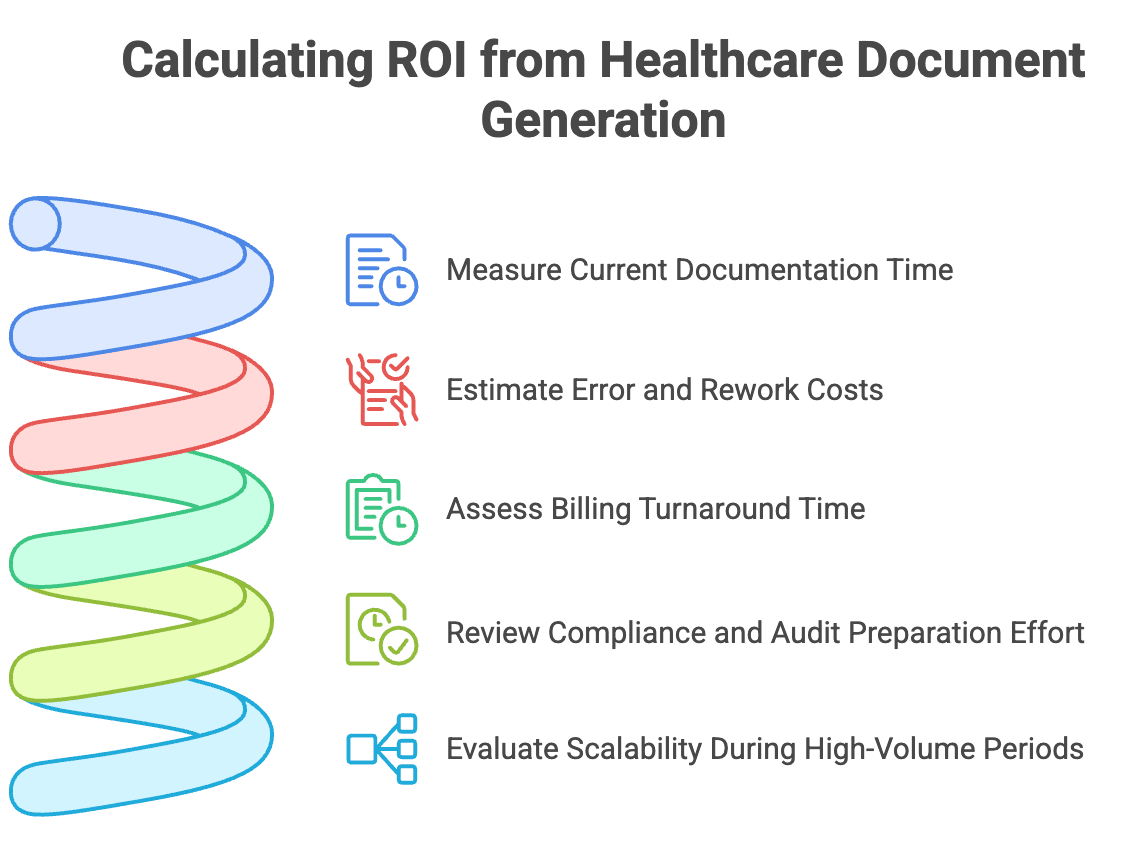
Step 1: Measure current documentation time
Start by calculating the average time required to prepare one document manually. Include drafting, formatting, coordination, and corrections.
Multiply this by the number of documents generated daily or weekly. This gives a view of the current administrative effort.
Step 2: Estimate error and rework costs
Track how often documents require corrections due to missing information, outdated language, or formatting inconsistencies.
Measure the time spent resolving these issues. This reveals additional labor costs tied to manual documentation.
Step 3: Assess billing turnaround time
Measure the time between patient discharge and claim submission.
Quantify any documentation-related billing delays identified earlier to measure financial impact. Faster document generation can shorten this cycle and improve revenue predictability.
Step 4: Review compliance and audit preparation effort
Estimate the time spent verifying documentation during audits or internal reviews.
Standardized templates with smart content blocks and advanced conditions reduce manual verification time and improve documentation readiness.
Step 5: Evaluate scalability during high-volume periods
Examine how the documentation workload increases during peak patient intake.
If higher volume requires additional staffing hours, automation can reduce that dependency and stabilize operational costs.
How Docupilot supports healthcare document generation workflows?
Use the evaluation factors above as a checklist to choose a healthcare document generation solution that fits your integration, compliance, and workflow requirements.
If you are looking for a structured and scalable approach, Docupilot enables healthcare teams to generate documents directly from system data, manage templates centrally, apply smart content blocks for required disclosures, and move documents through defined workflows. Docupilot integrates with 1000+ apps through Zapier and Make.
Start a 14-day free trial or request a demo to see how Docupilot can streamline healthcare document workflows in your organization.
Frequently asked questions
1. How long does it take to implement healthcare document generation software?
Implementation time depends on integration complexity and template volume. Organizations with structured data systems can begin generating automated documents within weeks, especially when API connections and templates are clearly defined.
2. Can healthcare document generation support multi-location hospital networks?
Yes. A centralized document generation system can standardize templates and workflows across multiple facilities while allowing role-based access for different teams.
3. How does document generation support compliance reporting?
Automated templates use smart content blocks and advanced conditions to enforce required fields and standardized language. This helps maintain consistent documentation across departments, making internal reviews and compliance checks more structured.
4. Does healthcare document generation integrate with legacy EHR systems?
Yes. Most healthcare document generation platforms support API-based integration with EHR, billing systems, and internal databases. Tools like Zapier and Make can also be used to connect legacy systems, allowing structured data to flow directly into document templates without manual exports or data entry.
5. What security standards should healthcare organizations verify?
Healthcare organizations should verify role-based access controls, secure data handling practices, and compliance readiness when evaluating a document generation solution. This includes controlled permissions, audit trails, and safeguards for sensitive patient data to ensure consistent and secure documentation workflows.
Learn how to automate document creation with Docupilot


Contents
Stop rebuilding the same document by hand.

Generate and sign documents in one workflow
Save ~15 minutes per application