







Key takeaways
- Manually generating high-volume documents results in errors, time wastage, and formatting drifts
- Automating high-volume document generation requires a tool with dynamic templates, smart merge fields, flexible data connections, and automated delivery to handle volume without manual intervention
- Docupilot gives teams everything needed to automate high-volume documents, from template building to signed, delivered documents
To generate one document, most teams start with a simple process: a template, some copy-pasting, maybe a mail merge. It works well in the beginning. But as volume grows errors start creeping in, turnaround slows down, and tasks that once took hours begin to take days. The process that got you started is no longer enough to help you scale.
To handle high-volume document generation, you need automation. When done properly, it removes most of the manual work and delivers clear efficiency gains.
This article explains the main problems with manual high-volume document generation, what to look for in a tool that can handle it at scale, and how to create your first automated workflow using Docupilot.
The challenges with manual high-volume document generation and how automation fixes them
Here are some of the biggest challenges teams face when generating documents at scale and how automation solves them.
Errors are likely to occur
When you fill in document fields manually, mistakes are unavoidable. A wrong figure, a mismatched name, or an outdated clause can easily slip through. At low volumes, these errors are manageable. At high-volumes, they become much harder to catch.
Automation fixes this by pulling data directly from your source system. The information is entered once, correctly, and every document uses that same data.
Here's what this data scientist said after automating their documents:
"Docupilot generates documents that need to be created multiple times for our end users and reduces human error rates by a lot for our business teams.
Formatting and branding consistency breaks down
When multiple people are creating documents manually, layout drift, such as font changes, spacing breaks, and logos getting resized, is almost unavoidable. Even when one person is handling a large batch, small formatting issues start to add up. Maintaining a consistent, professional look across thousands of documents is extremely difficult.
Automation solves this by generating all documents from a single master template. The structure, branding, and layout stay consistent every time.
Here is what a G2 reviewer said after switching to automated document generation:
"Docupilot removes all the manual effort involved in creating repetitive documents. Instead of formatting the same PDFs, invoices, agreements, or reports over and over, we just feed the data and the template handles the rest. It keeps all our documents consistent and professional."
Data lives in one place, documents get made in another
Most teams store their data in one system and then manually transfer it into a document tool. That gap is where time gets lost, and mistakes happen.
Automation removes this step completely by connecting your data source directly to your document generation process. The data flows automatically, so there is no copying, no pasting, and no risk of transferring the wrong information.
One user described setting up exactly this kind of workflow:
"Docupilot connects with Jotform, so recruiters fill in my Jotform, and then Docupilot produces a highly customized offer letter for every investigator we hire, and that's a lot."
Processes that can't keep up with growth
At a certain point, manual document generation stops being just a workflow issue and becomes a business problem. It slows down operations, creates bottlenecks, and makes it impossible to scale without adding more people.
Automation solves this by handling increasing volume without changing the process. What works when you're generating a few documents a day still works when you're generating hundreds.
One user summed up the cumulative impact:
"It saves about 8 hours of manual work for me, and at the same time reduces the chance of human error by a lot by the sheer brilliance of their automation."

What to look for in a high-volume document generation tool
Not every document generation tool is designed to handle large-scale use. If you are evaluating one for high-volume workflows, these are the capabilities that matter most.
- Template flexibility: A good tool should support dynamic templates with conditional logic, calculated fields, and variable content blocks. This allows one template to handle multiple document variations without duplicating work. If the template system is too rigid, you will end up managing dozens of templates instead of one
- Data source integrations: For automation to be possible, the tool should connect directly to where your data already lives. That could be a CRM, a Google Sheet, an Airtable base, a form, or a custom database through an API
- Bulk and batch generation capability: The tool should be able to process large batches in a single run, whether through a CSV upload or an API call
- Output formats and delivery options: Most use cases require PDF output, but DOCX support matters for documents that need further editing. So keep that in mind
- Embedded template editor: To help your team quickly adopt the tool, ensure your document automation tool integrates directly into your interface. This allows template creation to happen inside your product using real data, instead of forcing users to learn a new tool
- Audit trail: When you're generating documents at high-volume, you need to know what was generated, when, by whom, and whether it was delivered and signed. A clear audit trail is essential for accountability, compliance, and troubleshooting
- Built-in e-signature workflow: Generated documents often need signing. A tool with a built-in e-signature workflow means documents can be routed for signature immediately after generation, without exporting to a separate platform and breaking the automation chain
- Security: Documents generated at scale often contain sensitive data like financial figures, personal information, and legal terms. The tool should meet recognised security standards and offer features like encryption, access controls, and compliance certifications to protect that data at every step
- Pricing that scales with you: Flat per-document pricing models can work against you at high-volume. Look for tools that offer volume-based discounts or pricing that grows more efficiently as your usage increases
How to automate high-volume document generation with Docupilot
If you’re wondering how to find a tool that checks all the boxes above, Docupilot is a great choice.
It gives you all the features you need to scale document generation successfully. The platform is intuitive, offers affordable, flexible pricing, and comes with customer support that’s always available via email or in-app chat.
Here’s what a Docupilot user has to say:
“The product is fantastic — reliable, versatile, and at a great price. The customer service is just incredible — seriously unbeatable. They've gone way above and beyond to help us meet our goals."
To use it, sign up for your 14-day free trial and follow these steps to set it up:
Step 1: Build your template
Start by creating the document you want to generate at scale. Docupilot gives you four ways to do this: build from scratch using the built-in editor, upload an existing Word or PDF file, start from a pre-built template in Docupilot's template library, or generate one using AI by describing the document you need.
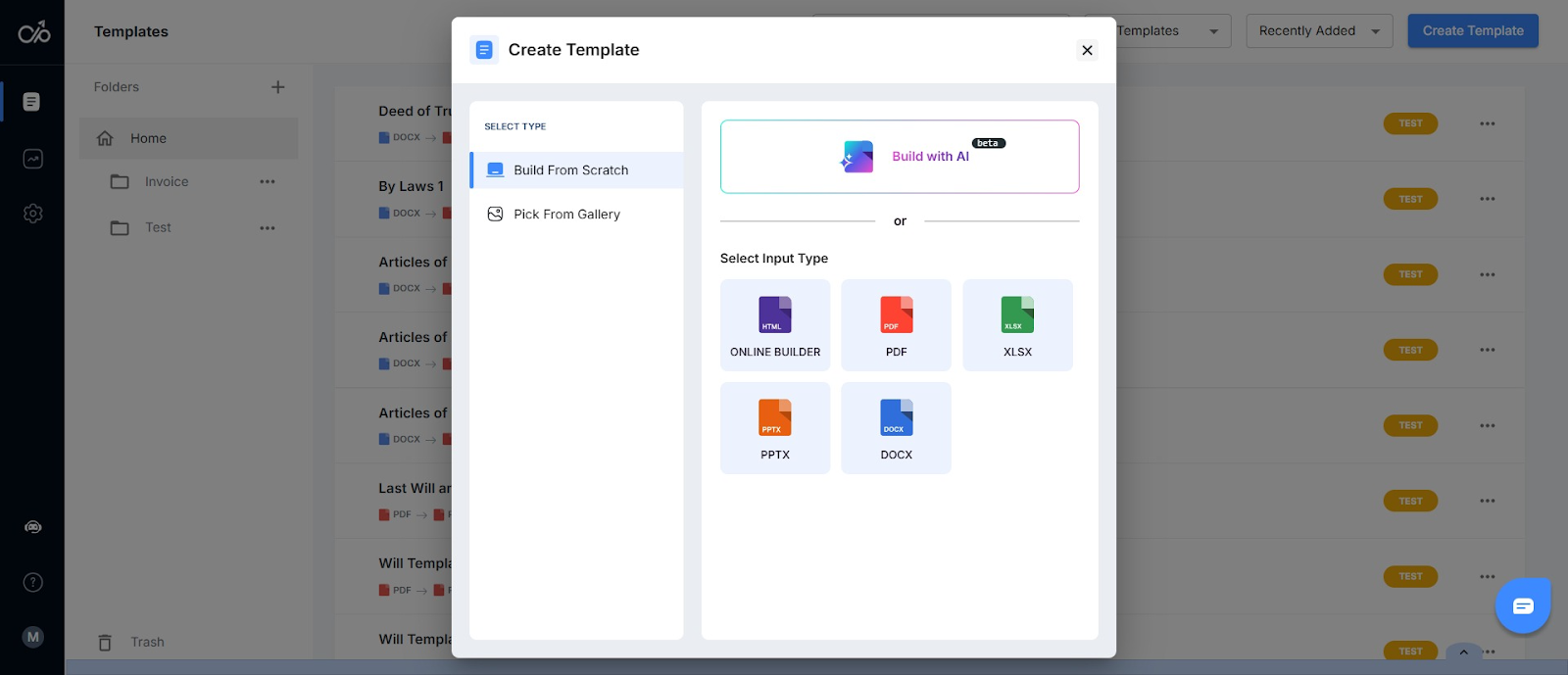
Once your template is ready, the next step is adding the fields that will be populated with data at generation time
Step 2: Add your merge fields
Once your template structure is in place, add dynamic fields to personalize your documents. Token fields are simple placeholders, such as {{first_name}} or {{invoice_amount}}, that are replaced with the corresponding value from your data source each time a document is generated.
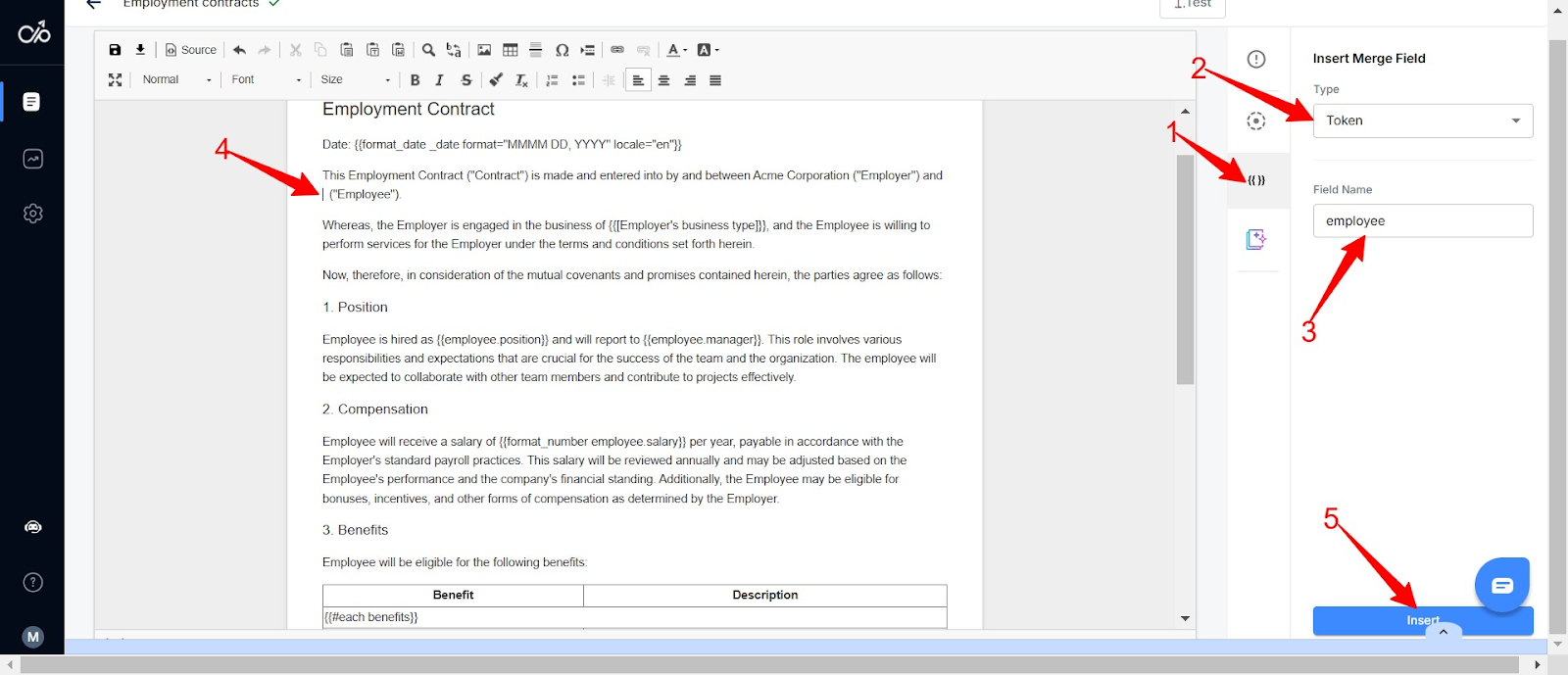
Use advanced conditional logic when documents need to vary based on incoming data. Set up if-then-else rules to show or hide sections, swap clauses, or change content depending on specific field values. This allows one template to handle multiple document variants without maintaining separate files for each.
Step 3: Connect your data source
With your template ready, connect it to wherever your data lives. Docupilot supports four ways to do this:
- Zapier or Make: connect to over 1,000 apps, so anything from a CRM update to a form submission can trigger document generation
- CSV upload: upload a spreadsheet, and Docupilot generates a separate document for every row in a single run
- API: for teams with custom systems who want to trigger generation programmatically
- Data capture form: Docupilot's native form collects submissions and automatically kicks off document generation without needing a third-party tool
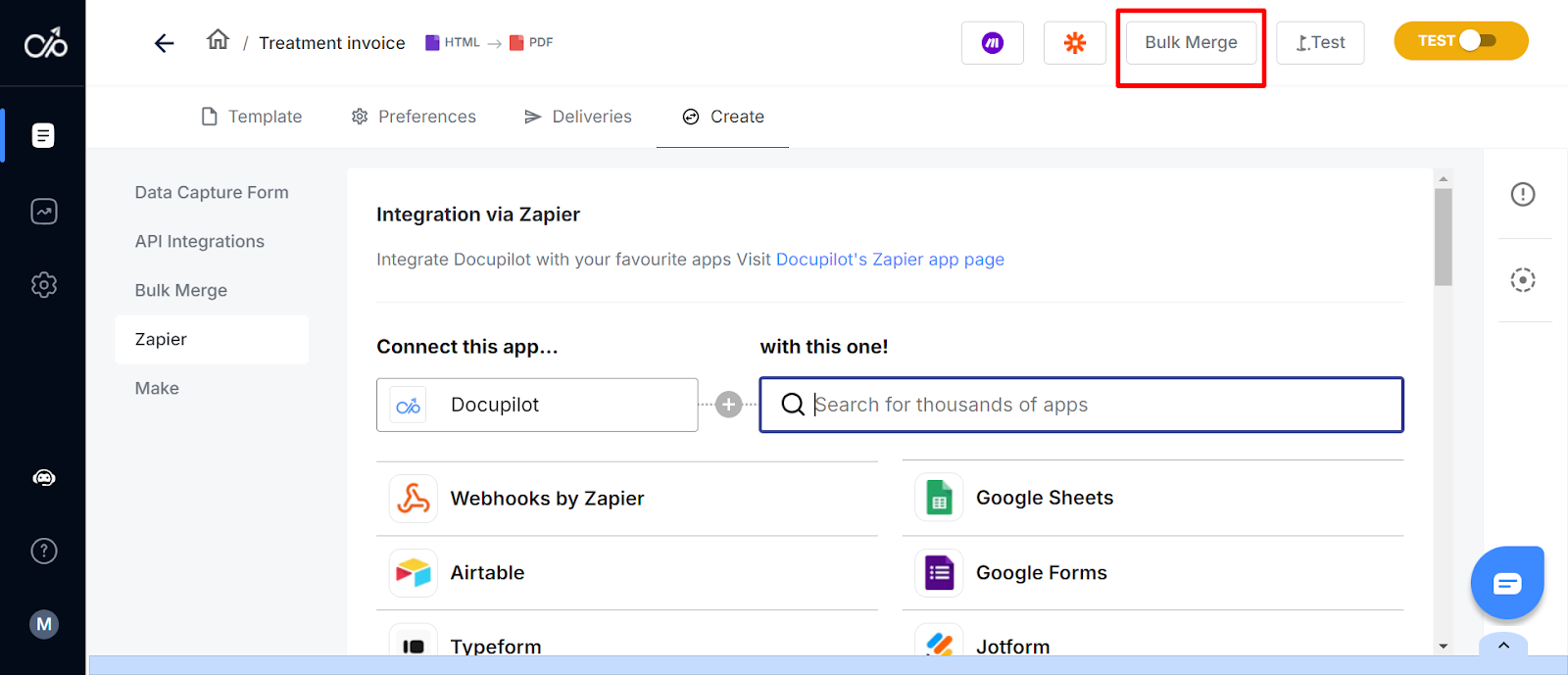
Step 4: Set up delivery and e-signature
The last step is deciding what happens to the document after it's generated. Docupilot handles both delivery and signing:
- Email delivery: send generated documents directly to recipients automatically, with a customisable email body and subject line
- Cloud storage: route documents to Google Drive, Dropbox, and OneDrive automatically, so they land in the right folder without manual saving
- E-signature: for documents that need signing, Docupilot integrates with e-signature tools so you can route documents for signature immediately after generation, without switching platforms
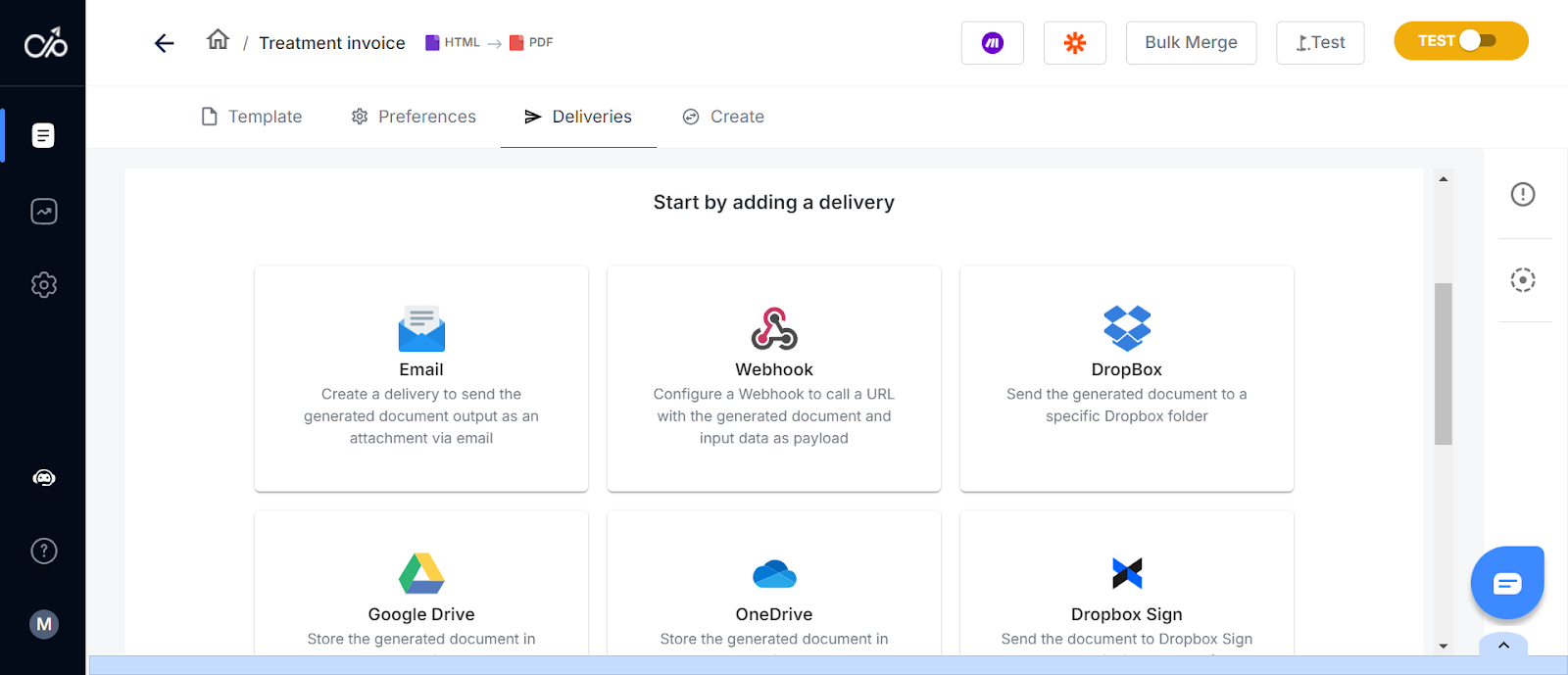
Once this is configured, the entire process from data input to a signed, delivered document runs without manually managing it.
How Docupilot Streamlines High-Volume Document Generation?
High-volume document generation doesn't have to be a bottleneck. The teams that struggle lack the right system.
With manual processes, every mistake, delay, and inconsistency scales with volume. With automation, none of that happens.
Docupilot gives you everything you need to set up that system, including flexible templates, smart merge fields, broad integrations, and automated delivery. This lets your team spend less time formatting and more time on work that drives the business forward.
Ready to see it in action? Start your free trial or book a demo.
FAQs
What is the difference between document generation and document automation?
Document generation is the process of creating documents, while document automation is the broader system that triggers generation automatically based on data or workflows, removing the manual step entirely.
What types of documents can be generated at high volume?
Any document with a consistent structure but variable data per recipient can be generated at high volume. E.g invoices, contracts, offer letters, certificates, compliance reports, insurance policies, and more.
How long does it take to set up a high-volume document generation workflow in Docupilot?
Setting up a high-volume document generation workflow in Docupilot takes most teams less than a day. Building a template, adding merge fields, and connecting a data source can be done in hours without technical expertise.
Is high-volume document generation secure?
High-volume document generation is secure when you use the right tool. Look for encryption, role-based access controls, audit trails, and compliance certifications. Docupilot is HIPAA and SOC 2 compliant, making it suitable for industries handling sensitive data.
Learn how to automate document creation with Docupilot


Contents
Stop rebuilding the same document by hand.

Generate and sign documents in one workflow
Save ~15 minutes per application




