







Key takeaways
- Using a document generation API lets you create documents inside your systems, control data flow, and design workflows that fit your needs
- When choosing a document generation API, prioritize template flexibility, merge fields, conditional logic, pricing transparency, and strong support
- Docupilot offers an affordable, reliable, and effective API to streamline workflows, maintain data security, and scale automation
If you're already using a document generation tool, you’ve probably reached a point where you want to generate documents directly from your own systems, create more complex workflows, and scale smoothly as volume grows.
That said, you can only experience those benefits if you choose the right API. The wrong choice can lead to fragile templates, formatting problems, and workflows that become harder to maintain instead of easier.
It’s also important to understand that a good document generation tool does not automatically come with a good API. There are specific factors you need to evaluate.
This article breaks down those factors so you can choose an API that is secure, reliable, and affordable
But first…
Why would your business benefit from a document generation API
An API requires more technical setup than no-code or low-code tools, but the added control and long-term benefits often outweigh the upfront effort. Let’s dig into them:
Generate documents inside your systems, not between them
When a sales rep closes a deal in the CRM, the contract is generated automatically without them clicking another button or opening another dashboard. This removes context switching, reduces training needs, and makes document generation feel like a native feature of your product rather than an external tool.
A document generation API doesn't change how you already work. Instead of logging into another tool, your team keeps using the CRM, billing system, or internal app they already rely on.
You control how systems connect and exchange data
With Zapier or Make, integrations are convenient, but you don’t have full control over how they work. You’re limited to what the connector supports, and when something breaks, debugging can be slow or opaque.
An API gives you full control over how data is passed, transformed, and validated before it becomes a document. This matters when documents depend on multiple systems, complex objects, or evolving schemas. You can control edge cases, enforce rules, and adapt integrations as your systems change.
For teams scaling document automation, this control is often the difference between a fragile setup and a reliable one.
You design workflows that match your business
With an API, you are no longer adapting your process to fit the tool. You design the experience exactly as your business needs it. That means building your own interface, defining custom approval steps, enforcing internal rules, and deciding when and how documents are generated. The document automation platform becomes an engine, not a workspace.
This is especially important for teams with internal review requirements, multi-step approvals, or role-based controls that go beyond what off-the-shelf dashboards support.
Deep customization
Document tools are good at conditional logic inside templates. They are less effective when logic depends on external rules, permissions, or calculations already handled by your system.
With an API, the intelligence shifts upstream. Your application decides which template to use, what sections apply, and what data is allowed. The document engine focuses on rendering, not decision making.
This reduces template sprawl and makes documents easier to maintain as rules grow more complex.
Sensitive data stays under your control
When customer data flows through Zapier to a document automation tool and back, you've introduced multiple third-party processors into your compliance chain. For healthcare, financial services, or enterprise contracts, this creates audit headaches. You're trusting every platform in the chain and have limited control over where data lives or how long it's retained.
With an API, you remove the middleware layer. Data goes directly from your system to the document service. You still need to trust the API provider's security, but instead of auditing three or four platforms, you're auditing two.
This simplification can give you an edge with auditors and make it easier to meet contracts that require data residency guarantees.
Lower long-term cost
With tools like Zapier or Make, you’re paying for multiple subscriptions and dealing with extra tasks, retries, workarounds, and manual fixes when something fails. As your document volume grows, these costs can scale quickly.
A direct API simplifies the pipeline: fewer moving parts, fewer tools in between, and fewer failure points. Over time, this usually reduces operational costs, even if the per-document price stays the same, the savings come from stability and predictability.
Factors to look out for when choosing a document generation API
Many vendors claim to have the best document generation API. Instead of relying on marketing claims, use the factors below as a practical checklist for finding a tool that actually works for your business.
- Output quality
Imagine designing a document with perfect tables, spacing, and fonts, only to see the generated version come out wobbly with shifted margins or a completely different typeface. That is why output quality should be the first thing you examine.
Poor outputs create hidden costs. Teams start manually fixing formatting, which defeats the whole point of automation. When those documents go straight to customers, the business looks careless. In regulated industries, a broken layout can even invalidate contracts or official reports.
You can listen to vendor promises, but the safest approach is to test with your own documents. Upload the most complex template you currently rely on and generate several versions using different data sets. Real documents reveal problems that polished demos never show.
Pay attention to the following areas:
- Layout drift: Some APIs rebuild documents using their own rendering engines instead of respecting your original template. This can cause margins to shift, headers to move, or page breaks to appear in the wrong places
- Table and image handling: Tables with merged cells, nested rows, or dynamic length are notoriously difficult. Logos may appear blurry or stretched. Charts can lose alignment. These details matter in invoices, financial statements, and legal documents
- Font substitution: If the API does not support embedded fonts, it can silently replace them with alternatives, which may violate your brand guidelines or make certain languages hard to read
- Supported formats: Confirm that the API can generate all formats you need today and in the future. Common requirements include PDF, DOCX, HTML, and sometimes images or spreadsheets. Conversions between formats should preserve the same structure and visual quality
2. Merge fields and conditional statements
The whole purpose of using an API is to automate document creation. Without merge fields and conditional statements, you would still need to manually edit documents after they are generated, which defeats the point of automation.
Merge fields allow the API to pull dynamic data into a document, such as names, dates, amounts, or product details. Without them, every document would look the same, and the API would add little value beyond storing a template.
To go a step further, conditional statements and dynamic blocks let you control what appears in a document based on data or rules. This makes it possible to scale personalized documents, such as:
- Contracts that include different clauses for different countries
- Invoices that show tax only for certain regions
- Proposals that display a discount section only when it applies
If an API cannot handle conditions, you end up creating dozens of separate templates to cover every scenario. Maintenance quickly becomes chaotic, and the risk of errors increases as your document volume grows.
3. Integration flexibility
Documents rarely exist in isolation. They’re usually the final step in sales processes, onboarding flows, billing systems, or customer communications.
A strong API should allow information from a CRM, payment platform, database, or internal application to flow directly into the document template. When integration is rigid, teams often end up exporting spreadsheets, copying values manually, or building fragile middleware just to generate a simple file.
Your API of choice should also support webhooks, so you can get immediate confirmation when a file is ready, signed, or delivered.
To evaluate integration flexibility, test a full scenario end-to-end: pull data from the real source, pass it through the API, generate the document, and deliver it to the final destination, such as email or cloud storage. Any manual step discovered in that chain is a weak point that can disrupt your automation flow.
4. Pricing model
Using a document generation API shouldn’t just save you time, it should save you money. Your budget shouldn’t scale at the same rate as your document volume; vendors should offer discounts for higher volumes, and pricing should be transparent to avoid hidden charges.
That’s why it’s important to understand how a vendor charges before committing. Some charge separately to access the API, while others include it in their main tool plans. Fees can be per API call, per document generated, or based on a monthly or annual subscription.
For example, all Docupilot’s plans give you access to the API and charge per document under the regular plan. Additional users cost $4 and each e-signature cost $1.50 with volume discount.
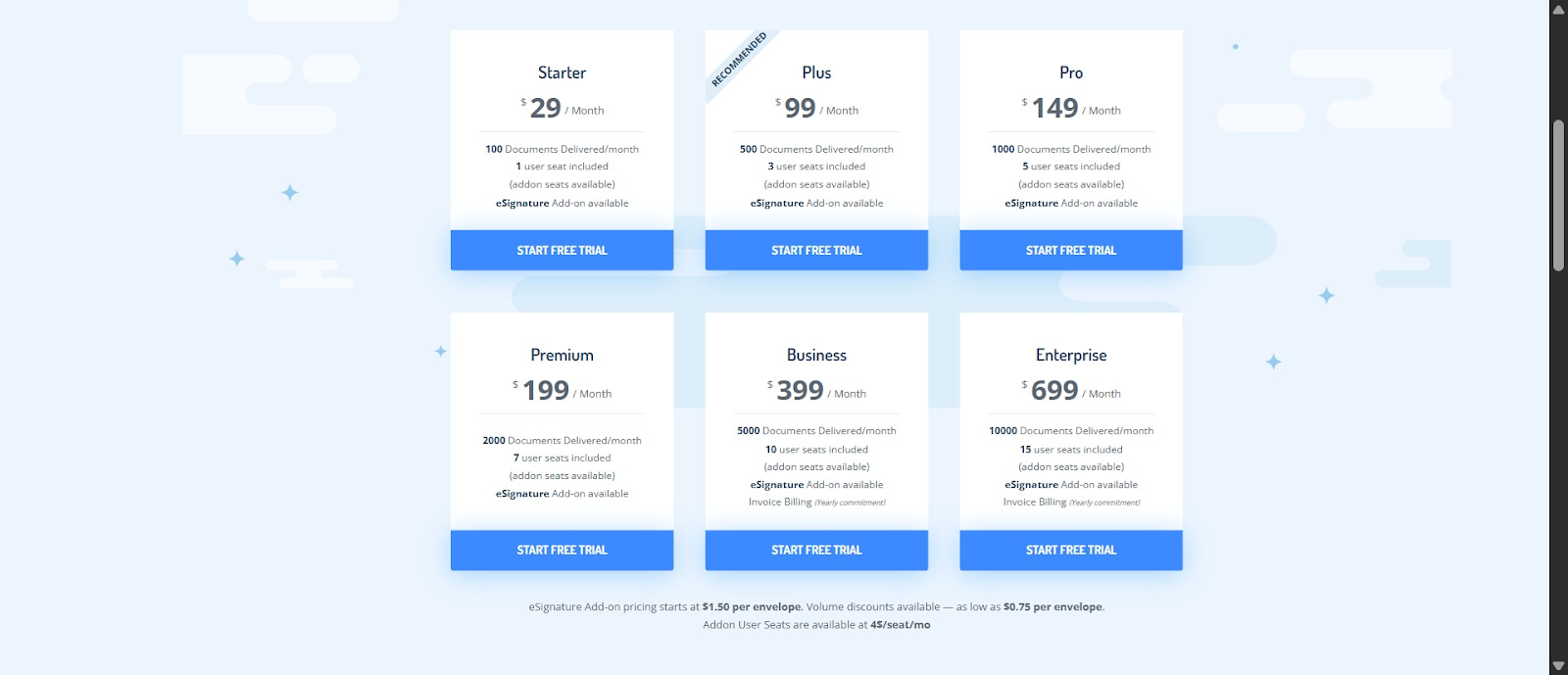
Your ideal vendor should be willing to tailor a plan to your needs, so you don’t overpay for unused capacity. One user shared their experience with Docupilot:
“I didn't love the payment plans initially; however, customer support helped me and showed me the Enterprise solutions that allow for one-time purchases of required credits.”
To avoid being misled by marketing claims, consult forums like G2 for reports of unexpected fees after upgrades or new feature releases.
5. Security and compliance
Security and compliance is very key especially if you’re in a regulated industry. So, consider how well the tools align with general and industry specific safety standards like hippaa for health care. This prevent data breaches, legal penalties, and reputational damage.
Key considerations
- Data encryption: Look for APIs that encrypt data during transmission (TLS/HTTPS) and at rest. Some platforms offer advanced encryption for stored templates or generated documents
- Access controls: Role-based permissions ensure that only authorized users or systems can create, view, or edit documents
- Regulatory compliance: Check whether the API complies with standards relevant to your industry, such as GDPR (EU data protection), HIPAA (healthcare), SOC 2, or ISO certifications. Compliance is especially important for financial, healthcare, or legal documents
- Audit logs and traceability: The ability to track who generated or accessed a document, when, and what changes were made is essential for audits and accountability
- Data residency: Some industries require that data never leaves a specific geographic region. Verify the API’s server locations and data handling policies
5. Clear documentation and reliable support
An affordable and effective API with poor or confusing documentation and weak customer support is a recipe for frustration.
Before committing, check the vendor’s API documentation and share it with your developers to ensure they can work with it.
Check out Docupilot’s API documentation here.
Even if the documentation is clear, ongoing customer support is crucial for handling future issues: you want to know what channels are supported, typical response times, and how maintenance updates are handled.
Real user feedback can give you a sense of what to expect. For example, one user praised the ease of Docupilot’s API:
“I tried Docupilot to help me speed up my paperwork. Surprisingly, it’s saved me a ton of time sitting around doing the same stuff over and over. I like the fact that I can write conditional logic and generate documents with APIs without any fuss.”
Another user shared a happy experience with Docupilot’s support:
“...the customer support is the best part, and we really appreciate it. The software is incredibly useful for our operations and service delivery, and we hope to continue with Docupilot for longer.”
Docupilot: Your secure, reliable, and affordable document generation API
Use this checklist as a cheat sheet to choose the right document generation API and avoid trial-and-error, so you can start reaping the benefits faster.
If you want our recommendation, try Docupilot. It supports multiple formats to keep your templates intact, offers merge fields and conditional statements for automation, integrates with a variety of tools for complex workflows, and keeps your data secure, all while remaining simple and affordable. See the full range of Docupilot's document generation capabilities across document types and industries.
Sign up for a 14-day free trial of Docupilot and experience the API for yourself. If you have any questions or run into issues, you can reach out via email, in-app chat, or the website chatbot and get help quickly.
Learn how to automate document creation with Docupilot


Contents
Stop rebuilding the same document by hand.

Generate and sign in one workflow.
Fifteen minutes back, per application.




