




Key takeaways
- A document workflow runs when a trigger in one system pulls data into a template and produces a finished document. The trigger can be from a system, a CRM, a form tool, or an HRMS
- The workflow moves in four stages: trigger, data mapping, conditional logic, and generation & delivery. Each stage is configured once and runs for every document.
- 4 signals that indicate that your team is ready to automate: sending multiple documents of the same document type monthly, copying data between tools, editing every document before it goes out, or depending on one person to run the process.
- Contracts, invoices, offer letters, compliance reports, and proposals are the document types most teams automate first. This is because the volume is high and the structure can be templated.
- Docupilot supports workflows across all these document types. It connects to over 70 tools like Salesforce, HubSpot, BambooHR, and Airtable. Every plan includes conditional logic, unlimited templates, API access, and compliance for HIPAA, SOC 2, and GDPR.
Would you still spend an hour writing a contract if the contract could write itself the moment the deal closed in your CRM?
That choice already exists. It's called document workflow automation, and teams in 2026 are already running it.
When a trigger fires in a connected system (such as a closed deal, a form submission, a new hire record, or a spreadsheet update), the data flows straight into a template. The template applies the right content rules, generates the file, and delivers it to the right person. And all of this happens without manual intervention.
Fahrenheit 451, a fire safety planning company in Calgary, Alberta, runs this for 6 to 10 fire safety plans every month. Jotform submissions trigger a Docupilot template, the data maps in, and the finished plan gets delivered. They recovered at least one hour per document.
The rest of this article breaks down the full sequence stage by stage, the volume at which automation pays back, and how conditional logic adjusts each document to the data behind it.
But first, what does document workflow automation actually mean?
Document workflow automation is the process of generating, routing, and delivering a business document without anyone assembling it by hand.
A single document generated from a template is just document generation. A workflow is the full path the document takes, from the moment the trigger fires to the moment it reaches its destination. That path covers pulling the data, applying the right content rules, producing the file, and sending it where it needs to go.
For example, a sales team automating contracts has a workflow that runs from a closed deal in the CRM to a signed PDF in the client's inbox. For an HR team, the workflow runs from a new record in the HRMS to a signed letter in the candidate's inbox. A property team's lease workflow starts with a tenant form submission and ends with a lease document on file. If the document is the output, the workflow is everything that produces it.
How document workflow automation runs end-to-end
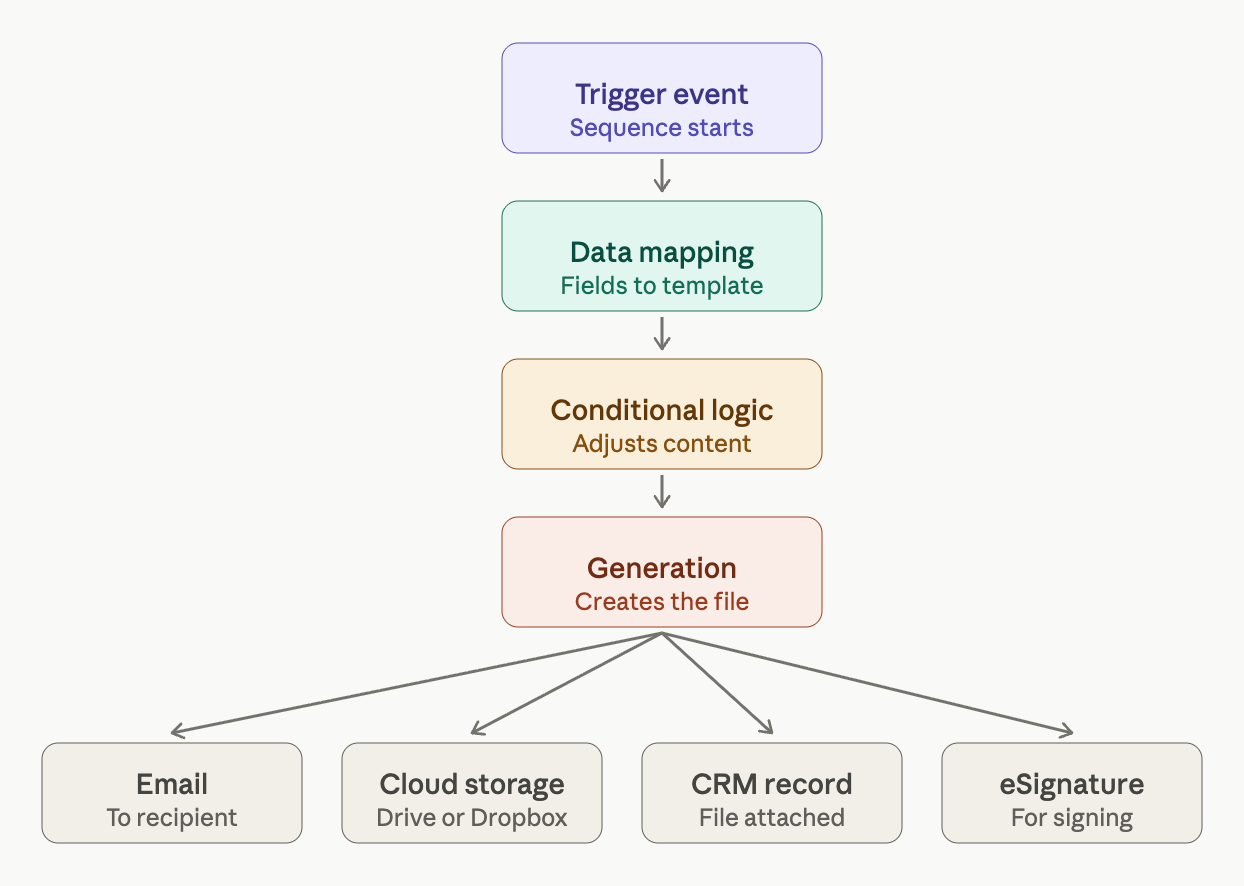
There are four steps in total. Together, they help run the document workflow automation end-to-end.
The trigger event
The trigger is an event that starts the sequence. It tells the system that a document needs to be generated.
The trigger decides three things at once:
- Which template the system uses
- Which data record fills it
- Where the finished document gets delivered
Data mapping
Once the trigger fires, the system needs to know which piece of data goes where in the document. That connection is the data mapping.
Data mapping is a one-time configuration. Every field in the data source, like the client name, the deal value, the start date, or the contract tier, gets connected to its matching spot in the template.
Once the mapping is set, every future document is generated from the template automatically. The system pulls the latest data from the source each time, so the document is always up to date.
Conditional logic
Data mapping fills in what the document needs to say. Conditional logic decides what the document needs to include.
The template reads the incoming data and adjusts its content based on rules written into the template. If the client's jurisdiction is California, the California disclosure clause appears. If the contract value is above $50,000, the template adds a senior approval addendum. If the employment type is part-time, the document is generated with part-time compensation terms. If the employment type is full-time, the same template produces the full benefits enrollment section.
Every variation is handled at generation time. The same master template produces every version without a manual edit between them.
Generation and delivery
Once the template creates a document, the system delivers it. The output file can be a PDF, a Word document, an Excel file, a PowerPoint deck, or HTML.
The format is set once in the template and applies to every document generated from it.
Delivery runs to every destination set up in the template, all at the same time. That could be:
- An email to the recipient
- A copy saved to cloud storage like Google Drive or Dropbox
- The file attached to the relevant CRM record
- A route to an eSignature platform for signing
4 signs your team is ready for automation
There are four patterns that signal your team is ready for document workflow automation. They are:
- Volume on a single document type crosses 50 a month
At 50 documents a month, even a conservative 20 minutes per document adds up to more than 16 hours spent on one document type. That is two full working days lost to one document type.
Contracts, invoices, offer letters, lease agreements, renewal notices, and compliance reports hit this threshold first. The structure stays identical across every recipient. Only the data changes.
For a full walkthrough of how document automation works across these categories, see our complete guide to document automation.
- Data moves between tools before the document is ready
The data you need usually lives in a CRM, a form tool, or a spreadsheet. Teams export it, reformat it, paste it into a template, or pass it through a manual step.
Plussa Suomi, a Finnish energy consulting firm, was moving data between Microsoft Office apps and Excel spreadsheets. There was no clean way to bring information from their existing tools into their documents. After connecting their CRM and Microsoft Office tools to Docupilot, document generation that used to take hours now runs in minutes. Once the data source is connected directly to the template, the manual step disappears.
If your team has the data in a system but still runs it through a middle step before the document is final, an integration between the source and the document layer removes that step.
- Every document needs a manual edit before it goes out
Every document needs a manual edit before it goes out. The template generates the document. Before it goes out, someone on the team opens it and edits it.
Sunnon & Charlotte Property Management hit this wall with leases. Their legacy platform required the team to drag and drop hundreds of fields into a web editor for every 10-page lease. Every state form change meant rebuilding the template by hand.
After moving to Docupilot, templates were pulled directly from the database with conditional logic handling the variations. Lease preparation time dropped by 80%. Template reviews went from ongoing to once a year.
The pattern holds across contract types. A single master template with conditional logic built into it handles the variations at generation time. You can see more about how contracts work inside Docupilot's template system here.
- One person owns the whole process
When one person on the team runs the document workflow, every document waits on them. If they are on leave, documents do not go out. If they are busy, documents go out late. As the team grows, more documents wait on the same person.
A shared document platform changes this. Anyone on the team can run the workflow, and the document comes out the same way every time. When teams have shared access with role-based permissions, the workflow does not sit with one person.
Document types you can automate first
Start with the documents your team sends the most of. For most teams, that falls into one of five categories.
1. Contracts
Contracts are legally binding, which means errors in them cost real money. A wrong clause can void the deal. A missing signature can make the contract invalid, and a late contract delays the payment tied to it. Contracts also change from client to client, with different terms and deal sizes.
If your team sends contracts often, automation handles the variations at generation time and removes the room for error.
2. Invoices
Invoices are how businesses ask for payment. If the invoice is late, then the payment will also be late.
Invoices also involve numbers: line items, tax rates, subtotals, and totals. Any of these can be wrong when typed by hand. A wrong invoice goes back to the client for a fix, which pushes the payment out further. Automation pulls the numbers from the source and sends the invoice as soon as the work is logged.
See how invoice automation works inside Docupilot.
3. Offer letters and onboarding packs
Offer letters and onboarding packs are time-sensitive. Once a candidate is told they are being hired, they expect the offer to follow quickly. If it keeps getting delayed, there is a high chance the candidate gets an offer letter from another company and accepts it.
Automation sends the offer letter along with related onboarding documents as soon as the new hire is added to your HR system. This is one of the most common use cases in HR teams, where the speed of the offer directly affects whether the hire is accepted.
4. Compliance reports
Compliance reports are filed on a schedule set by a regulator, with a format the regulator also defines. A late filing or a wrong number can lead to a fine, a failed audit, or extra scrutiny in the next one. Teams that file these reports already know the due dates, the format, and the data sources. Automation pulls the data on the schedule, fills the regulator's format, and submits the filing on time.
5. Proposals and quotes
Proposals and quotes close deals faster when they arrive faster. A sales team that sends a quote within an hour of a discovery call has a higher chance of winning the deal.
CRM-triggered generation removes the delay. See how Docupilot handles quote generation.
The workflow is the whole job now
Before automation, to produce a document, someone opened the template, pulled the data, edited for the recipient, formatted the file, and sent it. Crafting every document was a task by itself.
After automation, the job is just about building the workflow. The template is set up once, the data mapping is done once, the conditional rules are written once, and the delivery is configured once. Basically, every step takes place just once.
Docupilot is built to run document automation workflows end-to-end. It connects to over 70 integrations including Salesforce, HubSpot, BambooHR, Airtable, Zapier, and Make, pulls the data directly into a template. It then creates the right content based on the data in each record. Every paid plan includes conditional logic, unlimited templates, and API access, with no feature gating between tiers. The platform is also HIPAA compliant, SOC 2 certified, and GDPR compliant. This way, even teams that handle sensitive data are safe with Docupilot.
The fastest way to see this in action is to build a workflow yourself. Start a free trial with no credit card requirement.
If you want to see it run on a real use case before setting one up, book a 30-minute demo, and someone will walk you through it.
FAQs
How much does document workflow automation cost?
Pricing depends on the platform and document volume. Docupilot's entry plan starts at $29 per month for 100 documents, scaling up based on volume. All paid plans include conditional logic, unlimited templates, API access, and every integration. See full pricing at Docupilot's pricing page.
What happens if a required data field is missing when the workflow runs?
If a mapped field has no value in the source record, Docupilot either skips the field, uses a default value set in the template, or flags the record for review, depending on how the workflow is configured. You can decide which behaviour applies to each field, so a missing optional field does not stop the workflow but a missing critical field does.
Can one workflow deliver the same document to multiple destinations at once?
Yes. Each template in Docupilot can be configured to deliver the generated document to multiple destinations in parallel, including an email to the recipient, a saved copy in cloud storage like Google Drive or Dropbox, an attachment to the related CRM record, and routing to an eSignature platform. All deliveries happen in the same run with no separate setup per destination.
What happens when I update a template? Do previously generated documents change?
No. Documents generated before the template update stay unchanged, because each generated document is a completed file at the moment it was produced. Template updates apply only to documents generated after the update is saved. This gives teams control over when new language, clauses, or formatting start appearing in outputs.
Do you need technical skills to automate document workflows?
No. Docupilot is built for teams without developers. Templates are created in Word or Google Docs, data fields are mapped with a visual interface, and workflows are configured without writing code.
Learn how to automate document creation with Docupilot


Contents
Stop rebuilding the same document by hand.

Generate and sign in one workflow.
Fifteen minutes back, per application.