

.png)





Key takeaways
- A contract letter of acceptance formally acknowledges the agreement to terms, making the contract legally binding.
- Key components include the parties' names, statement of acceptance, reference to the offer, next steps or conditions, date, and signature.
- Automate recurring acceptance letters with Docupilot for accuracy and efficiency.
For a contract to be legally binding, one party must make an offer and the other must formally accept it. The letter of acceptance contract serves as the official confirmation of that agreement — and in legal practice, the difference between a well-drafted acceptance letter and a sloppy one can determine whether a contract holds up under scrutiny or falls apart at the first dispute.
If you work in legal operations, in-house counsel, or a law firm handling volume contracts, you already know the problem: drafting acceptance letters manually for every deal, proposal, or offer is slow, error-prone, and quietly expensive. Bloomberg Law's 2025 Attorney Workload Survey found that lawyers lose roughly 600 non-billable hours per year to administrative tasks — at $250/hour, that's $150,000 in unrealized revenue per attorney. Document drafting is a significant chunk of that.
Before you write any letter of acceptance, make sure you've done the following:
- Reviewed and fully understood the original offer
- Verified that the contract is directed at the correct parties
- Confirmed all terms and conditions are clear and agreed upon
- Noted the deadline for acceptance
- Gathered any required supporting documentation
This guide walks you through the essential elements of a valid contract acceptance letter, provides practical letter of acceptance contract samples across four common scenarios, and shows you how to automate the process so your team stops spending hours on documents that should take minutes.
What Is a Letter of Acceptance Contract and Why Does It Matter?
A letter of acceptance (LOA) is a formal document confirming that a party agrees to the terms and conditions of a contract offer or proposal. It's used across business, real estate, employment, and legal contexts. It expresses agreement, confirms the parties involved, and outlines next steps.
Here's why legal operators treat it as more than a formality:
It shows mutual commitment
A letter of acceptance contract formally acknowledges that both parties have agreed to the terms and are committed to fulfilling their obligations. That mutual commitment is the foundation of a working business relationship — and it's documented.
It makes the contract legally binding
Issuing a letter of acceptance confirms that both parties voluntarily accept the contract terms, creating a legal bond between them. If one party fails to perform, the other has documented grounds to pursue breach of contract remedies.
It creates a clear paper trail
Acceptance letters outline the agreed offer, date, and key terms. This matters enormously in disputes. Industry research shows that approximately 25% of legal malpractice claims relate directly to missed deadlines and documentation failures — a well-maintained acceptance letter record is one of the simplest ways to reduce that exposure.
It signals professionalism
A well-drafted acceptance letter demonstrates that both parties take the agreement seriously, adhere to established business protocols, and value clear communication. In high-volume contracting environments, consistency in how these letters are produced also signals organizational maturity.
What Essential Elements Should Your Contract Acceptance Letter Include?
Whether you're drafting from scratch or working from a letter of acceptance contract sample, every acceptance letter needs these components:
Parties involved
Identify both the offering party and the accepting party clearly. Include full names, titles, company names, and authorized representatives where applicable. This eliminates ambiguity and ensures legal clarity — particularly important in multi-entity transactions or contracts involving subsidiaries.
Statement of acceptance
This is the core of the letter. Use explicit language: "I hereby accept," "I am pleased to confirm my acceptance," or "I confirm my acceptance of the terms outlined." Vague language creates room for disputes about whether acceptance was genuine or whether further negotiation was intended.
Reference to the offer
Cite the specific offer: contract number, date, and key terms. For example: "We are pleased to accept the 'Service Agreement for IT Support,' contract number [Contract Number], dated [Date]. We agree to provide IT support services for 12 months at the rate of $13,000 per month."
This step is critical in contracts involving lengthy negotiations and multiple amendments — it confirms both parties are working from the same version of the document.
Next steps
Outline the actions both parties need to take to finalize the agreement: submitting paperwork, agreeing on a start date, scheduling follow-up meetings, or completing due diligence. If the offer letter already specifies next steps, restate them in your acceptance letter for confirmation. If it doesn't, use the acceptance letter to request clarification.
Signature and date
A signature adds legal weight. Place it at the end of the letter, followed by the signer's printed name and title. Include the date near the signature to ensure proper finalization. In digital workflows, AES (Advanced Electronic Signature) standards provide the legal equivalence of a wet signature in most jurisdictions under the ESIGN Act and UETA.

Once the letter is e-signed, you can confirm its authenticity and tamper status with Docupilot's free E-Sign Validate tool.
Contract Acceptance Letter Samples
The following letter of acceptance contract samples cover the most common scenarios legal and business teams encounter. Each follows the structure above and can be adapted to your specific context.
1. Real estate offer acceptance letter
This letter confirms acceptance of a purchase offer for a property. It legally binds both buyer and seller to the agreed terms — purchase price, contingencies, and closing date.
Subject: Acceptance of Real Estate Purchase Offer for [Property Address]
Dear [Buyer's Name],
I am pleased to confirm my acceptance of your offer to purchase the property located at [Property Address] for the agreed price of [Offer Price]. Your offer, dated [Offer Date], has been thoroughly reviewed, and I appreciate your attention to the contingencies, including [Inspection, Financing, etc.].
As part of this acceptance, we will move forward with the following next steps:
- A meeting to finalize and sign the purchase agreement
- [Any additional actions, such as inspections, escrow details, etc.]
I look forward to working with you to complete the sale. Please contact me at [Phone Number] or [Email Address] with any questions.
[Your Signature]
[Your Printed Name]
[Date]
2. Job offer acceptance letter
This letter confirms acceptance of a job offer, restating key details including job title, start date, salary, and any conditions. In some cases that offer grew out of a candidate's own job proposal pitching them for the role.
Subject: Acceptance of Job Offer for [Position Title]
Dear [Hiring Manager's Name],
I am writing to formally accept your offer of employment for the position of [Position Title] at [Company Name]. I look forward to starting on [Start Date], as discussed, and contributing to the team's continued success.
Please let me know if there is any additional information or paperwork required before my start date.
[Your Signature]
[Date]
[Your Printed Name]
3. Loan acceptance letter
This letter confirms acceptance of a loan offer, specifying the loan amount, interest rate, repayment terms, and any conditions to be met before disbursement.
Subject: Acceptance of Loan Offer
Dear [Loan Officer's Name],
I am writing to formally accept your loan offer of [Loan Amount] for [purpose of the loan] with a repayment term of [XX months/years]. I agree to the terms and conditions stated in the offer, including the disbursement and repayment schedule.
Please advise on the next steps for processing the loan and let me know if any additional documentation is required.
[Your Signature]
[Date]
[Your Printed Name]
4. Business proposal acceptance letter
This letter formally agrees to a partnership, service contract, or supply agreement, confirming readiness to move forward on agreed terms.
Subject: Acceptance of Business Proposal
Dear [Proposer's Name],
We are pleased to inform you that [Your Company Name] has reviewed and accepted your business proposal dated [Proposal Date]. The project outlined, including [brief description of key terms], aligns with our goals, and we are eager to begin this collaboration.
Please let us know the next steps to finalize the agreement. If additional documentation is required, contact us at [Phone Number] or [Email Address].
[Your Signature]
[Date]
[Your Printed Name]
[Your Position]
The Real Cost of Manual Acceptance Letter Drafting
If your team handles more than a handful of contracts per month, manual drafting is costing you more than you realize — in time, in errors, and in compliance exposure.
Here's what the data actually shows:
- Organizations lose approximately 9.2% of annual revenue to contract inefficiency, including delays, missed renewals, and processing errors. For a $10M firm, that's $920,000 per year. (Nidish Law Firm Challenges Report, 2025)
- 76% of legal professionals report significant friction in contract processes — and the majority still rely on manual methods because available tools add friction rather than removing it.
- Nearly 50% of organizations fail to track contracts effectively, leading to missed renewal dates and costly oversights. (World Commerce and Contracting, 2024)
- Professionals spend nearly 20% of their workweek searching for documents — for an attorney billing $300/hour, that's $150/day in lost billable time, per person. (Filot Document Management Report)
The acceptance letter itself is a small document. But multiply it across 50, 100, or 500 contracts per year — each requiring manual drafting, review, formatting, and delivery — and the aggregate cost becomes significant.
How to Automate Letter of Acceptance Creation with Docupilot
Document automation tools like Docupilot let you build a single master template for each type of acceptance letter, then generate accurate, personalized documents at scale — without manual copy-paste, without version confusion, and without the compliance risk that comes from inconsistent drafting.
Here's how the process works:
Step 1: Draft a template
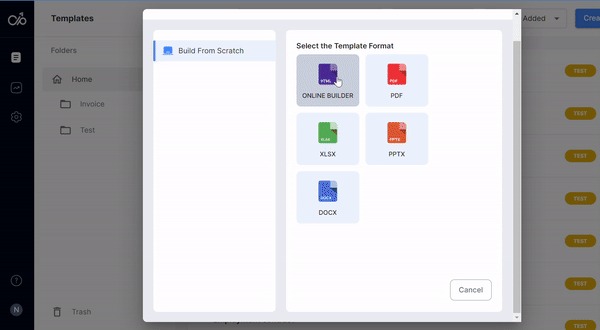
In Docupilot, create a template by uploading an existing acceptance letter or drafting from scratch using the Online Builder. Once your template is set, brand it with rich formatting tools — letterhead, fonts, signature blocks.
Step 2: Insert merge fields
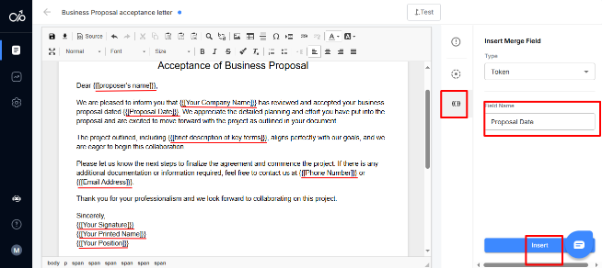
Docupilot's merge fields — tokens and conditional logic — let you create personalized letters from a single template. For a business proposal acceptance letter, you insert tokens as placeholders for variable details: proposer's name, date, contract number, key terms, and any jurisdiction-specific language. Docupilot's conditional logic means clauses can appear or disappear based on the data — so a real estate acceptance letter automatically includes the correct contingency language based on the deal type, without manual editing.
Step 3: Test the template
Click the "Test" tab, fill in placeholder fields with sample data, and click "Test" at the bottom of the window. Docupilot replaces placeholder data with real information so you can verify the output before going live. This step catches formatting errors, missing fields, and logic gaps before they reach a client or counterparty.
Testing the template in Docupilot Step 4: Generate acceptance letters in bulk
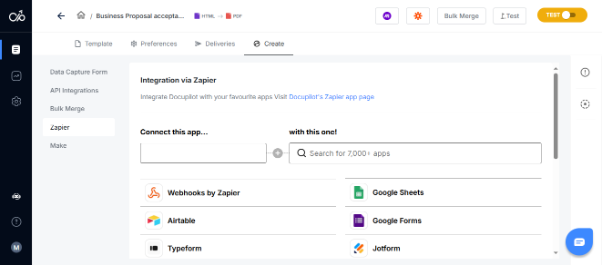
Use Docupilot's Bulk Merge feature to integrate with your data source — CRM, intake forms, or Excel — via Zapier or Make. When a new contract is signed or a proposal is accepted, the trigger fires automatically and Docupilot generates the correct acceptance letter with the right data pulled from your source system. No manual data entry. No copy-paste errors.
Step 5: Automated delivery
Connect Docupilot to your email system and set up automated delivery. Once acceptance letters are generated, Docupilot sends them directly to recipients — no manual intervention required. For deals requiring signatures, Docupilot supports AES eSignature workflows that are compliant with the ESIGN Act and UETA, giving your acceptance letters the same legal weight as wet signatures without the back-and-forth of printing and scanning.
Learn how to automate document creation with Docupilot


I can do that, but I need the page URL or the page content to **fetch the actual** `datePublished` and `dateModified`.Meanwhile, here is a **valid JSON-LD schema template** for SEO that won’t cause syntax errors. Replace the dates with the real values in **ISO 8601** format:```html```### Best practices to avoid SEO/schema errors- Use **ISO 8601** dates: - `YYYY-MM-DD` - or full timestamp like `2026-06-24T10:30:00+00:00`- Make sure `dateModified` is **the same as or later than** `datePublished`- Use the correct schema type: - `Article` / `BlogPosting` for posts - `WebPage` for general pages- Keep quotes and commas exactly as shown- Do not leave placeholder text in the final code### If you want a safer blog-post version```html```If you send me the **URL**, I can help you extract the actual publish/modified dates and generate the exact schema for that page.
Contents
Stop rebuilding the same document by hand.

Generate and sign in one workflow.
Fifteen minutes back, per application.




