







Key takeaways
- A Professional Services Agreement (PSA) outlines the scope of work, payment terms, confidentiality clauses, and liability protections, reducing the risk of disputes and misunderstandings.
- A PSA is essential for businesses hiring external service providers, freelancers, and regulated industries.
- Key components like indemnification clauses, termination terms, and non-disclosure agreements (NDAs) provide legal protection and clarity in case of disputes.
You land a project, shake hands, and everything seems great — until the client expects twice the work for the same price or disappears when it's time to pay. Maybe you hired a consultant; now they charge for every question you text them.
Verbal agreements don't cut it. And that's exactly why you need a Professional Services Agreement (PSA). Without one, there's nothing stopping either party from conveniently "forgetting" what they agreed to.
- It locks down deliverables so no one moves the goalposts halfway through
- It spells out payment terms, so you're not refreshing your inbox waiting for that "Sorry for the delay" email
- It protects confidential information, so your hard work doesn't magically reappear in a competitor's hands
But here's the part most guides skip: drafting and managing PSAs manually is one of the biggest operational drains in any legal or professional services team. Research shows lawyers spend up to 30% of their time on document creation alone — time that isn't available for strategic analysis, client counseling, or revenue-generating work. For a firm with fifty attorneys, that translates to roughly $900,000 in annual sunk cost on pure document friction.
In this guide, we'll break down exactly what goes into a solid professional service agreement, when you need one, how to write one without spending hours buried in legalese, and how to stop recreating the same document from scratch every single time.
What is a Professional Services Agreement?
A Professional Services Agreement (PSA) is a legally binding contract that outlines the terms between a business and a service provider — whether that's an independent contractor, freelancer, or consulting firm hired to perform specialized services.
A PSA ensures that both parties understand their rights, responsibilities, and obligations, reducing the risk of disputes. But why exactly do businesses rely on PSAs, and what makes them so essential?
The purpose of a PSA in business contracts
Businesses use PSAs to:
- Clearly define the scope of work, deliverables, and deadlines
- Establish payment terms, including fees, invoicing schedules, and late payment policies
- Set expectations regarding confidentiality, intellectual property rights, and liability
- Outline dispute resolution mechanisms to handle conflicts professionally
Not all service agreements are the same. Some businesses work with service providers on a one-time basis, while others have ongoing relationships that require a different type of contract. That's where Master Service Agreements (MSAs) come in.
How a PSA differs from an MSA
While both PSAs and MSAs govern service-based contracts, they serve different purposes:
Who Might Use a PSA?
A PSA is essential for anyone entering into a formal arrangement for services. It's the kind of document you don't realize you need until you do.
1. Businesses hiring external service providers
Companies working with external professionals — marketing firms, IT consultants, or freelance designers — need PSAs to define deliverables, timelines, and payment terms upfront. Research shows that 76% of legal professionals report significant friction in contract workflows, and most of that friction starts with inconsistent or missing agreement templates.
2. Freelancers and consultants protecting their work
Freelancers and consultants use PSAs to secure timely payments, limit scope creep, and establish legal protections. Without a written agreement, scope creep is almost inevitable — and almost impossible to push back on.
3. Enterprises managing multiple vendor contracts
Larger organizations streamline service agreements by using standardized PSAs that ensure consistency, compliance, and efficiency when working with multiple vendors. This is where document automation becomes genuinely transformative: instead of drafting each agreement from scratch, you generate them from a master template with conditional logic handling the variations.
Types of services covered by a PSA
From high-level strategy to hands-on execution, businesses rely on specialized services across industries. A PSA ensures these engagements are structured, transparent, and legally sound.
Consulting services: From IT strategists to legal advisors and financial consultants, businesses rely on external experts to guide critical decisions. A PSA ensures that advice is delivered, billed, and appropriately documented.
Creative and professional services: Designers, writers, architects, and engineers all bring specialized expertise to the table. A PSA locks in scope, timelines, and ownership rights so no one ends up in the dreaded "one more revision" cycle that never ends.
Healthcare and specialized industry agreements: In industries like healthcare, biotech, and compliance-heavy fields, PSAs ensure regulatory compliance and liability protections. Healthcare PSAs must comply with HIPAA, Stark Law, and Anti-Kickback Statute requirements — vague agreements in this space don't just create operational problems, they create federal liability.
When is a Professional Services Agreement Most Useful?
A PSA is one of those things you don't think about until you desperately need it — like renter's insurance or a backup charger on a long-haul flight. It protects both parties, sets clear expectations, and saves you from potential headaches (or full-blown legal disasters).
1. When you want legal protection
Let's say you hire a consultant to help scale your business. You shake hands, agree on a price, and get started. But then — surprise — they claim you owe them for extra work. Meanwhile, you're convinced the additional work was already included in your agreement (you know, the one that doesn't exist in writing).
If you had a PSA, this wouldn't even be a debate. The contract would have spelled out exactly what's included, what's extra, and how disputes get resolved.
Case in point: CGI Group (Europe) Ltd. v HMRC — CGI Group structured their employee agreements to avoid VAT. The UK tax authorities disagreed. The tribunal ruled that the company's employment agreements weren't structured enough to support their tax claims, resulting in unexpected tax liabilities and a costly lesson in why PSAs must be airtight.
The stakes are higher than most people realize. Approximately 25–40% of legal malpractice claims relate directly to missed deadlines and unclear contractual obligations, with deadline-related claims averaging $200,000 per settlement. A well-drafted PSA with clear milestones and obligations is one of the most effective risk management tools available.
2. When you need to define scope, deliverables, and payment terms
A PSA sets clear expectations for:
- Scope: What's being done and what's NOT being done
- Deliverables: What you're getting at the end of the project
- Payment terms: When invoices are due and what happens if someone doesn't pay on time
Take this business coaching case as an example: a coaching firm offered a 12-week program to help clients develop business plans. One client attended every session but never submitted their drafts. When the program ended, they demanded a refund, claiming they didn't get a finished business plan. Luckily, the coaching firm had a PSA that clearly stated completing the business plan required the client's active participation.
3. When you want to avoid messy disputes
Disputes happen. But when you have a PSA, they happen a lot less often. And if they do happen, you have a clear, written agreement to back you up.
For example, a healthcare group and a radiology practice needed a new contract for professional interpretation services after ending a joint venture. Instead of leaving things vague and risking fights over payments, responsibilities, and working hours, they used a PSA to define fair market compensation, set clear performance expectations, and establish who was responsible for what.
What Should You Include in Your PSA?
Leave out key details in a PSA, and you could end up debating scope, chasing payments, or wondering why confidential information is suddenly public knowledge. Here's what must be in your professional service agreement to keep things professional, clear, and legally sound.
1. Scope of Work (SOW): What's being done (and what's not)
This section outlines exactly what services are being provided. Scope creep is real — a client might think "website design" includes copywriting, SEO, and a custom logo, while you thought they just wanted a homepage layout.
A solid SOW defines:
- The specific tasks being performed
- Deliverables — what the client gets at the end
- Deadlines and milestones for key stages
2. Payment terms: How and when you get paid
Your PSA should lock down payment details so there's no ambiguity. Key things to define:
- Fixed fee vs. hourly billing: Are you being paid a lump sum, per project, or hourly?
- Milestones and invoicing schedule: When do invoices go out? Are there payments at different stages of the project?
- Late payment penalties: What happens if the client doesn't pay on time?
3. Confidentiality and non-disclosure clauses: Keeping business secrets, secret
Some projects involve sensitive information — financial data, trade secrets, or upcoming product launches. A confidentiality and non-disclosure clause (NDA) in a PSA legally restricts parties from sharing or using this information outside the project, protecting both business interests and proprietary data.
Without it, a contractor could legally share details about a client's business or reuse proprietary strategies for a competitor. In regulated industries, the stakes are even higher: PwC's Global Compliance Survey found that 85% of organizations report compliance requirements have become more complex in the last three years, with data privacy obligations — GDPR, CCPA, HIPAA — sitting at the top of that list. A PSA without a properly drafted confidentiality clause is a compliance gap waiting to be exploited.
4. Liability and indemnification: Who's responsible when things go wrong?
What if a mistake costs the client money? What if their system crashes because of a bug in the software you developed? Liability clauses define who takes responsibility in case of issues.
- Indemnification clauses protect one party from being held liable for damages caused by the other.
- Limitation of liability ensures that if something does go wrong, there's a cap on how much can be claimed.
5. Termination clause: How to exit without drama
What happens if either party wants to walk away? A termination clause outlines how the contract can end, on what terms, and what happens next.
- Termination for cause: If one party violates the agreement (e.g., non-payment, breach of confidentiality), the other can cancel immediately.
- Termination without cause: If either party simply wants to end the contract, this defines how much notice must be given (e.g., 14 days).
- Refunds or outstanding payments: What happens to work already completed? Is there a partial refund, or is payment still due?
Professional Service Agreement vs. Subcontract: What's the Difference?
This is a question that comes up constantly in legal operations, and the distinction matters more than most people realize.
A professional service agreement governs the relationship between a client and a primary service provider. The service provider is directly accountable to the client for the work product, the timeline, and the quality of deliverables.
A subcontract governs the relationship between a primary contractor and a third party they bring in to fulfill part of the work. The subcontractor is accountable to the primary contractor, not directly to the client. The client typically has no direct contractual relationship with the subcontractor.
Why does this matter operationally? Because the liability flows differently. Under a PSA, if the service provider uses a subcontractor who delivers poor work, the service provider is still fully liable to the client. Under a subcontract, the primary contractor can push some of that liability down to the subcontractor — but only if the subcontract is properly drafted to do so.
When you're generating these documents at volume, the PSA vs. subcontract distinction should be built into your template logic from the start. Using Docupilot's conditional logic, you can create a single master template that surfaces the correct liability language, indemnification structure, and party definitions based on whether the engagement is a direct PSA or a subcontract arrangement.
How to Write a Professional Services Agreement
Drafting a PSA doesn't have to feel like a law school exam. Docupilot's AI Template Builder makes the process streamlined, precise, and tailored to your needs — and more importantly, it means you're not starting from scratch every time a new engagement comes in.
Here's how to use it:
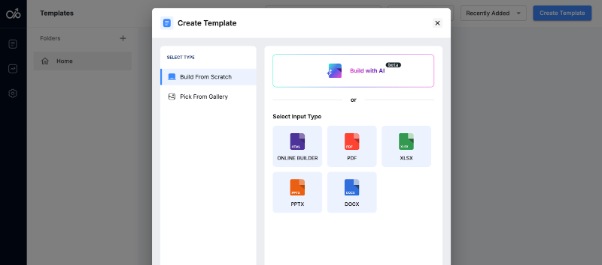
Step 1: Log in and create a new template
In the top right corner, click Create Template and choose Build with AI.
Step 2: Enter your prompt
After naming your template, describe what you need in the AI Assistant prompt box. For example:
"Create a Professional Services Agreement (PSA) between [Client Name] and [Service Provider Name] for the provision of [Service Type, e.g., 'marketing consulting, IT support, graphic design'] services. Clearly define the scope of work, including [specific tasks, deliverables, and deadlines]. Outline the payment terms, specifying [fixed fee or hourly rate], invoicing schedule, and late payment penalties. Include a confidentiality clause to protect proprietary information, an indemnification clause to limit liability, and a termination clause detailing the process for ending the contract. Ensure compliance with [State/Country] laws and industry regulations. Make the agreement easy to customize for additional clauses or modifications as needed."
The AI will draft a detailed and accurate PSA based on your input.
Step 3: Copy the source code and create a new template
Once the PSA is generated, copy the source code. Return to the Docupilot dashboard, create a new template, click the Source button, and paste the code into the editor.
Step 4: Add merge fields
Docupilot: Insert merge fields Merge fields act as placeholders in the template, enabling you to customize variable data like names, addresses, payment amounts, and jurisdiction-specific clauses. Click the curly bracket icon in your template editor to access token, condition, loop, and table field types. The conditional logic fields are particularly valuable for PSAs — they let you automatically include or exclude clauses based on service type, jurisdiction, or engagement value without maintaining separate templates for each variation.
Step 5: Connect to your data sources
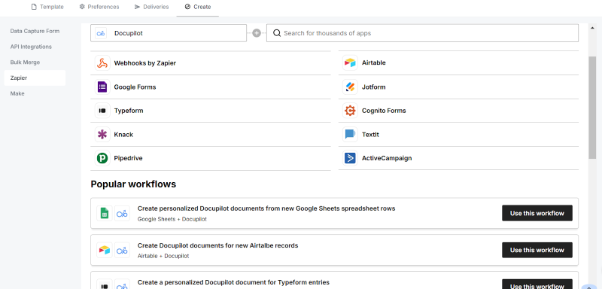
Connect Docupilot to your data sources — Google Sheets, Airtable, Typeform, your CRM — through Zapier and Make integrations. Docupilot pulls client and engagement details from those sources and automatically replaces the merge fields in your template. For legal teams managing high volumes of vendor or client agreements, this is where the real time savings happen: you're generating accurate, fully populated PSAs in seconds rather than spending twenty to thirty minutes manually drafting each one.
Step 6: Review, personalize, and sign
Use Docupilot's editing tools to review and customize the agreement. Then route it for signing. Docupilot integrates with eSignature tools including DocuSign, Yousign, SignNow, and Signable — and supports AES (Advanced Electronic Signature) standards where required. All documents generated through Docupilot are covered by SOC 2 Type II and HIPAA compliance frameworks, which matters when your PSAs involve sensitive client data or healthcare-adjacent services.
The practical impact of this workflow is significant. Document automation technology has been shown to compress what normally takes six hours of attorney drafting time into fifteen to twenty minutes — a reduction of more than 75%. Legal and Ops, a five-person San Francisco firm, used Docupilot to meet fixed-fee deadlines by automating their client onboarding and agreement generation process. OteroMD eliminated errors and saved $800 per month by automating 100 documents per day through the same platform.
FAQs
What is the difference between a PSA and an MSA?
A Professional Services Agreement (PSA) covers a specific service engagement. It's project-based and defines the terms for one particular job or contract. Once that project is complete, the PSA ends (unless renewed).
A Master Services Agreement (MSA) is broader — it sets the general terms for an ongoing business relationship. Instead of renegotiating every time a new project comes up, an MSA acts as a framework, allowing multiple projects or service agreements to operate under the same umbrella.
What is a PSA agreement in healthcare?
A PSA in healthcare is a contract between a hospital, clinic, or healthcare provider and a medical professional or organization. It defines the terms under which services like radiology, anesthesia, or specialty consulting are provided. Healthcare PSAs are especially critical because they must comply with HIPAA, Stark Law, and Anti-Kickback Statute requirements. Any PSA involving patient data or physician compensation must be carefully structured to avoid federal liability.
What does PSA mean in a contract?
A PSA is a legally binding contract that outlines the terms, scope, payment, and responsibilities between a business and a service provider. It prevents disputes by clearly defining:
- What's being done (scope of work)
- How much is being paid (fees, invoicing, late payment penalties)
- Who owns the work (intellectual property rights)
- How the contract can be terminated (exit clauses)
What is a professional service agreement sample?
A professional service agreement sample is a pre-drafted template that outlines the standard structure and clauses used in a PSA. A good sample includes a scope of work section, payment terms, confidentiality provisions, liability limitations, and a termination clause. Rather than using a generic sample as a final document, use it as a starting point, then build it into a templated, automated workflow so every agreement you generate is consistent, accurate, and ready to sign. Our agreement example shows how those sections fit together.
What is an example of a professional service?
A professional service is any specialized, knowledge-based work provided by an expert — typically requiring advanced education, training, or certification. Common examples include:
- Legal services (hiring a lawyer for contract review)
- Consulting (IT, financial, business strategy)
- Marketing and design (branding, website development, ad campaigns)
- Healthcare services (hiring a physician group for a hospital)
Learn how to automate document creation with Docupilot


Contents
Stop rebuilding the same document by hand.

Generate and sign documents in one workflow
Save ~15 minutes per application




