





Key takeaways
- Finance professionals spend 20 to 30% of their time on manual data work. Automation gives that time back for actual strategy.
- Almost every recurring accounting document, from invoices to audit documentation, can be automated using templates connected to your existing data sources.
- Manual document workflows create four compounding problems: time drain, errors, compliance risk, and month-end pressure. Document automation solves all four in three steps: build a template, connect your data, and set up automated delivery.
- Docupilot handles the full document lifecycle, from AI-powered template building and bulk generation to e-signatures, integrations, and compliance tracking.
Your finance team didn't sign up to be data entry clerks. But that's what month-end looks like for most accounting teams. How much of their day is actually finance work?
McKinsey's 2025 research found that finance professionals spend 20 to 30% of their time manually crunching data. The teams that automated that work got that time back to focus on the actual strategy.
Most teams haven't made that switch yet. Accounting document automation is how you start. This guide covers what it is, which documents it applies to, how it works, and what to look for in a platform.
What is Accounting document automation?
Accounting document automation is software that automatically creates, populates, manages, and delivers financial documents. It pulls structured data from your existing systems and drops it into pre-built templates. It is finance document generation applied to the accounting stack, from invoices to statements.
These tools speed up the process while ensuring that documents are accurate, compliant with regulations, and on-brand. By automating repetitive tasks such as data entry and document organization, they reduce errors, save time, and maintain consistency.
Instead of opening a blank invoice every month, typing in client details, reformatting, and emailing it out, you set up a template once. Connect it to your data, and the system handles the rest every single time.
Why manual accounting documents cost you more than you think?
Most teams know manual work is slow. What they underestimate is how much it actually costs in terms of time, accuracy, and growth.
The hidden time drain
Your team spends one to three hours every day just moving data between systems. When your document output depends on how fast your team can type, growing the business means hiring more people to do the same repetitive work.
Errors that compound fast
According to Gartner, 18% of accountants make financial errors every single day, and 59% make several mistakes a month. It could be anything, such as entering the wrong tax rate, a mismatched figure, or a missing clause. Every mistake means going back, fixing it and sending it again. With clients, that costs trust, too.
Compliance risk you won't see coming.
When everyone on your team creates the same document slightly differently, because no single template or system is driving it, inconsistencies build up. Auditors check for standardization. When your documents don't meet that bar, it becomes a compliance problem fast.
Month-end always feels like a crisis.
Every month, your team is manually working through invoices, reports, and financial statements one by one. The busier your business gets, the longer it takes. This repeats every single month, which ultimately becomes tiresome.
What accounting documents can be automated?
Most people think of invoices first when they hear "document automation." The reality is that almost every recurring document your accounting team touches is a potential candidate for automation.
- Invoices and receipts: Automatically generated invoices and receipts ensure timely, accurate billing for every client. Recurring invoices can be scheduled, delivered automatically, and routed for e-signature without anyone having to touch them.
- Financial reports: Balance sheets, income statements, cash flow statements: these follow consistent structures and pull from the same data sources every time. A document automation tool pulls information from your CRMs and ERPs and generates these reports instantly.
- Expense reports: Instead of manually collecting receipts and re-entering figures, automation integrates with your expense-tracking tools to generate formatted reports from live data.
- Loan agreements and contracts: Every new client means the same agreement, recreated from scratch. Automation ensures all terms and conditions are correctly applied every single time, without opening a blank document.
- Engagement letters: This is one of the most time-consuming documents for accounting firms, and one of the most templatable. Client name, scope, fees and terms can all be pulled from a CRM into a reusable template.
- Audit and compliance documentation: Audit and tax work requires specific documentation every time. Inconsistency creates audit risk and regulatory exposure. Automated generation from firm-standard templates keeps every document consistent at scale.
- Purchase orders and expense summaries: They have high volume, a repetitive structure and data that already exists in your systems. These are among the easiest documents to automate and among the fastest to show results.
How accounting document automation works?
Accounting document automation follows a simple three-step workflow: a template is built, connected to your data source, and set to automatically deliver finished documents. Here is how each step works.
Step 1: Build your template
Start by taking a document you already use, such as an invoice or an engagement letter, and turning it into a template.
The parts that never change, your branding, standard terms and legal clauses, stay as they are. The parts that change each time, such as the client name, amount, and due date, are marked as fields that the system fills in automatically.
You set that mapping once, and the template is ready to run.
Step 2: Connect your data
Your accounting data already lives somewhere. It might be in your CRM, your ERP, a spreadsheet, an Airtable base, or a form your clients fill out. The automation platform should connect directly to that source. If that source is a spreadsheet, it helps to first automate data entry in Excel so the data feeding your documents stays clean.
From that point, every time a trigger fires, like a new client being added, a billing date arriving, or a form being submitted, the platform picks it up automatically. It pulls the relevant data, matches it to the right fields in your template, and generates a complete, accurate document in seconds.
Step 3: Deliver and action
Once a document is generated, it automatically moves through the workflow you have set up.
The document gets emailed to the right client, stored in your document folder, sent to your e-signature tool, or logged in your CRM. Every step happens without anyone manually touching it. By the time your team looks up, the document is already delivered, signed, and filed.
5 reasons finance teams are switching to document automation
Document automation saves time, reduces errors, ensures compliance, supports growth, and closes the full document loop. Here is how each one plays out.
- It frees your team up for actual finance work: When your team is not spending hours formatting invoices or recreating the same report every month, they have time to focus on work that actually needs them. Analysis, forecasting, client advisory: that is what your team was hired to do.
- It takes human error out of the equation: Automated documents pull data from a single verified source. There is no copy-pasting, no manual re-entry, no version confusion. The figure in the invoice matches the figure in your CRM because it came directly from there.
- It makes compliance consistent by default: When every document of the same type is generated from the same template, compliance is not something you check manually. It is built into the process from the start.
- It lets you grow without adding headcount: A team of five can produce the output of a team of 20 when repetitive work is automated. You scale the output without scaling the team.
- It closes the full document loop: Generation, delivery, signature, storage: all of it happens inside one connected workflow. A document moves from trigger to signed and filed without anyone manually touching it.
How Docupilot supports accounting document automation?
Docupilot covers everything from AI-powered template building and bulk generation to e-signatures, integrations, role-based access, and compliance. Here is how each feature works for accounting teams.
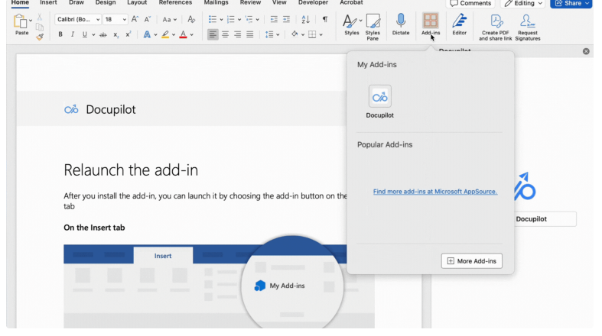
1. Docupilot Copilot: AI template building inside Microsoft Word
Most accounting teams already live inside Microsoft Word. Docupilot's Word Add-in lets you build automated templates directly there, without learning a new tool.
You select the text, enter a prompt, and Docupilot's AI converts your static document into a live template. Once done, it syncs to your Docupilot account in one click.
2. Bulk document generation: hundreds of documents in one run
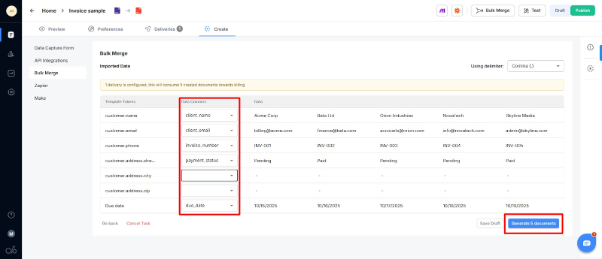
Docupilot lets you generate hundreds or thousands of documents at once using custom templates. Every document remains consistent, while conditional logic handles personalization for each.
You upload a CSV or Excel file, match the columns to your template fields, and click generate. The tool creates a separate document for every row and delivers it automatically. For a Word-specific walkthrough, see how to automate Word documents from Excel.
For accounting teams, this means your entire month-end invoice run goes from a manual queue to a single click.
3. Smart Templates with Conditional Logic
Not every accounting document looks the same. A UK client invoice looks different from a US one; payment terms vary by client tier; and tax fields appear or disappear depending on the transaction.
Docupilot templates support variables, basic and advanced conditionals, loops, and tables. One template handles all your variations. You do not need to build a separate template for every scenario.
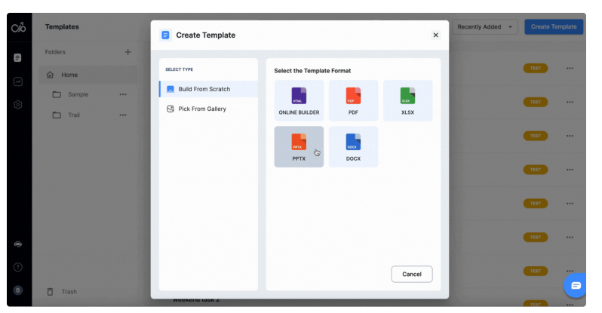
4. Built-In E-Signatures
Loan agreements, engagement letters, and client contracts all need a signature before they are done.
Docupilot's built-in e-signature feature lets you send documents for signing right after generation, without switching to a separate tool. The e-signature module complies with ESIGN and UETA regulations, so every signed document meets legal and security standards. For a side-by-side comparison of the options, see our roundup of electronic signature software for accountants.
5. 70+ Integrations with Your Accounting Stack
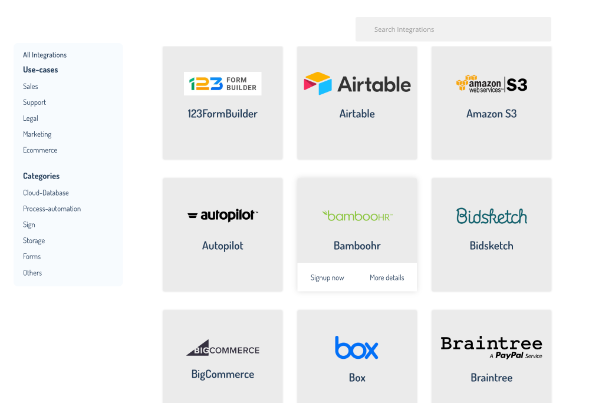
Docupilot connects natively with Zapier, Make, and 70+ tools. You can also build custom workflows using the REST API and webhooks.
For finance teams specifically, it integrates with Salesforce, Airtable, Make, and Zapier to pull data directly into your document workflows.
Your accounting data stays where it is. Docupilot automatically pulls from it whenever a document needs to be generated.
6. Role-Based Access Controls and Team Collaboration
Financial documents carry sensitive data. Not everyone on your team needs access to everything.
Docupilot's role-based access controls let you allocate access to resources based on each team member's specific needs, preserving both security and integrity. Team members can also work on different parts of a document simultaneously.
7. Version History, Audit Trails, and Compliance
Docupilot is committed to GDPR and HIPAA compliance and is in the process of obtaining SOC 2 Type II and ISO 27001 certification.
For accounting teams, every document generated is tracked, and every version is stored. You always know what was sent, when it was sent, and who generated it.
Where to start with accounting document automation
Pick the document your team creates most often and start there. For most accounting teams, that's invoices. Build one template, connect it to your data, and run it for a month. Once that's working, move to financial reports, then engagement letters, then expense summaries.
Every template you add is time your team gets back for work that actually needs them.
Docupilot is built to make that transition as simple as possible. Start your free 14-day trial and see how much time your team gets back in the first month.
Frequently Asked Questions
Is accounting document automation only for large enterprises?
No. Teams of any size benefit from it. Even a small finance team processing 20 to 30 documents a month can save significant hours by automating their most repetitive document types.
Does document automation work for businesses operating across multiple countries?
Yes. Templates can be built in any language and configured to handle region-specific fields like tax rates, currencies, and compliance clauses for different jurisdictions.
What happens if the data in my source system has errors?
The generated document reflects whatever is in your data source. Keeping your CRM, ERP, or spreadsheet accurate is what ensures every document that comes out is accurate, too.
Can I still manually edit a document after it has been generated?
Yes. Generated documents can be edited before delivery. Docupilot also maintains version history, so you can track every change made after generation.
How long does it typically take to see a return on investment?
Most finance teams see time savings within the first month of automating their highest-volume document type, usually invoices or financial reports.
Learn how to automate document creation with Docupilot


Contents
Stop rebuilding the same document by hand.

Generate and sign documents in one workflow
Save ~15 minutes per application