







Key takeaways
- Qualified Electronic Signatures have the same legal effect as handwritten signatures across all 27 EU member states, with automatic recognition and legal presumption of authenticity
- QES is required only for notarized documents, EU regulatory filings, and certain cross-border contracts
- Advanced Electronic Signatures (AES) suffice for routine, internal, or single-jurisdiction transactions. Docupilot enables AES-compliant e-signatures integrated with document automation for high-volume workflows
If your business operates in regulated sectors, works across borders, or deals with high-stakes contracts in the EU, you may have encountered the term Qualified Electronic Signature (QES). It’s the most secure way to sign, and in certain cases, the only legally accepted method.
But here’s the catch: while QES offers the highest level of assurance under EU law, it also comes with added implementation complexity and cost. And it’s not always the right fit for every business document.
This guide helps you cut through the confusion. You’ll learn what QES actually is, when you’re legally required to use it, how to create one, and what alternatives like Advanced Electronic Signatures (AES) offer.
Let’s start by breaking down what makes a signature “qualified” in the eyes of the EU.
What is a qualified electronic signature (QES)?
A Qualified Electronic Signature (QES) is the digital equivalent of a handwritten (wet) signature, but with cryptographic guarantees that make it virtually impossible to forge or repudiate.
Why a QES is legally special
Of the three legally binding signature types (SES, AdES, and QES), only a QES has the same legal effect as a handwritten signature under Article 25 of the eIDAS Regulation. This means it benefits from an automatic presumption of authenticity in legal proceedings. Other electronic signatures are still valid for most transactions, but may require additional proof of authenticity if challenged.
Note: A QES can replace a handwritten (wet) signature, but the latter cannot substitute for a QES where it is explicitly required (e.g., for certain EU filings or notarial acts).
How a QES ensures security and authenticity:
- The signature is uniquely linked to the signer: Each QES must be created using a private key (a secret code that proves your identity and lets you securely sign online) that only one person controls. This ensures authenticity and prevents forgery or impersonation.
- The signer can be identified: The signature must use authentication methods that verify the signer’s identity. This typically requires a certificate issued by a Qualified Trust Service Provider (QTSP) following government-grade identity checks such as passport validation, video identification, or eID card verification
- The signature creation data is under the sole control of the signer: Unlike standard digital signatures, where your private key might sit in software on your device, QES requires that key to be locked inside tamper-resistant hardware called a Qualified Signature Creation Device (QSCD). This could be a smart card, USB token, or secure server. Keeping the key in this protected environment prevents it from being copied or extracted, ensuring only you can use it to create signatures.
- Any change to the signed data is detectable: If even a single character in the signed document is changed, the signature becomes invalid. The cryptographic hash that binds the signature to the document’s content makes any tampering instantly detectable
- Based on a qualified certificate issued by a QTSP: A qualified certificate is issued by a QTSP that meets the requirements in eIDAS. The certificate identifies the signer, specifies validity, and is issued only after the QTSP has completed identity verification. QTSPs appear on the EU Trusted List and operate under government supervision through audits and conformity assessments
Why you should implement QES for your business
QES isn't on the radar for most businesses until they face a legal or regulatory requirement that explicitly mandates it. Understanding why it matters before you're scrambling to implement it mid-deal can save significant time, cost, and legal exposure.
To stay compliant
If you're in finance, law, or public procurement within the EU, you cannot proceed without a qualified electronic signature for the following types of transactions:
- Public sector tenders in EU member states
- Notarial acts under national law
- Company registry filings
- Cross-border submissions in the EU financial system
Cross-border business in the EU demands legal certainty
For investors and multinationals operating in the EU or transacting with EU entities, a QES provides automatic legal recognition across all 27 member states. This eliminates the risk of signature rejection or additional verification at critical moments. More importantly, if a dispute ever reaches an EU court, QES removes the uncertainty created by 27 different national e-signature standards.
High-stakes transactions need defensible legal protection
Even when QES isn’t strictly required, it’s often worth using, especially when the cost of signature disputes is high.
Unlike AES, which may need extra evidence to defend in court, QES carries a legal presumption of authenticity because it’s cryptographically secure and backed by a verified certificate, so the burden of proof shifts to the challenger.
Ask: "If this signature were disputed three years from now, what would it cost us?" For major asset acquisitions, long-term supply agreements, sensitive IP licensing, or high-fraud-risk environments, QES is cheap insurance.
How to create a qualified electronic signature (QES)
If QES is necessary, here's the practical implementation process:
Step 1: Choose a qualified trust service provider (QTSP)
Not all e-signature providers offer QES. You need a QTSP that's been audited, approved, and listed on the EU Trusted List. Many EU countries also have government-backed QTSPs like PostSignum in the Czech Republic or A-Trust in Austria.
What to consider when choosing:
- Geographic coverage: Does the QTSP operate in your target country/ies?
- Integration options: Cloud-based, mobile app, or hardware token?
- Pricing model: Per-signature fees, annual subscriptions, or enterprise licensing?
- Platform integration: Does it work with your existing document management systems?
Cross-border note: If your business operates in the EU and the UK, remember that post-Brexit, the UK still follows eIDAS-based rules but runs its own trusted list. The UK recognizes EU-issued QES, but not the other way around.
To ensure your QES is valid across the EU, choose a provider from the EU Trusted List; many of them support remote verification for UK-based signers. This way, your qualified signatures remain legally recognized in all EU member states even if you’re located outside the EU.
Step 2: Register and complete identity verification
This is where QES diverges from standard e-signatures. The identity verification process is mandatory and cannot be bypassed—it's what makes the signature "qualified."
Common verification methods:
- Video identification: Live video call with a QTSP agent who verifies your government-issued ID (passport, national ID card)
- eID card verification: If you have a national electronic identity card (common in Estonia, Belgium, Italy, Spain), you can use it directly
- In-person verification: Some providers require you to appear at a physical location with identification documents
- Bank account verification: In some cases, linking to a verified bank account can satisfy identity requirements
What you'll typically need:
- Valid government-issued photo ID (passport or national ID card)
- Proof of address (utility bill, bank statement)
- Email address and phone number
- Time: 15–45 minutes for the verification process itself
Reality check: This step can not be rushed. If you're signing an urgent document and haven't pre-verified your identity, you'll face delays. So, plan ahead.
Step 3: Obtain your qualified certificate
Once your identity is verified, the QTSP issues a qualified certificate for electronic signatures. This certificate contains your verified identity information, a public key for signature verification, the QTSP's digital signature confirming the certificate's validity, and an expiration date.
The certificate can be delivered through cloud-based storage on QTSP's secure servers (you sign via their platform), hardware token/smart card storage on a physical device you control, or mobile signature storage in your phone's secure element (SIM card or device security chip).
Cloud QES offers the most convenience as you can sign in from anywhere, provided you trust the QTSP's security infrastructure. Hardware tokens provide maximum control and security, but require carrying a physical device and a card reader. Mobile signatures offer a good balance of convenience and security if your country supports them. This approach is particularly popular in Estonia, Lithuania, Latvia, and Italy.
Step 4: Sign documents using your QES
With your certificate in place, you can now create qualified electronic signatures. The process varies depending on your certificate type.
If using cloud QES: Upload your document to the QTSP’s platform (or a compatible signing tool), authenticate yourself using your credentials and two-factor authentication, then review and confirm the document for signing. The QTSP’s secure server applies the qualified signature using your digital certificate, then you download the signed document.
If using a hardware token: Insert your smart card into a card reader connected to your computer, open the document in compatible software (Adobe Acrobat or specialized signing software), enter your PIN to unlock the card, select the signature location in the document, and the signature is created using the private key on your smart card.
If using mobile signature: Access the signing platform via mobile app, select the document to sign, authenticate with PIN or biometric (fingerprint/face ID), approve signature creation, and the secure element in your device creates the signature.
Note: You may not need to draw or insert a visual “handwritten” signature. Some platforms display a visual mark (like your name or a digital stamp) for clarity, but the legal validity comes entirely from the cryptographic signature and certificate, not from how it looks on the page.
Step 5: Distribute and verify signed documents
The signed document now contains your qualified electronic signature, the qualified certificate, a qualified timestamp proving when the signature was created, and cryptographic proof that the document hasn't been altered.
You can independently confirm any signed file's certificate and tamper status with Docupilot's free E-Sign Validate tool.
The signing platform often shows you details like this to verify that your QES was signed successfully.
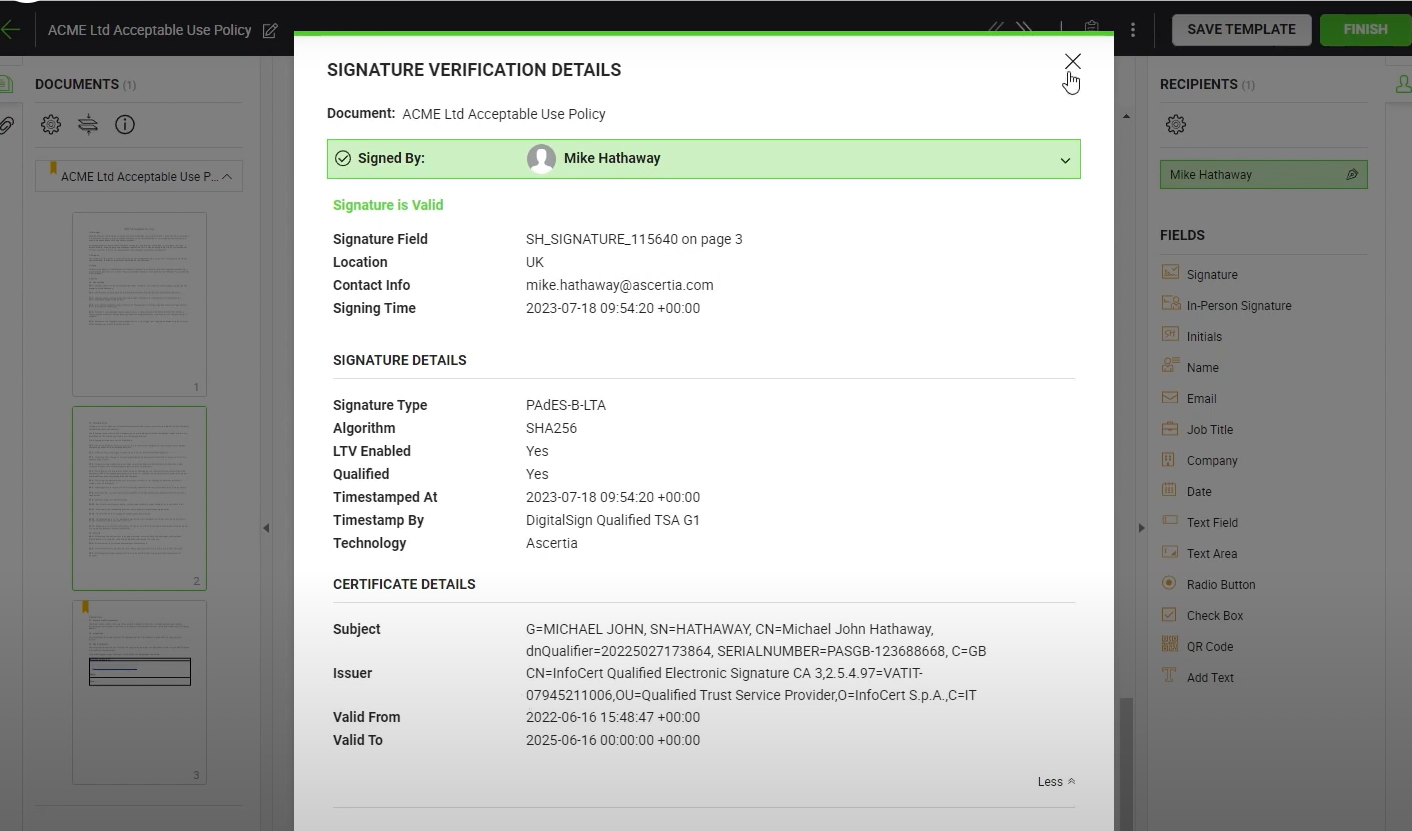
Recipients can verify the signature by opening the document in PDF readers with built-in tools that validate digital signatures, like Adobe Reader. Alternatively, they can use the EU’s official QES validator by simply uploading the signed document.
Ongoing management and challenges of implementing QES
QES isn't a one-time setup; there's ongoing lifecycle management to consider.
- Certificate renewal: Qualified certificates expire (typically after one to three years), which invalidates your ability to sign new documents. To avoid expiration, you'll need to re-verify your identity and obtain a new certificate, so be sure to set calendar reminders.
- Certificate revocation: If your certificate is compromised, you must notify your QTSP immediately to revoke it. Revoked certificates appear on Certificate Revocation Lists (CRLs). Documents signed before revocation remain valid; new signatures are blocked.
- Cost structure to expect: Setup costs range from €0–€100 (some national schemes are free, commercial providers charge). Annual fees run €20–€150 per certificate, depending on provider and certificate type. Some cloud QES platforms charge €0.50–€3.00 per signature. If using smart cards, expect €30–€80 for the card plus the reader.
- Time investment: Initial setup takes 30 minutes to two hours (depending on verification method). Each signature requires two to five minutes for cloud/mobile methods or one to two minutes for hardware tokens once set up. Annual renewal takes 15–30 minutes.
The honest take: QES is enterprise-grade infrastructure. It’s designed for regulatory compliance, legal certainty, and high-value transactions, not speed or convenience. If your goal is simply to make signing easier, QES is overkill. If your goal is to make signatures legally unassailable in EU courts, QES is worth the complexity.
Given that, let’s look at when it’s actually worth the effort.
When is QES actually worth it?
Scenarios where QES is recommended
- Government and regulatory filings: Mandatory for company registrations, financial statements, procurement bids, and compliance submissions in many EU countries
- High-formality legal documents: Real estate transactions, powers of attorney, and certain corporate governance documents benefit from QES-level assurance
- Cross-border M&A and major contracts: For deals exceeding seven figures or spanning multiple jurisdictions, QES removes enforceability risks
- High-fraud-risk sectors: Financial services, healthcare, and other regulated environments where signature integrity is critical
When you can (and should) use AdES instead
- Internal workflows: HR approvals, budgets, and project sign-offs
- Single-jurisdiction transactions: Domestic sales contracts within one EU country
- Medium-risk B2B deals: Routine procurement, vendor agreements, NDAs, and sub-€100K contracts
- High-volume operations: Sales proposals, onboarding forms, or recurring partnership agreements
In these cases, an Advanced Electronic Signature (AdES) with a solid audit trail provides more than enough assurance. Platforms like Docupilot integrate AdES-compliant signing directly into your document workflows, allowing you to create, send, and sign at scale without the infrastructure overhead that QES demands.
Use QES when legally required or for high stack transactions, not by default
Qualified Electronic Signatures are the highest legal standard for digital signing in the EU, but that doesn't mean you should use them for everything.
When QES is legally required or the stakes justify it, like in regulated filings or high-value cross-border contracts, it delivers unmatched legal certainty. Your signatures hold up in every EU member state, without question about authenticity or timing.
But for most day-to-day business transactions, that same rigor becomes unnecessary friction. Advanced Electronic Signatures (AES) often provide all the assurance you need, with a smoother user experience and fewer compliance hurdles.
The smart approach: match the signature level to the transaction. Use QES when regulations or risks demand it. Use AES everywhere else.
If your organization needs a user-friendly and secure AES-compliant tool, try Docupilot. It combines document automation with secure e-signatures in one platform. Start your 14-day free trial today.
Learn how to automate document creation with Docupilot


Contents
Stop rebuilding the same document by hand.

Generate and sign documents in one workflow
Save ~15 minutes per application




