







Key takeaways
- Xodo Sign offers Free, Basic, Professional, and Enterprise plans, with pricing that scales by users and feature access
- It has a low barrier to entry, but feature limits, add-ons, and per-user pricing can quickly hike the cost for growing teams
- Docupilot is a better fit for scaling businesses that need predictable pricing and flexible user growth
Xodo Sign is an e-signature tool built for solo users, small teams, and growing businesses. You will often see it positioned as a lower-cost alternative to larger platforms like DocuSign.
While it may look more affordable than many legacy tools, you need to understand what each plan includes, what is restricted, and how costs scale over time before choosing it for your business.
In this guide, you will see a clear breakdown of Xodo Sign pricing, including how the pricing model works, who each plan is designed for, and the key pros and cons to consider.
Here's a quick table showcasing the pricing plans of Xodo Sign
Understanding Xodo Sign pricing plans
Xodo Sign offers four pricing tiers for different users, from individuals to larger organizations.
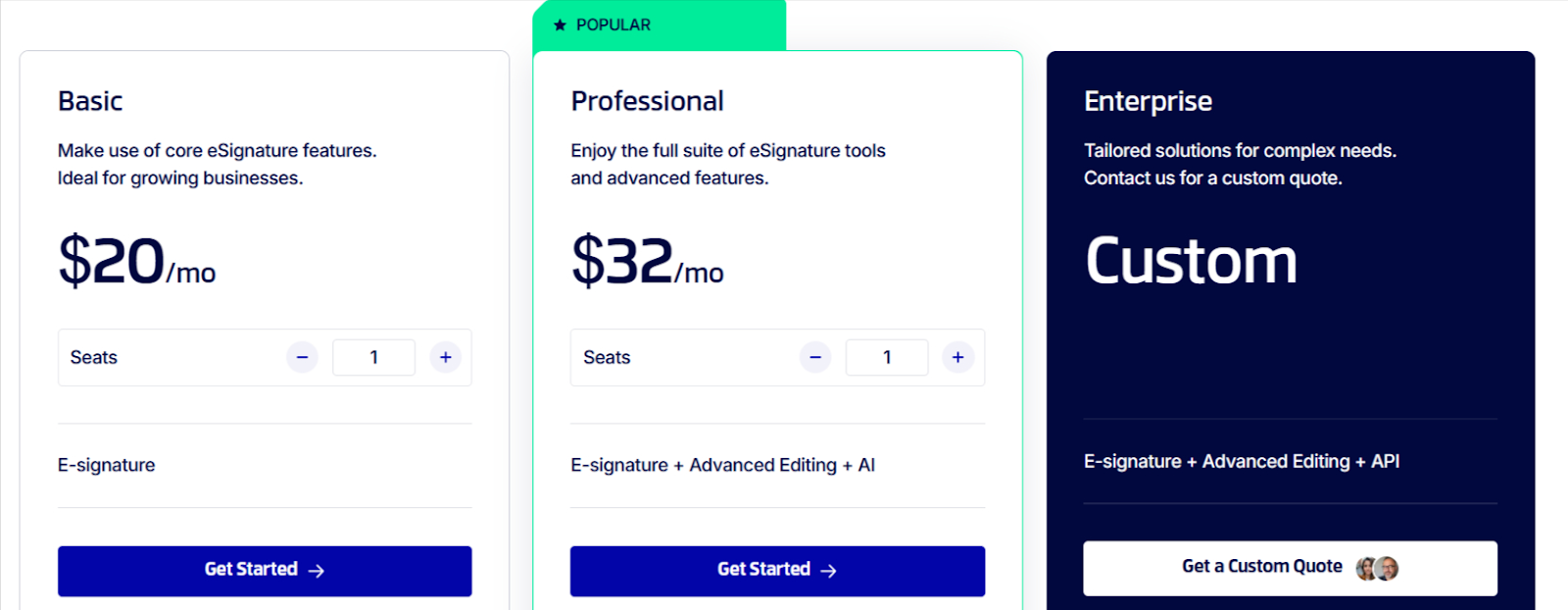
While the plans look straightforward on the surface, the real cost becomes noticeable once you look closely at what is included and what is restricted at each level.
Let's break it down…
Free plan – $0
While it is not clearly advertised on the main pricing page and instead mentioned in the FAQ section, Xodo Sign does offer a free plan.
This plan allows you to securely sign and send up to three documents per month using a single user account, at no cost. It provides access to basic e-signature functionality and is mainly intended for testing the platform or handling very occasional signing needs.
If you need to send documents regularly or work with others, upgrading to a paid plan becomes necessary.
Basic plan – $10/month
This entry-level paid option allows you to sign and send an unlimited number of documents. It includes access to the mobile app, standard app integrations, basic support, and up to three reusable templates.
While the plan works well for individual users, pricing becomes less attractive if you need to add more users. Each additional user requires a separate paid seat, which means costs increase based on team size rather than document volume.
This tier does not include advanced sending options and workflow controls, which is another reason you may need to upgrade sooner than expected.
Overall, the basic plan is best suited for freelancers, consultants, and single-user businesses that need to send documents regularly but do not rely heavily on automation, bulk sending, or advanced workflows.
Professional plan – $16/month
This is where Xodo Sign becomes practical for growing teams. It includes everything in the Basic plan and unlocks features that are often necessary once document volume and collaboration increase.
The plan adds unlimited templates, bulk sending, custom branding, in person signing, and more advanced workflow controls. It also includes advanced editing tools, an AI document summarizer, 10 bulk send credits, and 10 SMS credits for document delivery and notifications.
However, the limitation of the basic plan remains. The cost increases with every additional user seat, meaning as teams grow, monthly costs can rise quickly even if usage stays relatively stable.
Enterprise plan – contact sales
The Enterprise plan gives you access to all Xodo Sign features, along with dedicated support and advanced security and compliance options. Pricing is not publicly listed and requires contacting the sales team for a custom quote.
This plan is designed for larger organizations with complex requirements. For many small and mid-sized teams, however, the added negotiation can feel unnecessary, especially if you only need a few custom features.
Cons of Xodo Sign pricing
Individually, each limitation may seem manageable. But together, they can significantly increase your total cost.
Understanding these pricing nuances upfront helps avoid surprises and makes it easier to compare Xodo Sign fairly against alternatives that price based on usage rather than seats.
Per-user pricing adds up quickly
Xodo Sign’s pricing is tied to the number of users rather than how many documents you send. This means costs increase every time a new team member needs access, even if overall document volume stays the same.
Teams with shared or rotating signing responsibilities can end up paying for more seats than they actively use, and even temporary or occasional users require paid access.
As your team grows, you'll often find yourself paying for access rather than actual usage.
Feature-driven upgrades
You may need to upgrade not because of higher document volume, but to unlock essential features such as additional templates, bulk sending, branding to documents, or in-person signing.
This makes pricing less tied to document volume and more tied to workflow complexity, which can increase costs even when overall usage remains relatively stable
Credits and usage-based extras
Some functionality relies on credits or usage allowances rather than being fully included in the plan.
SMS notifications, certain delivery methods, and bulk sending can consume credits, while API access is sold separately.
These add-ons make it harder to predict monthly budgets.
Support quality varies by plan
Lower-tier plans include standard support, while faster and more responsive assistance is reserved for higher tiers. If your workflows are time-sensitive, getting help often means paying more.
As a result, reliable support becomes another reason to upgrade, not just access to features.
Pros of Xodo Sign pricing
Now that you understand the limitations, it is also important to look at where Xodo Sign pricing works well.
Low barrier to entry
One of the biggest advantages of Xodo Sign pricing is how easy it is to get started. You can begin with the free plan, and even the paid plans require little upfront investment. The platform also does not demand complex onboarding or long setup, so you can start sending documents almost immediately.
This makes Xodo Sign accessible to individuals, freelancers, and small businesses that need basic electronic signatures without a major financial commitment.
Suitable for occasional signing
If your document volume is low and you only need signatures from time to time, Xodo Sign can be cost effective. The free plan and short trial let you complete a few real transactions without committing to a subscription, which works well for consultants or small businesses that do not rely on e-signatures as a core process.
Docupilot: A more flexible, easier-to-scale pricing alternative to Xodo Sign
If you want to avoid the user and feature restrictions of Xodo Sign, Docupilot is a strong alternative to consider.
While Xodo Sign is primarily an e-signature tool, Docupilot is a document automation platform that also includes e-signature functionality. This allows you to create reusable templates, generate documents automatically, and send them for signing with little manual effort, all from one system instead of switching between tools.
Docupilot does not rely strictly on per-user pricing like Xodo Sign. It uses a usage-based model built around documents delivered, while user seats increase gradually with each plan. This aligns with how businesses actually scale, where document volume grows and the number of people involved often increases alongside it.
And even when you need to add more users than a tier provides, you only pay $4 per user, which is way less than doubling the cost of the tier with Xodo Sign.
Let's check out the pricing plans:
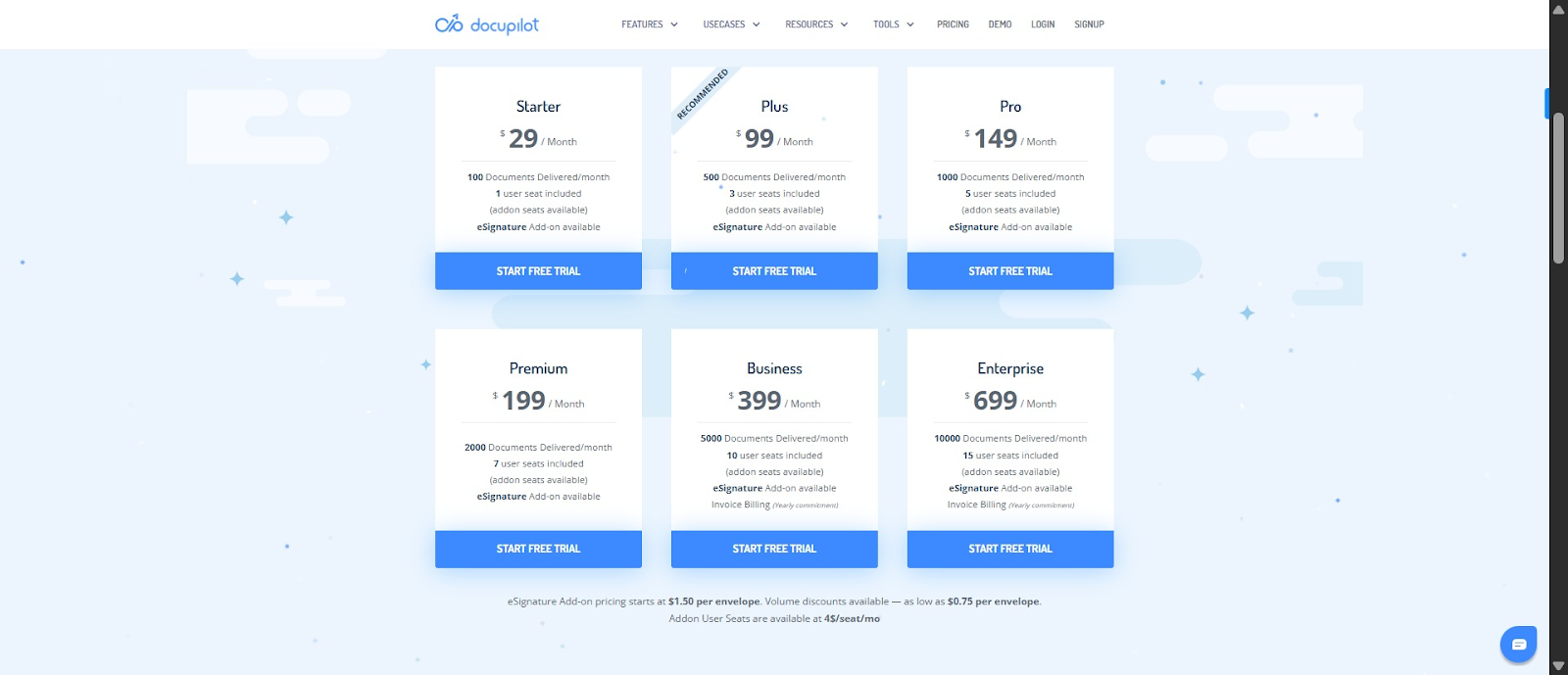
Wondering what features you have access to per plan? The goodnews is that unlike Xodo Sign, Docupilot does not lock core features behind higher tiers; all plans include full access to the platform’s document automation capabilities.
And if none of the plans does not fit your needs, you can reach out to our highly responsive customer support to work out a custom price for you, as this user did:
“I didn't love the payment plans initially; however, customer support has helped me and shown me the Enterprise solutions that allow for one-time purchases of required credits”
Want to see how Docupilot stacks up against Xodo Sign and if it offers better value? Sign up for the 14-day free trial and test it yourself. Even during the trial, support is super responsive, especially via the in-app chatbot like this user experienced:
“...The product is fantastic - reliable, versatile, and at a great price. We're completely satisfied with the product but the customer service is just incredible - seriously unbeatable. I had questions or needed help multiple times a week at some points. Unfailingly, they've gone way above and beyond to help us meet our goals. They've also reached out to others beyond their company to collaboratively help solve problems we encountered. For most of this period, they did all of that while I was still using their free version!”
Xodo Sign vs Docupilot: Choose the pricing model that suites your workflow
Xodo Sign can work well if you are an individual, freelancer, or small team that needs basic e-signature functionality at a lower cost than enterprise platforms.
However, as your team grows or your workflows become more complex, costs can increase quickly, and add-ons like SMS credits or advanced support can make budgeting unpredictable.
If you want more flexibility and predictable costs, Docupilot offers an alternative approach. With usage-based pricing, multiple users included per plan, and built-in e-signature functionality, you can scale your document workflows without paying for extra seats or features you don’t need.
In the end, the best choice depends on your team size, workflow needs, and how much control you want over costs. Understanding these differences ensures you select the solution that fits your business today and grows with you tomorrow.
Ready to experience the difference? Sign up for your 14-day free trial with Docupilot and see how it works for your team
Learn how to automate document creation with Docupilot


Contents
Stop rebuilding the same document by hand.

Generate and sign documents in one workflow
Save ~15 minutes per application




