







Key takeaways
- IPEDA is Canada’s law governing how you collect, use, and protect personal information in commercial activities
- Following its 10 fair information principles, like accountability, consent, and transparency, ensures your e-signature processes handle data responsibly
- Docupilot helps you comply by providing secure signing, audit trails, and tools to manage access, corrections, and retention efficiently
Pipeda Compliance for E-Signature: How to Meet the Requirements in 2026
Electronic signatures make document management faster and more efficient. As a Canadian business or a company serving Canadian customers, protecting those benefits means ensuring your e-signature process is compliant.
The key law to understand is Canada's Personal Information Protection and Electronic Documents Act (PIPEDA). It holds you responsible for how personal information, such as names and email addresses, in your signed documents is collected, used, stored, and protected.
Contrary to what many assume, the law is not a formality. The Office of the Privacy Commissioner of Canada (OPC)’s 2024/2025 report recorded a 32 percent increase in PIPEDA compliance, and about 700 data breaches affecting millions of Canadians.
If your e-signature solutions don't meet PIPEDA standards, you risk regulatory penalties and reputational damage.
That is why this article will help you understand how PIPEDA applies to e-signatures, how to stay compliant, and what to consider when choosing an e-signature solution.
What is PIPEDA compliance?
The Personal Information Protection and Electronic Documents Act (PIPEDA) is Canada’s federal law that governs how businesses collect, use, and disclose personal information in commercial activities.
Similar to the U.S. ESIGN law, it legally recognizes electronic documents and signatures as valid alternatives to paper documents. However, PIPEDA imposes stricter privacy and accountability obligations.
Understanding e-signature under PIPEDA
Section 31(1) of PIPEDA defines an electronic signature as any letter, number, or symbol in digital form that is attached to or associated with an electronic document. The law recognizes them if they are linked to the document and the signer in a way that demonstrates intent.
Because the definition of an electronic signature in PIPEDA is very broad, simple forms of digital signatures, such as typed names, clicks, or scanned marks, are legally recognized in Canada.
However, for documents that require identity confirmation and tamper evidence, such as statutory declarations and affidavits, a secure electronic signature may be required. This is a regulated signature type that regulations require you to create using prescribed technology or processes. It must:
- Be unique to the signer
- Remain under the signer’s sole control
- Identify who signed
- Be linked to the document so any changes would be detectable
Therefore, knowing which signature type your documents require is the first step in ensuring your e-signature process holds up under PIPEDA.
10 PIPEDA principles your e-signature must follow to be valid
PIPEDA outlines its privacy obligations through ten Fair Information Principles in Schedule 1 of the Act. These principles govern how any organization handles personal information, whether collected on paper, through an e-signature platform, or a document automation tool.
When the Office of the Privacy Commissioner of Canada assesses compliance, it evaluates organizations against these ten principles. The sections below explain how each one applies specifically to e-signature and document workflows.
Principle 1: Accountability
When you use an e-signature provider, you’re accountable for the personal information they process on your behalf. If your provider experiences a data breach, has poor security practices, or misuses customer data, PIPEDA holds you responsible.
Before choosing an e-signature vendor, review their privacy and security documentation. Ensure your service agreement confirms that they will:
- Only use customer data to provide the signing service
- Commit to appropriate security safeguards
- Notify you immediately of security incidents
- Disclose where data is stored
- Assist with access requests and data deletion when required
PIPEDA also requires organizations to designate a privacy officer or compliance lead who oversees the security of personal information throughout a document’s lifecycle.
Principle 2: Identifying purposes
Before you collect any personal information through an e-signature workflow, identify why you're collecting it.
This means your e-signature tool should let you clearly state what information you're collecting (name, email, signature, IP address) and why (to execute this agreement, verify identity, maintain legal records).
In practice, this means including a brief disclosure statement at the start of your signing workflow. For example:
"By signing electronically, you consent to us collecting your name, email address, and signature for the purpose of executing this agreement. Your information will be securely stored for [retention period] and will not be used for other purposes without your consent."
Principle 3: Consent
Under PIPEDA, you must obtain meaningful consent before collecting or using personal information. This consent is tied to the act of signing itself.
When a recipient signs, they are agreeing to the collection and use of their metadata: name, signature, IP address, and timestamp for the purposes you identified in Principle 2.
For that consent to be meaningful, the disclosure must appear before the signer reaches the signature field, so they are fully informed before they commit.
Principle 4: Limiting collection
Your document and e-signature tool should only collect personal information necessary for the signing process. There’s no need to request phone numbers, social profiles, or other data unless the agreement or process truly requires it.
This is where your document template matters. If you start from a generic template, review and edit it to remove any fields that are not necessary for the agreement.
If you use a document automation tool, configure your templates with conditional logic so that only the fields relevant to a specific agreement or transaction are presented to the signer.
For routine contracts, name and email may be sufficient. For higher-risk transactions, you might add identity verification or authentication steps. The key is proportionality—match what you collect to what the situation actually requires.
Principle 5: Limiting use, disclosure, and retention
Once someone signs a document, their personal information should only be used for the purpose you specified. If you collected an email to execute a contract, don't add it to your marketing list without separate consent.
Not everyone needs access to every document. Sales teams shouldn't see HR agreements. Customer service shouldn't browse financial contracts. Hence, signed documents should be stored with role-based access controls.
Additionally, PIPEDA requires you to retain personal information only as long as needed. For contracts, this might be the duration of the agreement plus the limitation period for legal claims. Ensure your e-signature vendor allows you set a retention period and supports automatic deletion after a period of inactivity.
Principle 6: Accuracy
The personal information you collect during e-signature workflows should be accurate and current. Your tool should allow signers to review and confirm their information before finalizing.
If errors are discovered after signing, you need a process to update records. This ties into Principle 9 (Individual Access), but the focus here is ensuring the information you're relying on is actually correct.
Principle 7: Safeguards
This is where most businesses focus their compliance efforts, and rightfully so. Your e-signature tool must protect personal information from unauthorized access, disclosure, loss, or theft.
At minimum, choose a tool that encrypts documents both when stored and when transmitted, meaning the data is unreadable to anyone who intercepts or gains unauthorized access to it.
The tool should also support secure authentication options proportionate to the risk level of your documents. For routine contracts, email verification may be sufficient. For higher-risk transactions, look for multi-factor authentication or knowledge-based authentication.
Finally, confirm that your provider has documented security practices, including regular audits and a clear incident response procedure. If they experience a breach, you need to know immediately so you can comply with PIPEDA's breach notification requirements.
Principle 8: Openness
PIPEDA requires you to be transparent about how you handle personal information. This means updating your privacy policy to cover how your e-signature process works.
Your policy should explain that you use electronic signatures, identify the third-party provider you use, and describe what personal information is collected during signing.
It should also state where that information is stored (Canada, US, EU, etc.), how long you retain signed documents, and how signers can access or request corrections to their information.
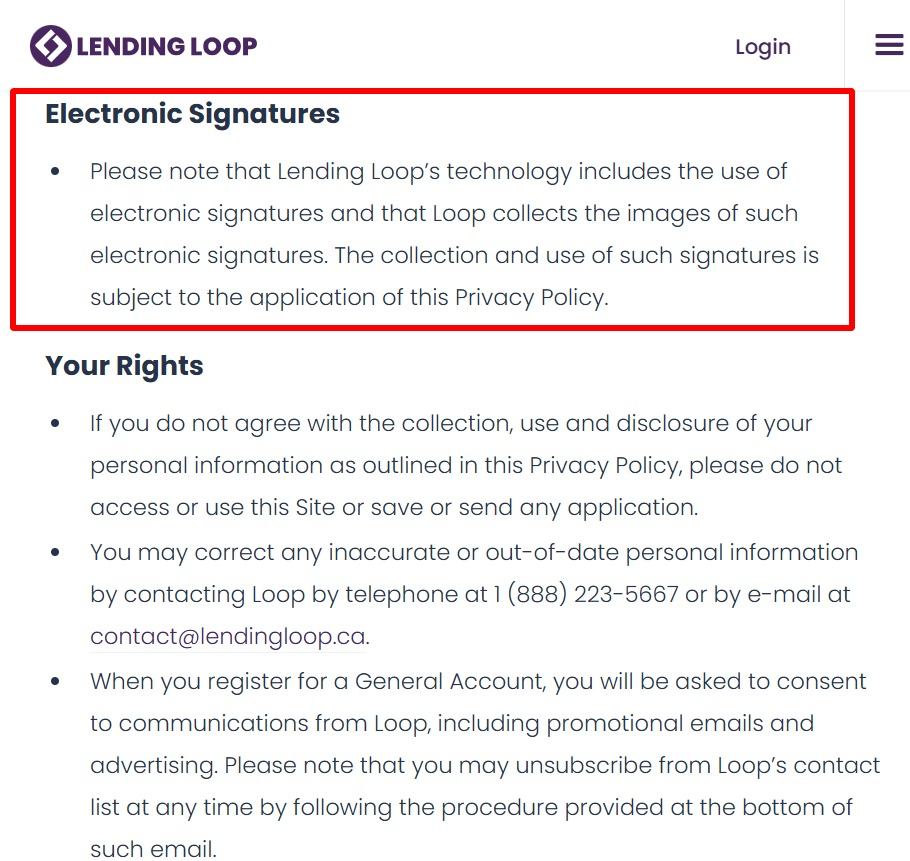
Most businesses add a brief section titled "Electronic Signatures and Document Execution" to their privacy policies. This doesn't need to be lengthy—two or three paragraphs covering these points is sufficient just like what Lendingloop’s privacy did:
Principle 9: Individual access
PIPEDA gives individuals the right to access their personal information and request corrections. Your e-signature tool should make it straightforward to retrieve a copy of a signed document and its associated metadata when someone requests it.
Some tools offer a self-service portal where signers can log in and retrieve their documents directly, without contacting your team. At minimum, the tool should let you quickly access records, provide copies, and make corrections without escalating to your IT team when someone emails a request.
Principle 10: Challenging compliance
Individuals must be able to challenge your compliance with PIPEDA principles. This means having a clear, accessible process for raising privacy concerns.
Your privacy policy should name the privacy officer you designated in Principle 1 as the point of contact for privacy complaints, along with how to reach them.
When someone raises a concern about how their signing data was handled, your process should include acknowledging the complaint, investigating it, and responding with a clear outcome within a reasonable timeframe.
How Docupilot helps achieve PIPEDA compliance
Now that you understand the 10 principles, how easy it is to meet these requirements largely depends on the e-signature tool you choose. Instead of stressing about finding the right solution, Docupilot’s document automation and e-signature tool is a reliable go-to. It’s built to make meeting PIPEDA requirements straightforward.
Here is how:
- Audit trail: Every document you create, send, access, sign, and store generates an immutable audit log. It shows you who did what, when, from where, and with what authentication, giving you the evidence PIPEDA expects
- Role-based access: Set permissions by document type, department, role, or custom rules to ensure sensitive signed documents are only visible to people who need them
- Automated retention policies: Transaction data is deleted automatically within 24 hours, and you can shorten this to as little as 30 minutes. After a workspace expires, service data is retained for up to six months, giving you time to restore or reactivate if needed
- Transparent data processing: Docupilot stores data on secure servers and clearly discloses where it is held and how it may cross borders. For example, data may be processed in the United States, with safeguards in place to protect it
- Easy access and correction: Docupilot lets you store signed documents in your repository of choice like Google Drive, so that you can quickly access and correct personal data when needed
- Customizable consent and disclosure: Edit document templates in Docupilot to include custom consent language. You can also add it to your email message when configuring your automatic e-signature delivery, to disclose what personal information you're collecting, why, and how it will be used
- Vendor accountability: Docupilot's Terms and Data Processing Agreement commits to processing data only as you instruct, notifying you of security incidents, and supporting access and deletion requests
Read more about Docupilot’s privacy and terms here:
https://www.docupilot.com/terms-and-conditions
https://www.docupilot.com/privacy-policy
PIPEDA compliance as a business advantage
PIPEDA compliance for e-signatures is not a checkbox. It shows your customers, partners, and regulators that you take privacy seriously and have built workflows to protect the personal information they trust you with. This builds trust that strengthens business relationships.
Choosing the right e-signature tool is key. Some are built with automations to help you comply with PIPEDA, while others treat it as an afterthought, creating workarounds and manual processes.
Docupilot was built for the former. It gives you audit trails, automated retention policies, and customisable consent controls, so you stay compliant without it getting in the way of running your business.
Ready to start creating secure, compliant documents and signatures? Sign up for a 14-day free trial today!
Learn how to automate document creation with Docupilot


Contents
Stop rebuilding the same document by hand.

Generate and sign documents in one workflow
Save ~15 minutes per application




