







Key takeaways
- E-sign compliance makes e-signatures legal by requiring clear consent, identity checks, and a solid audit trail
- Staying compliant requires clear workflows, trained teams, and a tool that applies baked-in e-sign requirements
- Docupilot supports this by combining document generation, e-signing, audit history, and secure storage in one workflow, so compliance becomes automatic
Electronic signatures are everywhere now. Contracts, onboarding documents, loan applications, NDAs, and vendor agreements are all moving online because it's faster, easier, and often more secure than paper.
But speed and convenience mean nothing if your signatures won't hold up legally. That's the whole point of the Electronic Signatures in Global and National Commerce Act (the E-Sign Act): to set clear rules for what makes an electronic signature valid and enforceable.
Get compliance right, and you'll close deals in hours with signatures that stand up in court. Get it wrong, and those same signatures can be challenged, delayed, or voided.
This guide breaks down how to comply with the E-Sign Act, what mistakes businesses commonly make, and how to build a reliable, compliant e-signature process. You'll also get a practical checklist to help you implement the workflow quickly.
What is the E-Sign Act?
The Electronic Signatures in Global and National Commerce Act (often called the E-Sign Act) is a United States federal law passed in 2000 that gives electronic signatures the same legal status as handwritten signatures in most situations.
If a person signs a contract, agreement, or form electronically and the process meets the law's requirements, that signature is just as valid as ink on paper.
The E-Sign Act applies to most business and consumer transactions, including contracts, service agreements, financial documents, HR paperwork, and more. However, a few types of records are excluded, such as wills and some real estate notices.
E-Sign also works alongside state-level legislation, particularly the Uniform Electronic Transactions Act (UETA), which most states have adopted. Together, these frameworks provide consistency across the country.
Why should you aim for E-Sign Act compliance?
Meeting E-Sign requirements isn't just about checking a box, and the case of Garcia v. Pacific Sunwear Stores is a typical example.
A California appellate court refused to enforce an arbitration agreement that the employer claimed an employee had signed electronically. The problem? The company couldn't provide sufficient evidence that the employee actually signed it. They had a digital signature, but no way to prove who created it or when.
If Pacific Sunwear had built E-Sign compliance into their process from the start, with signer authentication and audit trails, they would have had the evidence they needed to defend the signature.
The lesson is simple: if you rely on electronic signatures, you need confidence they'll stand up during disputes, audits, or legal reviews. E-Sign compliance gives you that confidence while delivering benefits such as faster workflows, lower administrative costs, the ability to operate remotely, and greater transparency and trust for everyone involved in the signing process.
Key E-Sign Act compliance requirements
The original E-Sign Act is written in legal language, but its requirements can be summarized into four key areas:
1. Clear intent to sign
The signer must take a deliberate action that shows their intention to sign. Examples include clicking a “Sign” button, typing a name in a dedicated signature field, or drawing a signature on screen.
You should also ensure the signer can review the document before signing, just as they would with paper.
2. Consent to use electronic records and signatures
Signers must agree to conduct business electronically. For consumer transactions, this consent often must be explicit and documented. In many cases, the law also requires that consumers receive certain disclosures electronically and confirm that they can access records in the same format they will later receive.
Good practice includes:
- Explaining that the transaction will use electronic records
- Informing the signer of their right to receive paper copies
- Describing how they can withdraw consent
Capturing this consent in your audit trail is important.
3. Association of the signature with the specific record
There must be a clear connection between the signature and the document being signed. In other words, you should be able to show what was signed, by whom, and when.
This is usually supported by:
- Metadata linking the signature to the document
- Timestamping
- System logs capturing actions taken during the signing process
If the document changes after signing, that change should be detectable.
4. Record retention and accessibility
Signed records must be stored in a way that allows them to be accurately reproduced later. If a dispute arises, you need to produce a copy that shows the complete executed document along with relevant signing details.
Your retention process should ensure:
- Secure storage
- Protection against unauthorized alteration
- Long-term accessibility
Think of this as the digital version of keeping a secure file cabinet.
Common E-Sign Act compliance mistakes to avoid
Many compliance issues arise not because businesses ignore the law, but because they misunderstand what is required. Here are some of the most common mistakes to watch out for.
1. Treating a typed name as automatically compliant
A typed name can be a valid electronic signature, but only if intent and consent are clearly documented. Simply allowing someone to type a name into a document without an audit trail, timestamps, or identity checks may leave you exposed if the signature is challenged later.
2. Failing to capture consent to do business electronically
One of the foundations of the E-Sign Act is consent. If your process does not clearly explain that the transaction is electronic, or if you cannot prove the signer agreed to receive and sign records electronically, you may not be compliant. This is especially important in consumer transactions.
3. Weak identity verification
If your signing flow does not reasonably confirm who the signer is, you may struggle to defend the validity of the signature. Using shared email accounts, generic links, or unsecured access increases risk. Higher-risk transactions often require stronger authentication.
4. Poor record retention and storage practices
Compliance does not end when the document is signed. You must be able to reproduce the signed record later. Storing files in unorganized folders, relying on local drives, or failing to back up signed documents can cause major problems during audits, disputes, or litigation.
5. Allowing documents to be altered after signing
If your system allows edits after a document has been executed, and those edits are not tracked or flagged, the integrity of the record may be questioned. A compliant solution should make changes detectable and preserve the original version.
6. Assuming your e-signature tool guarantees compliance automatically
Technology supports compliance, but it does not replace your legal or procedural obligations. Your internal controls, staff training, and disclosure wording all play a role. Compliance is about the full process, not just the software.
7. Overlooking applicable exclusions
The E-Sign Act does not apply to every type of document. Items like wills, certain court documents, and some real estate or family law records may still require traditional signatures or specific procedures. Failing to recognize these exceptions can create legal risk.
8. Not training staff on proper e-sign procedures
If teams are unsure how to use the signing system, capture consent, or handle exceptions, mistakes are more likely. Consistent training helps ensure that every transaction is handled correctly and defensibly.
How to establish an E-Sign Act compliance process in your organization
Before you even evaluate e-signature tools, it’s important to establish repeatable processes that follow the E-Sign Act. Doing this first makes it much easier to choose the right e-signature solution for your organization.
But before then, here’s a quickly checklist for implementing the process:
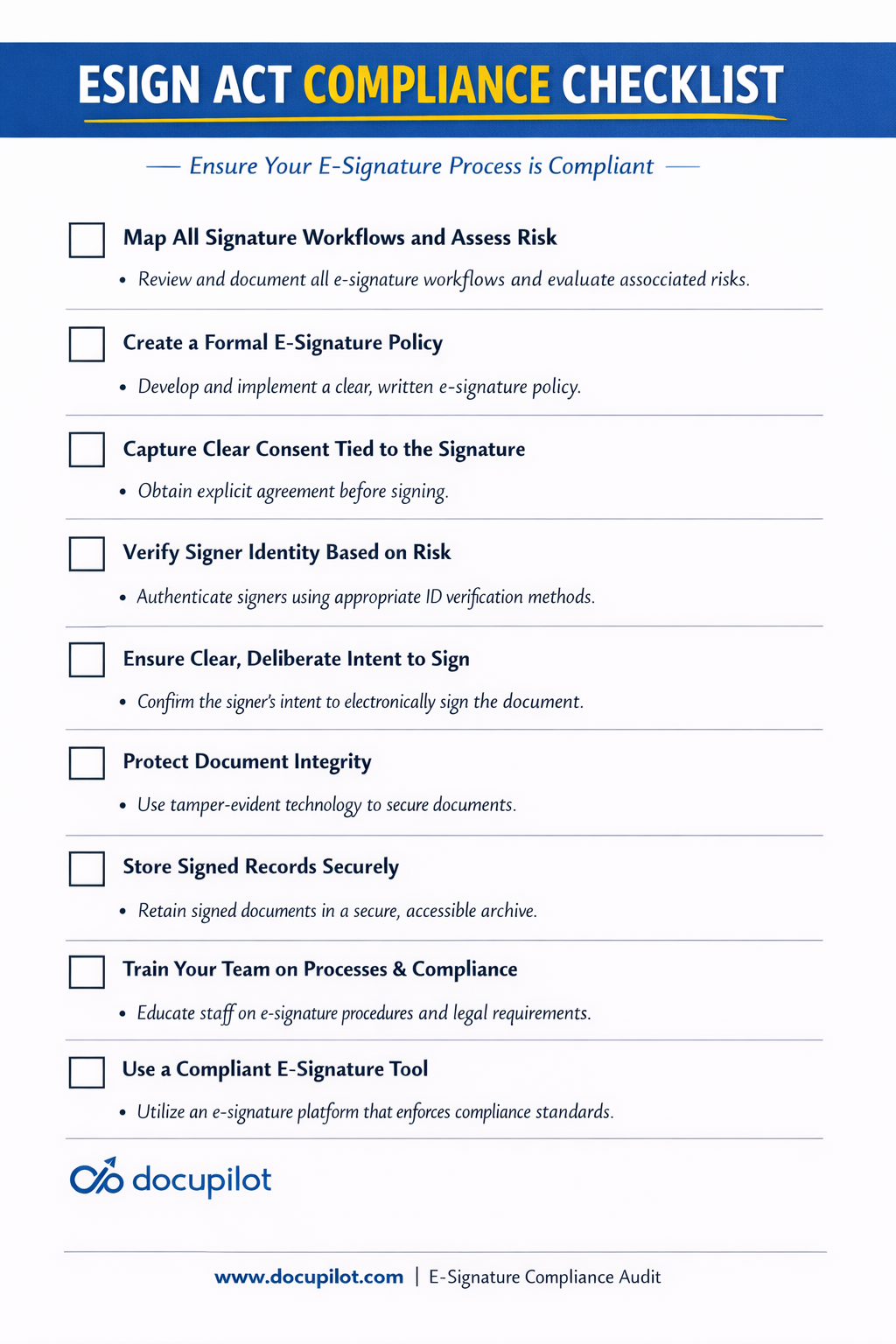
1. Map where your business uses electronic signatures
The first step toward E-Sign Act compliance is understanding exactly where electronic signatures appear across your organization. Many companies discover that signatures are used in far more places than expected. Mapping these workflows helps you manage risk, standardize processes, and make informed technology choices.
Start by listing every signature workflow. Identify each type of document that requires a signature. A simple spreadsheet works well and can include columns for:
- Document type
- Department
- Frequency
- Who signs
- Risk level
Next, assess the level of risk for each workflow. Ask yourself: “If this signature were challenged, what proof would we need?” This helps you identify high-risk transactions that require stronger controls, such as enhanced authentication or detailed audit trails, while keeping lower-risk workflows fast and efficient.
Mapping workflows also makes selecting the right e-signature tool much easier. With a clear understanding of your needs, you can ask vendors questions like:
- Does the tool support the consent process required in our industry?
- Can it create the audit history needed if a signature is challenged?
- Can signers easily retain copies for their records?
By linking workflows to risk, you can choose a solution that fits your organization rather than relying on generic feature lists.
2. Create a formal e-signature policy
Documenting your e-signature policy ensures consistency across teams and reduces compliance risk. Your policy should clearly specify:
- Which document types can be signed electronically, including any exceptions
- Required authentication methods based on the level of risk
- Consent language and disclosure requirements for signers
- Document retention periods by category
- Who has access to signed records
- Procedures for handling signature disputes
Once written, enforce the policy across workflows and keep it accessible for audits and regulatory reviews.
3. Capture clear consent to use electronic records and signatures
Your signing process should make it obvious that the transaction is electronic and that the signer agrees to proceed that way.
Before signing, present a clear disclosure that includes:
- Statement that the transaction will be conducted electronically
- Right to request or receive paper copies
- How to withdraw consent (and any consequences)
- Hardware and software requirements
- How to contact you with questions
You can capture consent in several ways, such as:
- Use tools with conditional logic or dynamic fields to require the signer to check a box confirming consent on the signing page before the Sign field becomes available
- Include consent language directly in the document, often near the signature
- Some tools support popup that requires the signer to accept electronic signing terms before proceeding
- Add the consent statement in the invitation email, requiring the signer to click a link to proceed
In all cases, consent is linked to the signature and the document, and the audit trail or metadata demonstrates that the signer explicitly agreed to proceed electronically at the time of signing..
4. Verify the signer’s identity appropriately
The law expects a reasonable approach to identity verification based on the transaction's risk and context.
Examples by risk level:
Low risk (internal expense approvals, routine acknowledgments):
- Email verification (sending signing link to known email address)
- Simple password or login to company portal
Medium risk (employment contracts, vendor agreements under $100K):
- Email verification plus one-time code sent via SMS
- Knowledge-based authentication (answering questions about their account)
- Multi-factor authentication through your existing system
High risk (loan documents, large contracts, healthcare consent):
- Government ID verification
- Live video verification
- Digital certificate-based signatures
- In-person identity verification before digital signing
The key is to match the level of verification to the transaction’s risk, balancing security and user experience.
5. Establish a clear action that shows intent to sign
Signing should always involve a deliberate user action that unmistakably indicates intent to be bound.
Good practices include:
- Dedicated "Sign" or "I Agree" button (not just "Submit" or "Next")
- Drawing a signature with a mouse or finger
- Typing the full legal name in a designated signature field
- Checking a box labeled "I have read and agree to be legally bound"
A simple workflow that demonstrates intent usually works like this: the signer receives a secure link to the document and is clearly informed that they are reviewing an agreement that will be signed electronically. They can scroll through the full document before taking any action. When ready, they actively sign by clicking a button or applying a signature in the designated field, followed by a clear confirmation step.
The system then records the action along with signer details and a timestamp, creating an audit trail that proves the decision was intentional.
6. Protect the integrity of signed documents
Your system should prevent or clearly flag any changes after signing.
Look for platforms that support any of these built-in safeguards:
- Cryptographic hashing: The system generates a unique digital fingerprint of the document at signing. Any change, even a single character, produces a different hash
- Version control: Documents are locked after signing, with pre-signed and post-signed versions stored separately
- Tamper-evident seals: Visual indicators show if a document has been modified
- Certificate of completion: A record that includes document hash, signer details, timestamps, and authentication methods, proving the integrity of the transaction.
7. Store signed records securely and make them accessible
Ensure your e-signature tool preserves an accurate copy of the signed document and its audit log and gives you access to them at any time.
A compliant platform should include:
- Encrypted storage both at rest and in transit
- Automatic backups to prevent data loss
- Access controls that limit who can view, download, or delete signed documents
- Retention management configurable to meet legal or regulatory requirements
- Export capabilities so documents can be moved to owned storage platforms like Google Drive or internal systems
8. Train your team on the process
Compliance only works when people follow the rules consistently. Make sure your staff are trained on every step of the e-signature workflow. Key areas include:
- How to send documents for signature using your platform
- What proper consent language looks like
- Which authentication method to use for different risk levels
- Where signed documents are stored and how to retrieve them
- How to handle technical issues reported by signers
- When to escalate concerns to legal or compliance teams
Refresh training regularly, set clear expectations, and hold team members accountable. Well-trained teams reduce errors, ensure compliance, and make the e-signature process smoother for everyone involved.
How to Choose an e-signature tool that supports E-Sign Act compliance
As you've seen throughout this guide, compliance depends heavily on your software choice. That's why it's critical to use tools that are built with E-Sign Act compliance in mind. When evaluating platforms, look for these essential features: audit trails, tamper-evident records, consent capture, authentication options, and secure storage or export capabilities.
One tool that checks all these boxes is Docupilot. It’s built with e-signature features designed to protect you legally.
Here's what sets it apart: Docupilot doesn't just handle signatures. It manages the entire document lifecycle from generation to signing to storage. This means you're not just getting signatures, you're building a complete, compliant document workflow that reduces risk at every stage.
Here are the ways Docupilot helps you stay compliant with the E-Sign Act
1. Automated document generation ensures consent and accuracy
You don't want to rely on people remembering to add e-signature consent statements in each document. Docupilot automatically inserts consent language into every document based on templates you configure once. You can even use conditional logic to ensure consent statements appear at exactly the right moment in the signing process.
This automation guarantees that every document meets E-Sign Act requirements for clear consent and prevents the human errors that could invalidate a signature down the line.
2. Audit trail provides verifiable evidence
Every document signed through Docupilot comes with a comprehensive audit trail that records all signing events, precise timestamps, IP addresses, and signer actions.
This audit trail is permanently tied to the document itself, providing the legal evidence of intent, consent, and authenticity you need if the signature is ever challenged in court or during a regulatory review.
3. Secure storage and flexible retrieval protect record integrity
Docupilot securely stores your signed envelopes and audit logs. You can track envelope status, review activity history, and download documents when needed for audits, legal reviews, or internal requests.
Docupilot also integrates seamlessly with external storage systems, allowing you to automatically save signed records to cloud drives (Google Drive, Dropbox, OneDrive).
You can configure retention settings or move documents to your own repository for long-term archival that meets your industry's specific requirements.
4. Signer authentication matches transaction risk
Docupilot supports multiple authentication methods so you can match security to risk level:
- Email verification for routine, low-risk documents
- Advanced Electronic Signatures (AES) for higher-risk transactions requiring stronger identity verification
- Multi-factor authentication for sensitive agreements
This flexibility ensures that the signer is who they claim to be, fulfilling the E-Sign requirement for reasonable identity verification based on the context and risk of each transaction.
5. Tamper-proof security maintains document integrity
Every document signed through Docupilot receives:
- Cryptographic sealing to detect any post-signature modifications
- Audit trail with timestamp certification showing exact signing time
- IP address logging for additional verification
- Compliant storage with encryption at rest and in transit
6. Smart workflow automation enforces compliance consistently
Manual processes lead to inconsistent compliance. Docupilot's workflow automation ensures your compliance requirements are followed every single time, without relying on human memory.
Set up automated signature workflows that:
- Route documents to the right signers in the correct sequence
- Send automatic reminders to prevent delays
- Trigger notifications when signatures are complete
- Move signed documents to designated storage locations
Create easy and legally enforceable e-signatures with Docupilot
If you're a business operating in the USA, E-Sign Act compliance isn't optional. It's what makes your signatures legally enforceable and protects your business from disputes.
But compliance doesn't start with choosing a tool. It starts with building the right process.
Before selecting software, you need an implementation strategy. Follow the checklist in this guide to map your workflows, capture clear consent, verify signer identity, verify e-signature validity, protect document integrity, securely store records, and train your team. Once your process is solid, then choose a tool that supports it.
That's where Docupilot comes in.
Docupilot integrates document automation with compliant e-signatures, making it easy to set up an automated, compliant document generation and e-signature workflow. It includes everything you need: audit trails, tamper-proof security, flexible authentication options, and automated workflows.
Ready to create compliant electronic signatures?
Sign up for your 14-day Docupilot free trial and make E-Sign Act compliance simple, secure, and seamless.
Learn how to automate document creation with Docupilot


Contents
Stop rebuilding the same document by hand.

Generate and sign documents in one workflow
Save ~15 minutes per application




