







Key takeaways
- Finance document generation pulls data from your ERP, CRM, or accounting system directly into standardized templates, producing invoices, board packs, compliance filings, and financial statements without manual assembly
- Conditional logic and dynamic data merge handle the variation across clients, jurisdictions, and reporting periods from a single master template, eliminating the need to maintain dozens of document versions
- The market for document generation software is valued at USD 3,022 million in 2026, signaling that finance teams across industries are moving away from manual document creation at scale
- Compliance-ready financial statement templates, automated balance sheet creation, and cash flow projection templates are among the highest-value starting points for automation
- Docupilot's no-code template builder, integrations with Salesforce, HubSpot, Zoho, Zapier, and Google Workspace, plus built-in eSignature routing let finance teams automate high-volume financial documents and scale output without increasing headcount or risk
If you lead a finance team, you know the feeling. It's late in the reporting cycle. Your team is buried in spreadsheets, copying figures between documents, reformatting the same numbers for different stakeholders, and searching for a file named something like Final_v3_revised_FINAL.xlsx.
Someone thinks the fix is a better spreadsheet. Someone else thinks the fix is hiring another analyst. Nobody has looked at what happens between the accounting system and the document that should have been ready two days ago.
Finance document generation solves this at the root. It automates the creation of reports, invoices, compliance documents, and financial statements so your team spends less time assembling files and more time analyzing the business.
This article covers what finance document generation is, why it matters now, where it delivers real results, the features to evaluate in any tool, and how to implement it with a step-by-step walkthrough.
What is finance document generation?
Finance document generation is the automated creation of financial documents by pulling data directly from core systems into standardized, pre-approved templates. Instead of manually building documents or copying numbers between sspreadsheets and Word files, the system auto-fills data fields, applies predefined logic and formatting, generates a customized document, and routes it for approval or storage.
The output is accurate, consistent documents produced at scale with minimal manual effort. This covers everything from free Excel templates for business financial statement generation to compliance-ready financial statement templates for banks, depending on the complexity of your reporting requirements.
Why does financial document generation matter for your team?
Every finance team that still assembles documents manually is paying a compounding cost in time, accuracy, and compliance risk. Here is where that cost shows up.
1. Manual work is consuming strategic time
Finance teams spend a disproportionate share of their hours on document assembly instead of forecasting, scenario planning, or advising the business. PwC's Finance Effectiveness Benchmarking research shows that up to 40 percent of finance team time goes to manual activities instead of strategic work.
To make that concrete, CFO Vanessa Galarneau shared a LinkedIn post describing a senior finance leader who spent 40 hours building a single board presentation. That meant formatting slides, exporting spreadsheets, reconciling numbers, and managing versions.
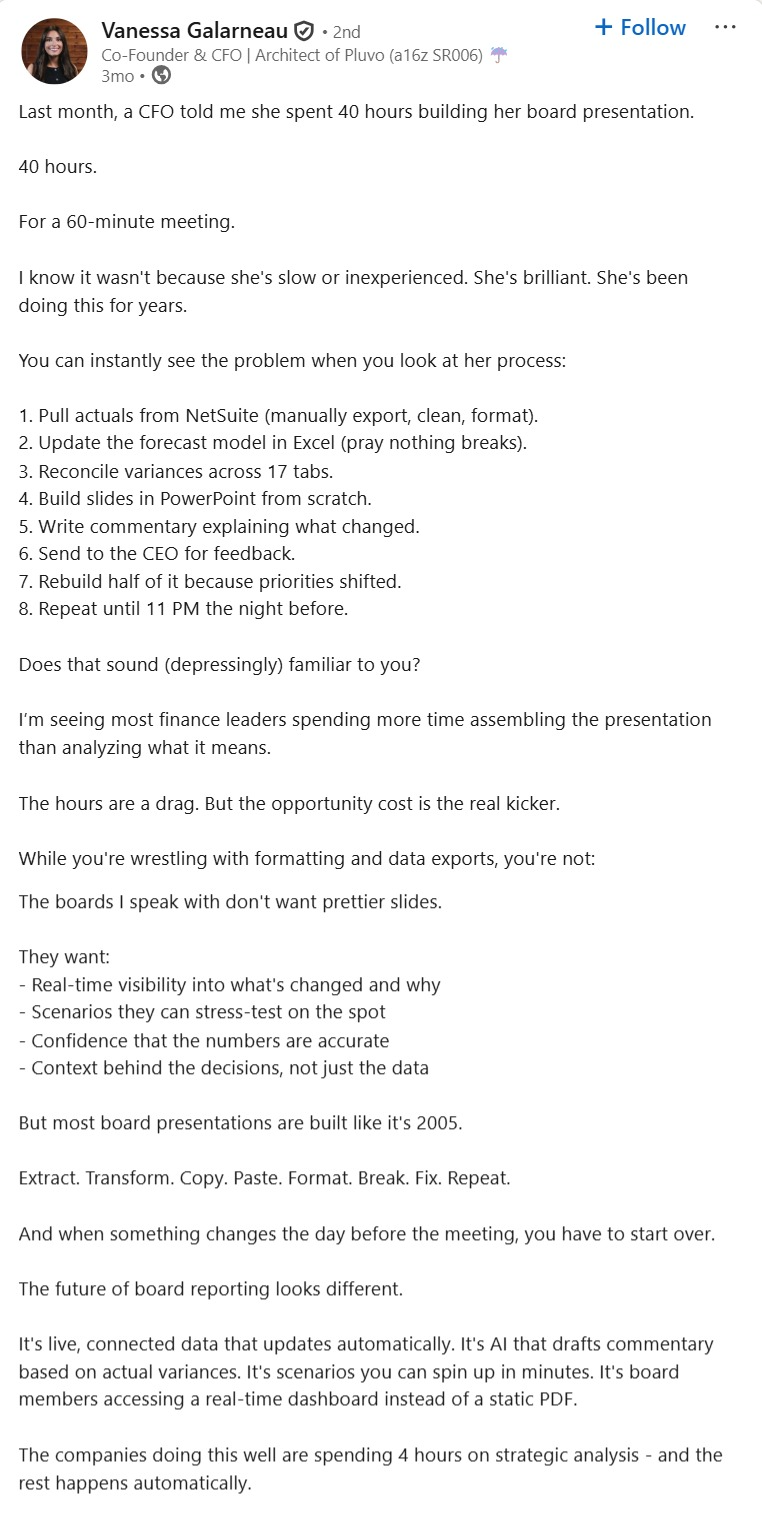
If your team is spending anywhere close to that amount of time assembling reports, you have a process problem. Document generation automation gives back most of that time so your team can focus on tasks that deliver direct value.
2. Errors are expensive and manual processes create them
When documents are assembled manually, mistakes follow: a wrong figure in a financial statement, mismatched revenue numbers across reports, or a missing disclosure in a compliance filing. Each error carries costs in rework, reputational damage, and regulatory scrutiny.
According to a Gartner survey, 59 percent of accountants make several mistakes multiple times per month. Enterprises that have adopted automated document workflows report a 38% reduction in manual errors and a 46% reduction in processing time. Document generation reduces the risk because data flows directly from source systems into structured templates, ensuring consistency and accuracy across every output.
3. Audit and compliance readiness is non-negotiable
Regulatory complexity in finance continues to increase year over year. According to PwC's Global Compliance Survey 2025, 85 percent of executives say compliance requirements have become more complex over the past three years. In financial services specifically, 90 percent of respondents reported rising complexity.
Manual document workflows cannot keep up. When documents are built from spreadsheets and email attachments, there is no single source of truth, no automatic audit log, and no straightforward way to prove consistency across periods. Document generation tools tied to your core systems address this directly. Every document carries data lineage, every version is tracked, and compliance rules are applied automatically.
4. Scaling is harder without automation
Your revenue and reporting complexity keep growing faster than your finance headcount. More customer contracts, more invoices, more regulatory filings, more investor updates, more jurisdictions. Manual document workflows do not scale. If you want to produce more documents without adding headcount, automation is the only path forward.
The broader market reflects this shift. 64% of B2B organizations now use document generation software for contracts, proposals, invoices, and compliance reporting. Finance teams that have not adopted automation are falling behind teams that have.
What are the key use cases for financial document generation?
The highest-value starting points are the documents your team produces most frequently with the least variation tolerance. Here are the financial documents you can start automating today.
1. Invoice processing and accounts payable automation
Invoices are among the highest-volume and most error-prone documents in any finance function. Matching invoices to purchase orders, manually extracting data, and routing them for approval is slow and opens the door for mistakes.
With document generation, you create invoices directly from your billing data. That means consistent formatting, accurate figures, and automated delivery without manual assembly. Customizable income statement generators for small businesses follow the same principle, pulling revenue and expense data into a pre-built template automatically.
This is a pain point that finance teams discuss frequently. Here is how one Reddit user described the challenge:
Which part of your financial document workflow would you automate first?
2. Financial reporting and board pack preparation
Board packs, management accounts, and visual financial report templates for company presentations are often the most time-consuming documents a finance team produces. Pulling data from multiple systems, structuring it properly, and presenting it clearly takes hours of repetitive work every cycle.
Document generation lets you define your report templates once, connect them to live data, and generate review-ready reports automatically. You can template narrative sections, leaving your team free to focus on analysis and insights instead of formatting. This applies equally to step-by-step guides for generating business financial documents and to automated balance sheet creation using document software.
3. Compliance and regulatory reporting
Compliance documents are high stakes, and their structure rarely changes. That makes them ideal for automation.
Automated systems produce standardized filings with timestamped audit trails, enforce consistent disclosure language, and align outputs with frameworks such as IFRS or anti-money laundering requirements. Because the required language and structure are embedded in your templates, compliance standards are applied automatically instead of relying on memory or manual checks.
The adoption curve here is accelerating. 58% of finance organizations have now adopted AI in some form, up from 37% the previous year. Compliance document generation is one of the most common entry points.
4. Loan and credit documentation
If you are involved in lending or credit workflows, you know how document-heavy the process can be. Application forms, approval letters, terms documents, and ongoing communications quickly add up. Personal financial statement templates for loan applications are a common starting point.
Document generation lets you pre-populate loan documents from applicant data, validate required fields against policy rules, and automatically generate approval or decline letters. You shorten decision cycles and reduce the operational burden of handling documents manually.
5. Client and investor communications
Finance teams produce a steady stream of structured communication: investor reports, account statements, credit memos, billing proposals, renewal notices, and disclosures.
Creating these manually at scale increases risk and inconsistency. With document generation, you deliver personalized, data-driven communications from a single template and source of truth, ensuring accuracy, consistent branding, and scalable output. Cash flow projection templates for financial planning and free downloadable financial model templates for forecasting follow the same automation pattern.
Other financial documents you can automate include purchase orders, payment reminders, pricing quotes, statement of accounts, credit notes, debit notes, and expenditure requests.
What key features should you look for in financial document generation software?
The right document generation tool for finance needs specific capabilities that generic document platforms often lack. Here is what to evaluate.
One dimension that separates finance-ready tools from generic ones is the depth of conditional logic. Finance documents frequently require variable sections based on jurisdiction, client tier, or regulatory framework. A tool that handles this at the template layer, rather than requiring manual edits per document, is the one that scales.
The partial automation trap is real. A survey of 450 finance leaders found that 54.2% of finance teams remain stuck in partial automation, still relying on inconsistent OCR tools and human intervention. The features above are what move a team from partial to full automation.
Here is a Reddit thread that captures the frustration finance teams feel with tools that promise automation but deliver something closer to assisted manual work:
Financial reporting automation that actually saves time not just adds more steps
How can you use Docupilot to automate financial document generation?
Many document generation tools are enhanced versions of MS Word with storage, versioning, and collaboration features. They lack true automation capabilities like merge fields, advanced conditional logic, and dynamic data mapping, which are what actually save time and reduce manual work.
If you want a tool that automates document generation with these capabilities, Docupilot is a strong choice. Here is how to get started.
Step 1: Identify your highest-volume or highest-risk documents
For most finance teams, that is invoices, a recurring report, or a compliance document that consumes significant manual effort every cycle. Start with the document type that costs your team the most time today.
Step 2: Build your template in Docupilot
Sign up for Docupilot and log in. In the dashboard, click "create template" in the top right. You will find three options:
- Upload your existing template if you are customizing manually
- Choose from the template library with pre-built templates for common finance documents
- Use the AI template builder to create one from scratch with a simple prompt
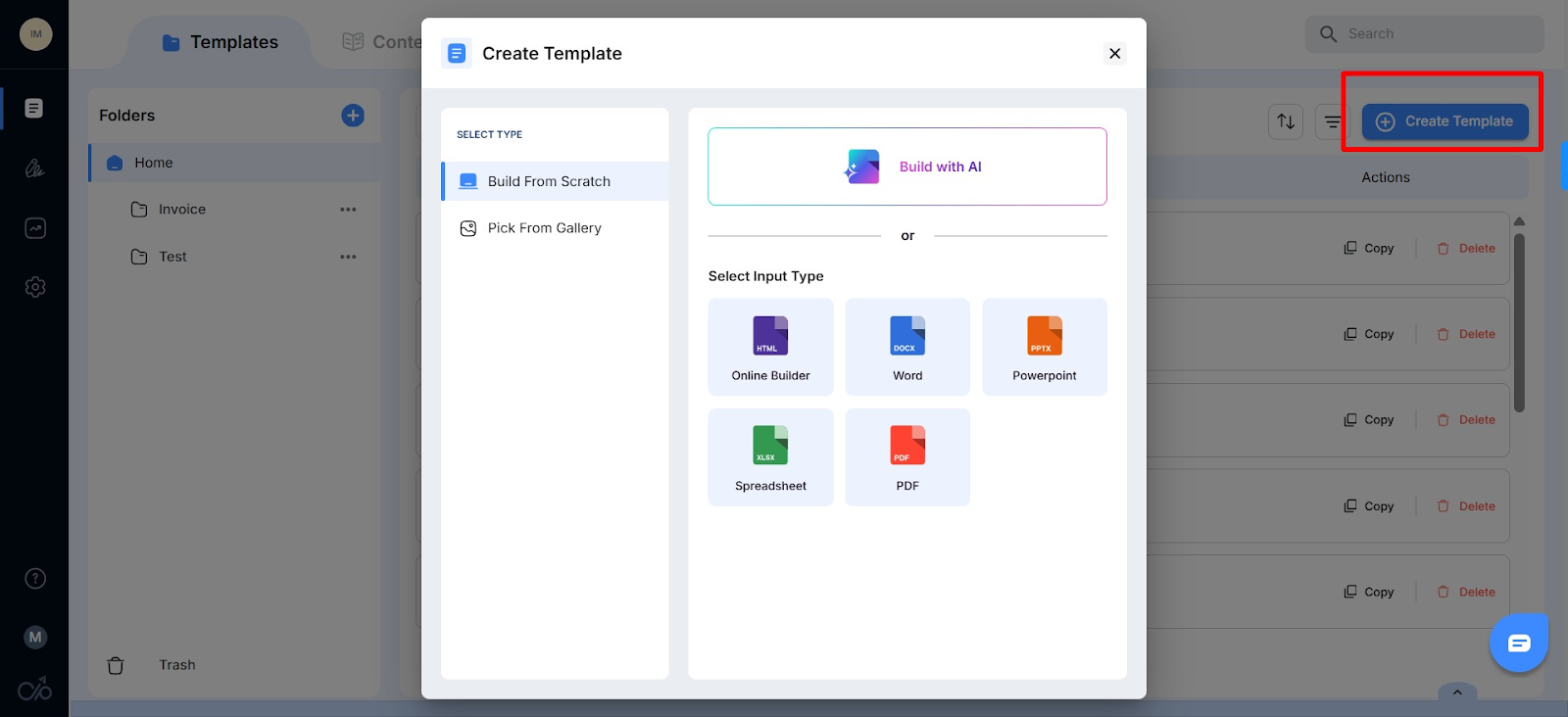
Now make your template dynamic. In the template editor, you can format text using standard editing tools. To turn it into a dynamic template, click the double bracket icon on the side to add:
- Tokens: For dynamic fields like {name}, {amount}, {invoice_number}
- Conditions: Show/hide content based on criteria (e.g., display late fees only if payment is overdue)
- Loops: Repeat sections (e.g., line items in an invoice)
- Tables: Populate rows dynamically from your data
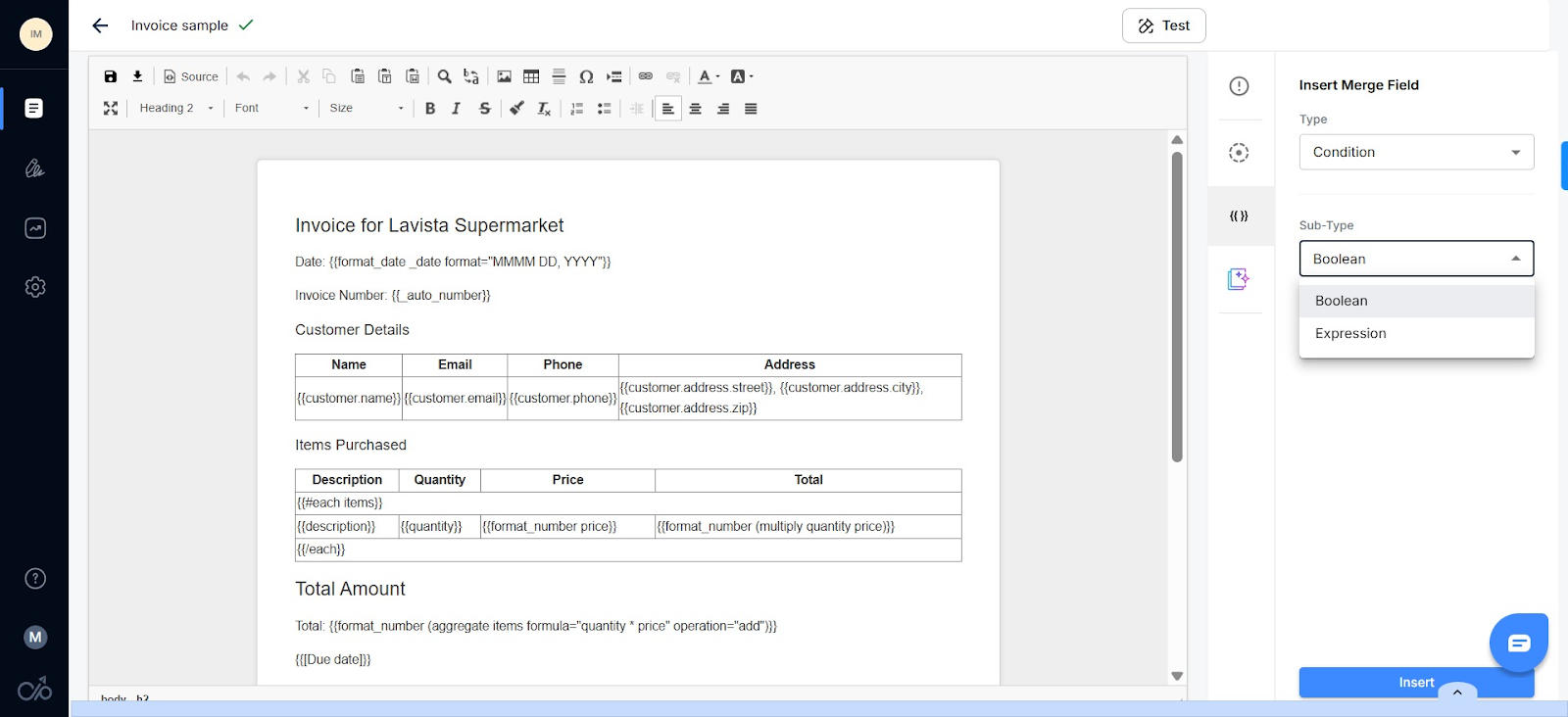
Alternatively, use the AI editor. Click the neon icon to summarize, expand, or improve sections of your template and add merge fields with a prompt.
Step 3: Connect your data source
Now that your template is ready, connect your data. Docupilot integrates with the systems your data already lives in, including ERP, accounting software, CRM, or spreadsheets.
Click the back arrow to find the setup tab, click the Make or Zapier connector icons at the top of the page, and choose the tool you want to connect.
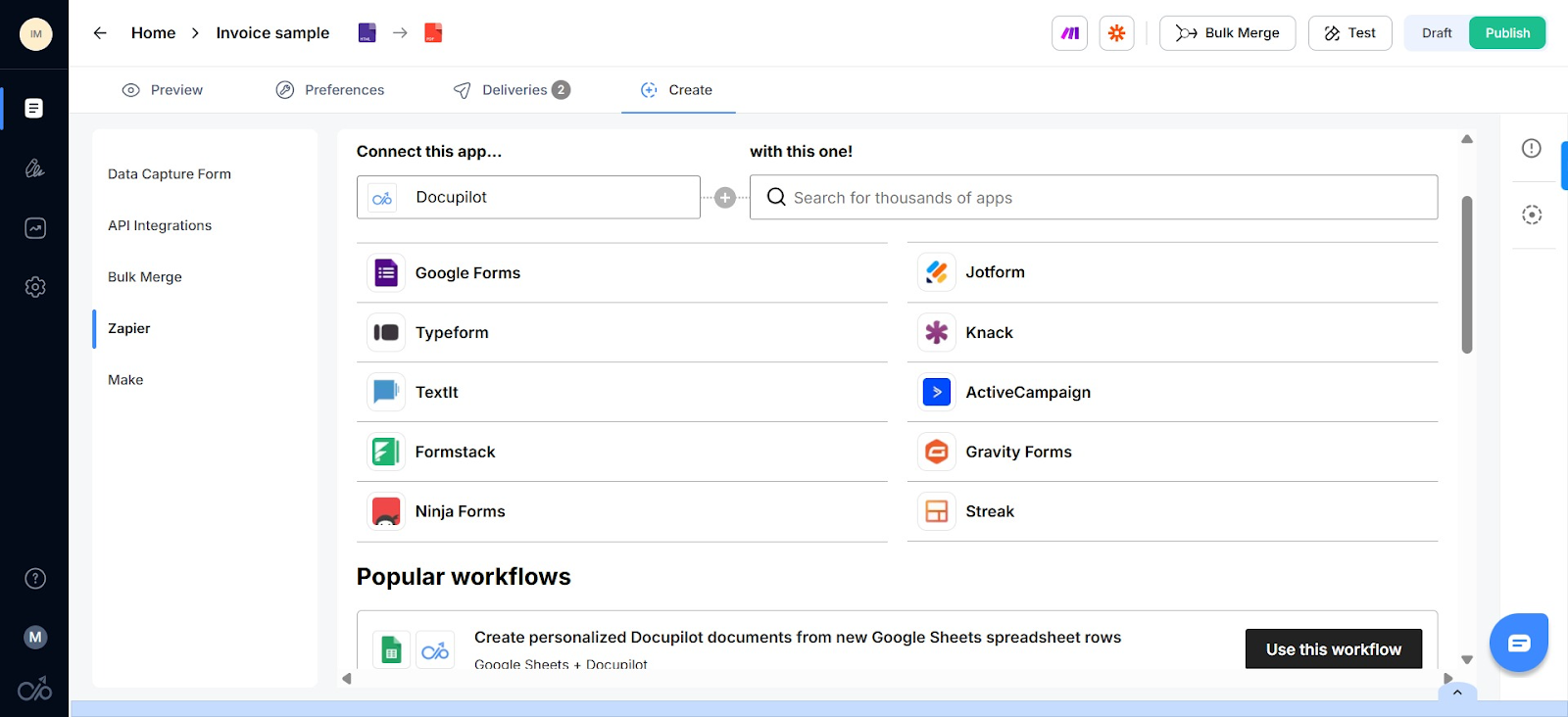
Sign in to your Zapier account, add your trigger event (e.g., "New or updated spreadsheet row"), and fill in the required fields to connect your data source with Docupilot.
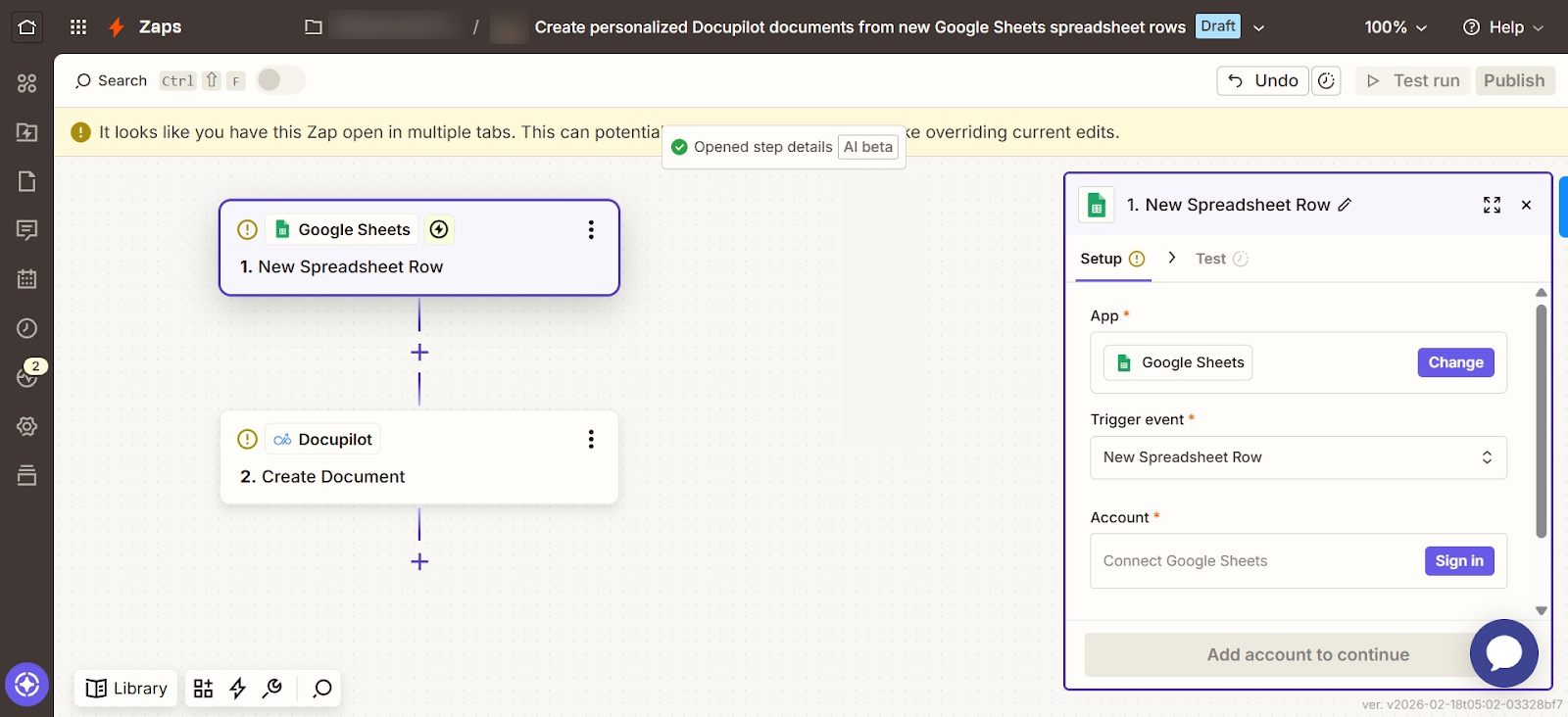
Once configured, every time a trigger event happens in your data source, Docupilot automatically generates a custom document with all your conditions applied. For developer teams, Docupilot's REST API supports programmatic document generation directly from internal systems without a middleware layer.
Step 4: Set up delivery
With your data source connected, decide where the document goes after generation. In Docupilot, click the Delivery tab to see your options:
- Storage systems: Automatically save to Dropbox, Google Drive, or OneDrive
- Email delivery: Send documents directly to recipients
- E-signature routing: Route for signing using third-party tools like DocuSign or Docupilot's native e-signature tool
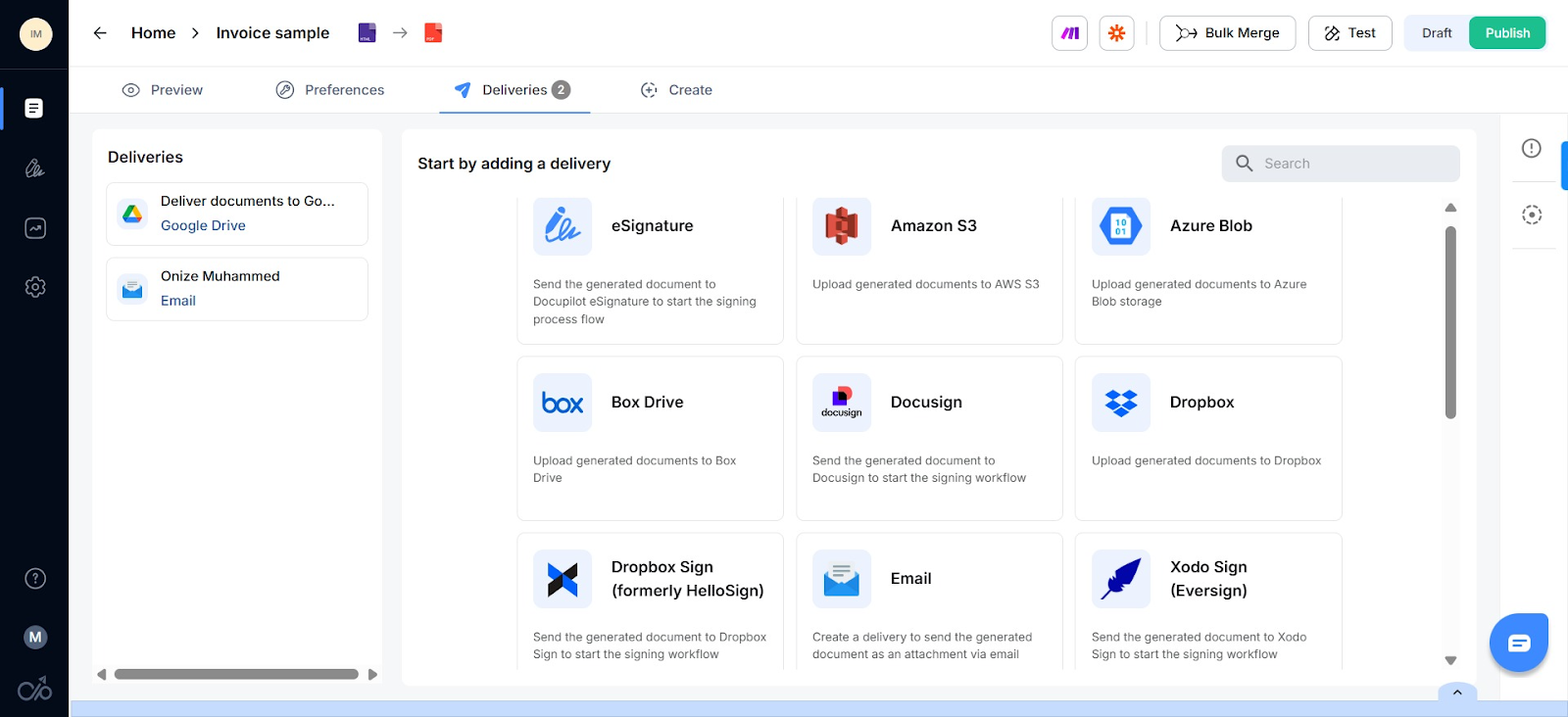
Choose an app, fill in the fields, and your delivery is set up.
Step 5: Run your first automated batch
See the documents produced, verify accuracy, and adjust the template if needed. You should have a complete document like this:
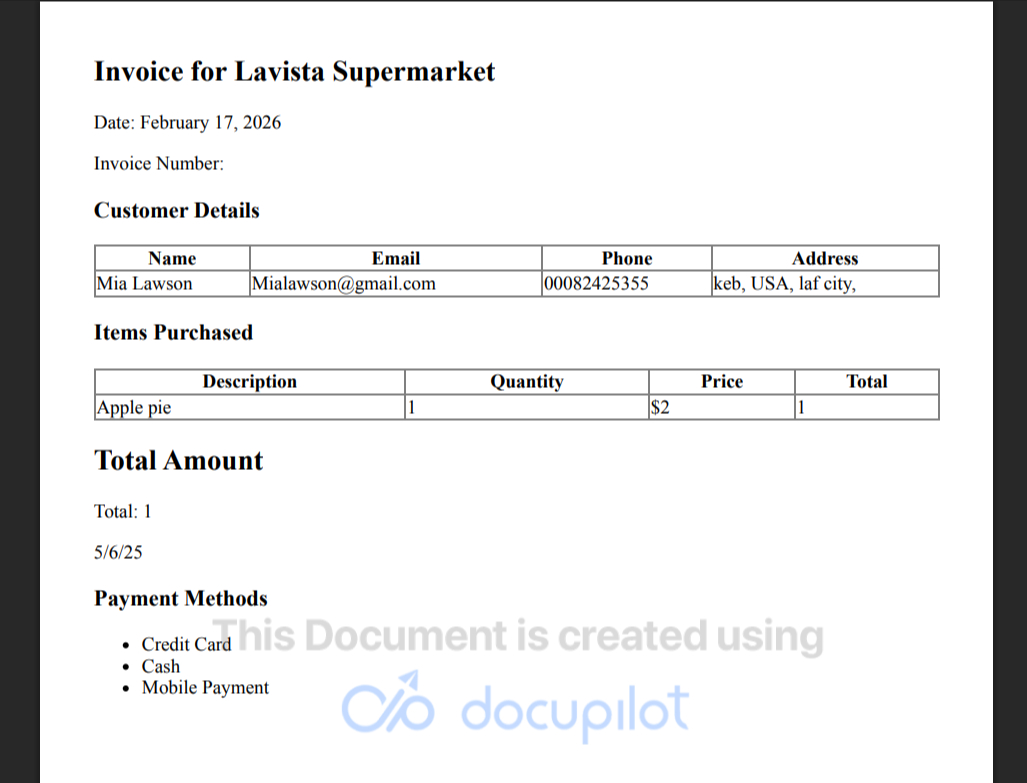
Once one workflow is running reliably, expand to additional document types. The incremental cost of automating the next one is much lower because the pattern is already established.
If you get stuck at any point in this setup, click the in-app chatbot, share your issue, and within eight minutes you will get a live human response.
And yes, Docupilot has a customer support team that is committed to giving you a hassle-free experience, as this user on Capterra experienced:
"The BEST element and 90%+ of our decision to switch was the customer care & support. Available when we needed and hand held us through any onboarding issues and queries we had. They had no idea that I was basing my decision to move 10,000+ merges a month on their support replies - but they aced it and we have moved 2 businesses so far, and will be moving a third next month."
What common mistakes should you avoid when automating finance documents?
The technology is straightforward. The implementation mistakes are where teams lose time. Here are the ones that show up most often.
Building the template before confirming the data structure
The most common reason a first workflow needs to be rebuilt is that the template was designed before anyone confirmed the exact field names and data format coming from the source system. Confirm the data structure first. Build the template around it.
Trying to automate everything at once
Teams that attempt to automate invoices, board packs, compliance filings, and investor reports simultaneously in the first month typically end up with four half-finished workflows instead of one reliable one. Start with the single document type that has the highest send frequency and the most consistent data structure.
Ignoring conditional logic during initial setup
Finance documents frequently require variable sections. Skipping conditional logic during the first template build means someone is still manually editing documents before every send. Set up the conditions from the start, even if the first version only handles two or three variations.
This Reddit thread captures the broader question finance teams face when deciding what to automate first:
How necessary is it for companies to have automatic document generation?
How can Docupilot help your finance team stop assembling documents and start analyzing the business?
The signal that financial document generation applies to your team is straightforward. If the data already exists in an ERP, CRM, or accounting system and someone is still manually moving it into a document, the gap is there. The question is how much it is costing.
The place to start is the single workflow with the highest volume and the lowest tolerance for error. One template, one connected data source, one automated delivery. Run it for 14 days and the time recovered will make the next decision obvious.
Docupilot is built around exactly that starting point. The no-code template builder handles financial document generation across PDF, Word, Excel, and PowerPoint formats. Conditional logic covers variation across client types, jurisdictions, and reporting periods from a single master template. Integrations connect directly to Salesforce, HubSpot, Pipedrive, Zoho, Zapier, Google Workspace, and eSignature tools without a middleware layer adding cost.
Docupilot offers a 14-day free trial with full access to conditional logic, bulk generation, integrations, and API from day one. No credit card required. Start with the document type that costs your team the most time today and have the first workflow live before the end of the week.
Finance document generation FAQs
What is the document generation process in finance?
Finance document generation automates creating invoices, reports, and compliance documents by pulling data from core systems into pre-approved templates, reducing manual work and errors across every reporting cycle.
How does AI improve finance document generation?
AI speeds up template creation through natural language prompts, suggests smart content blocks, applies advanced conditions, and reduces errors across reports and invoices. It is most useful for initial template setup.
What are the benefits of automating document generation in finance?
Automation saves time on document assembly, ensures accuracy by pulling data directly from source systems, improves compliance with automatic audit trails, and frees finance teams to focus on forecasting and analysis.
What types of financial documents can be automated?
Invoices, financial statements, board packs, compliance filings, loan documents, investor reports, account statements, purchase orders, credit notes, and payment reminders are all candidates for automation.
How does Docupilot help with financial document generation?
Docupilot connects directly to your ERP, CRM, or accounting system and generates financial documents from templates with conditional logic, bulk generation, and automated delivery. Every plan includes API access, unlimited templates, and all integrations with no feature gating.
Learn how to automate document creation with Docupilot


Contents
Stop rebuilding the same document by hand.

Generate and sign documents in one workflow
Save ~15 minutes per application




