





Key takeaways
- A document automation API can generate documents from structured data and move them through signing, delivery, and storage, without anyone editing a file by hand.
- The basic workflow is straightforward: a business system triggers the request, data maps to an approved template, the service generates the document, then routes it for signature or delivery.
- Rules can decide which template applies, who signs, in what order, and where the finished file is stored, all from the same submitted data.
- Reliable workflows require more than document generation. Teams should also define the payload contract, name a template owner, handle failures, and track delivery or signing status.
- The best candidates for a document automation API are repeatable documents built from data that already lives in a business system.
Business systems store the data needed to create contracts, invoices, offer letters, and other documents. Yet turning that data into a finished document often requires manual copying, formatting, routing, and follow-up.
A document automation API connects this process to your application. It uses structured data to generate documents, apply workflow rules, collect signatures, deliver files, and return status updates.
This guide explains how document automation APIs work, what they can automate, how they differ from PDF and eSignature APIs, and what to evaluate before choosing one.
What is a document automation API?
A document automation application programming interface (API) bridges your business data and the documents built from it. A customer relationship management (CRM), enterprise resource planning (ERP), or billing system can trigger the workflow. The system then generates the document and sends it to the required destination in the background.
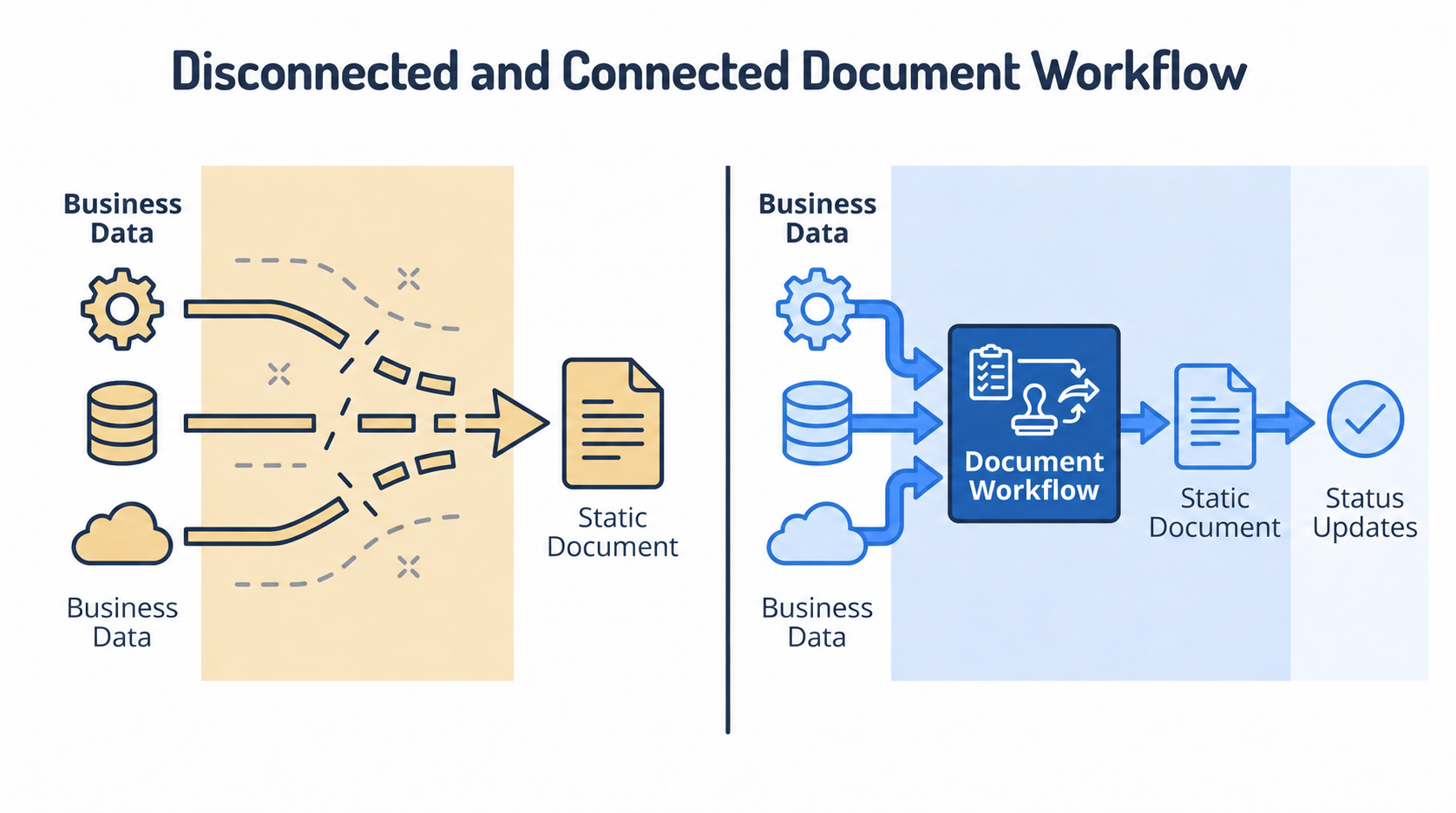
A document automation API does more than create files. Depending on the platform, it can map data to templates, process files, collect signatures, route documents, and send status updates back to your application.
This differs from a PDF API, which generally focuses on file-level tasks such as generating, converting, merging, splitting, or compressing PDFs. A document automation API manages the wider workflow around how a document is created, approved, signed, delivered, and stored.
Why use a document automation API?
A document automation API helps you to:
- Generate documents directly from current system data
- Apply approved templates, wording, and branding consistently
- Track generation, delivery, approval, and signing events
- Reuse the same document workflow across multiple applications
A document automation API is best suited to frequent, repeatable documents created using data already stored in business systems.
It gives developers a shared document service. CRMs, billing platforms, ERP systems, and internal applications can call the same workflow without requiring separate document logic for every product or team.
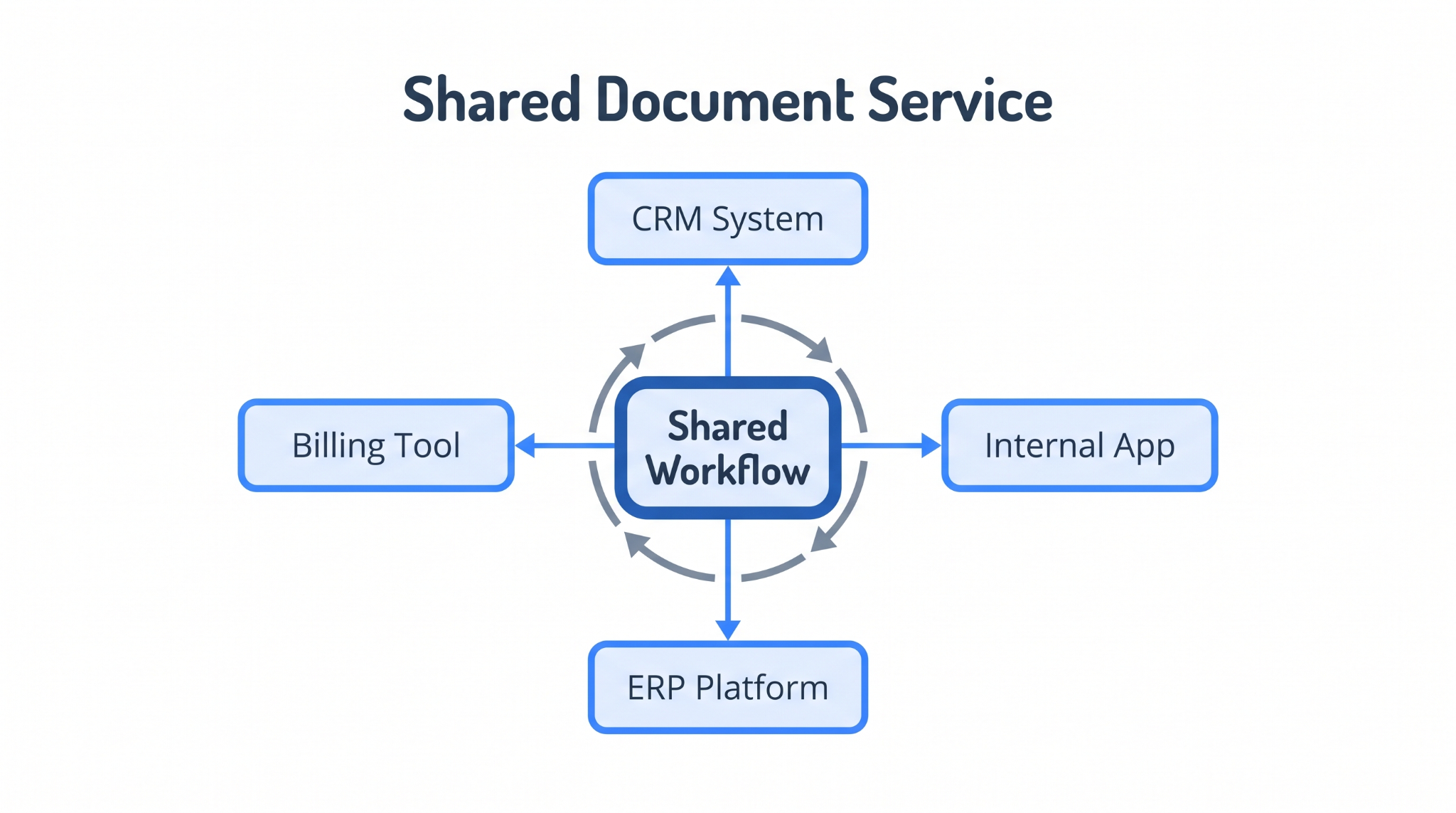
The initial integration still requires engineering support, while operations teams must maintain templates and workflow rules.
How does a document automation API work?
A document automation API works as a pipeline. It receives data from another system, applies that data to a template, generates the document, and returns the result.
The process typically includes six steps.
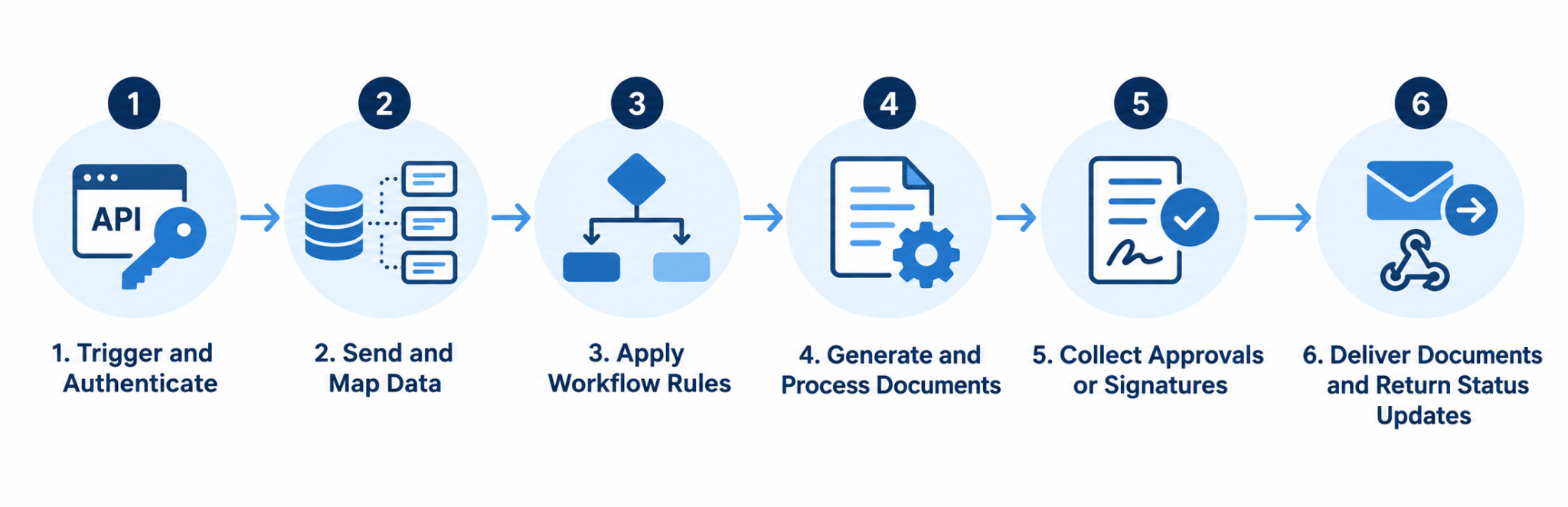
Let’s look at each step below.
Trigger and authenticate
The workflow begins when a defined event occurs in a system you already use. This could be a form submission, status change, completed payment, or document request.
Your application sends an authenticated API request to the platform. The platform then verifies the request, applies the relevant permissions, and starts the configured workflow.
Send information and map data
The calling system sends the information required to create the document, commonly as a JSON payload. Each value maps to a corresponding variable in the template.
Simple fields can populate names, dates, and addresses. Arrays and nested objects can generate tables, repeated sections, line items, or multiple recipients.
Apply workflow rules
Workflow rules determine what happens based on the submitted data. They can select the appropriate template, include or exclude clauses, assign recipients, define signing order, and choose delivery destinations.
This allows one integration to support multiple document variations without requiring separate API calls for every scenario.
Generate and process documents
The platform combines the submitted data with an approved template to generate the document. Templates may use Word files, existing PDFs, or a platform-specific editor.
The workflow can also fill PDF fields, convert formats, combine files, rotate pages, or add page numbers. Batch processing can generate multiple documents from a larger dataset.
Collect approvals or signatures
If approval or electronic signature is required, the generated document moves directly to the appropriate recipients.
The workflow can define signing roles, recipient details, and signing order. Recipients may sign sequentially or in parallel, depending on the process.
A webhook can notify your application when the document is approved, declined, or signed.
Deliver documents and return updates
The completed document can be emailed, saved in cloud storage, transferred through SFTP, or returned to another business system.
Webhooks and status endpoints notify the originating application when the document is generated, delivered, approved, declined, or signed. They can also report failures, allowing the application to retry the request or send it for manual review.
What can you automate with a document automation API?
With a document automation API, you can send business data into programmable templates, apply workflow rules, and receive completed files or status updates.
- Sales and revenue: Generate quotes, proposals, order forms, and master service agreements from customer relationship management data. Workflows can populate customer details, add signer information, and send documents for approval or signature.
- Legal: Assemble nondisclosure agreements, engagement letters, matter packets, and standard forms from case or client records. Conditional rules can include the relevant clauses and supporting documents.
- Human resources and onboarding: Create offer letters, policy acknowledgments, and onboarding packets when you add an employee record. Operations teams can maintain the templates without changing the integration.
- Finance and lending: Populate loan offers, disclosures, and account-opening forms from application data.
- Operations and service: Produce service agreements, work orders, inspection reports, and incident reports from operational systems. Webhooks can return generation, delivery, and signing updates to the source application.
If your systems regularly produce the same types of documents from structured data, they are strong candidates for automation.
Who manages a document automation API?
You need a developer to integrate a document automation API. You do not need a developer for every template or workflow update after the integration is running.
With Docupilot, ownership is divided between developers, the platform, and operations teams.
This setup reduces ongoing engineering involvement because your operations team can manage frequent content changes through Docupilot. You may still need developer support for changes such as adding new document types, changing the payload, or updating application logic.
How to choose a document automation API
Consider the following criteria:
- Template support: Check for loops, conditions, calculations, reusable sections, and support for formats such as Word and PDF.
- Generation and processing: Confirm the required output formats, batch-generation limits, file conversion, PDF filling, and document-combination capabilities.
- eSignature and approvals: Evaluate native signing or external integrations, signing order, multiple recipients, reminders, and status tracking.
- Workflow orchestration: Look for conditional branching, routing rules, approval steps, and a reliable webhook event model.
- Integrations and delivery: Check connections with your data sources, automation tools, signing providers, and storage destinations. Confirm that completed documents and status updates can return to the originating system.
- Developer experience: Review the REST endpoints, authentication options, documentation, code samples, testing environment, and error responses.
- Security and reliability: Check encryption, access controls, audit logs, uptime commitments, and performance under load.
- Pricing: Evaluate pricing models, usage limits, scaling costs, and whether the pricing aligns with your expected document volume.
A practical tip: Test one complete workflow using your own templates and data before committing. This will show how the platform handles your actual conditions, integrations, document volume, and edge cases.
Building document automation API workflows with Docupilot
With Docupilot, you can connect your business data to configured templates and workflows that generate, process, deliver, and track documents. Your application sends the required information, the document workflow runs, and you receive completed files and status updates back in your system.
You can connect your systems using APIs, including document-generation APIs, workflow execution APIs, eSignature APIs, and file APIs. After the initial integration, your operations teams can manage document-specific updates such as templates, content, and workflow rules without changing your application logic.
Whether you need to generate contracts from CRM data, create reports from operational systems, or automate document packets, you can build repeatable document workflows that fit into your existing applications.
When you're ready to test your own document workflows, you can start a 14-day free trial with no credit card required.
FAQs
Can a document automation API generate multiple documents from one request?
Yes. A batch request can process multiple records against the same template, generating a separate document for each record. This is useful when the same document structure needs to be produced for many customers, employees, transactions, or other records.
Can a document automation API fill existing PDF forms?
Yes. A document automation API can populate predefined fields in an existing PDF using data supplied by the calling application. This allows organizations to automate established forms without rebuilding them as new templates.
What is the difference between a document automation API and an e-signature API?
An e-signature API focuses on sending completed documents for signing and recording signing activity. A document automation API covers document creation and preparation, making it useful when documents need to be generated before signing.
When should you use a document automation API instead of a no-code tool?
Use an API when document generation needs to connect directly with application logic or developer-controlled processes. A no-code tool is better suited to workflows that can be configured and maintained primarily through visual interfaces.
How does a document automation API handle different document formats?
Format support varies between platforms. Some accept formats such as Word and PDF for templates, while others also support conversion or file processing. Check supported input, output, and conversion formats before selecting an API.
Learn how to automate document creation with Docupilot


Contents
Stop rebuilding the same document by hand.

Generate and sign in one workflow.
Fifteen minutes back, per application.