





Key takeaways
- A document conversion API uses HTTP requests to convert files from one supported format to another.
- Conversion support depends on direction. An API that converts DOCX to PDF may not convert PDF back to DOCX.
- Output quality depends on the rendering engine and available fonts. Complex source files and conversion settings can also affect the result.
- Synchronous requests work well for smaller jobs that need an immediate response. Asynchronous or batch processing is better for large files and high volumes.
- Some workflows begin with document generation, then use conversion before the file is delivered or signed.
Your application may receive Word files, spreadsheets, or HTML. If every file needs to become a PDF, manual conversion becomes difficult as request volume grows.
A document conversion API automates the process. It takes an existing file and returns it in another supported format. The right API must support your required conversion path and preserve the document layout. It should also perform reliably at your expected volume.
This guide explains how document conversion APIs work and which formats they support. You will also learn how to test an API for production use and when to consider a broader document workflow.
What is a document conversion API and how does it work?
A document conversion API adds file conversion to an application or business workflow. Your system sends an existing file or source, and the API returns it in a supported format.
A conversion request usually follows four steps:
- Provide the source: Upload a file directly or reference one through a URL. You can also send an HTML string or use a supported cloud-storage object.
- Choose the conversion: Tell the API which format you are sending and which format you need.
- Set the output rules: Choose the page size and orientation. Adjust the image quality when needed.
- Collect the result: Download the file immediately or retrieve it when the asynchronous job is complete.
You can choose a managed API or host the conversion service in your own environment. A managed API runs on the provider’s infrastructure. A self-hosted service gives your team more control over where files are processed.
A conversion library works directly inside your application. If other systems need to use it, your team must build an API layer around the library.
When should you use a document conversion API?
An API becomes useful when conversion must start from an event inside your application or when request volume becomes too high to manage manually.
For example, a customer portal can convert each uploaded Word proposal into a PDF preview. It can also log failed requests for review without assigning each file to an employee.
How a document conversion API works
The image below shows how a file moves from the original request to the finished PDF.
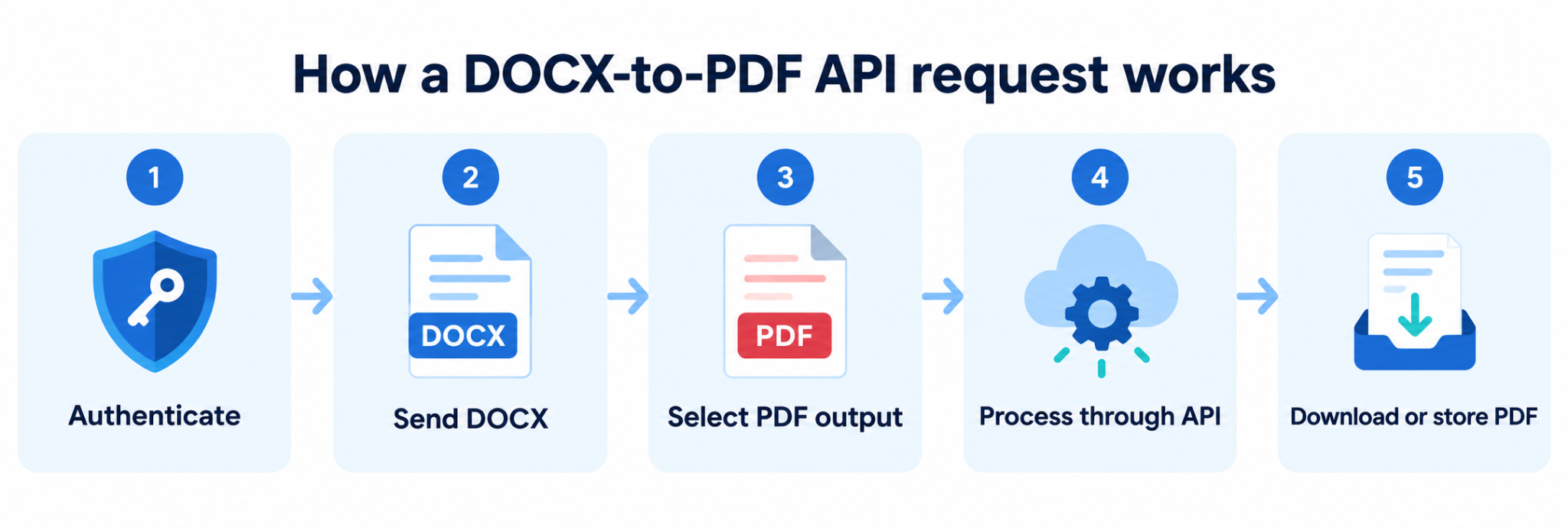
A basic conversion request may look like this:
curl --request POST "https://api.example.com/v1/convert" \
--header "Authorization: Bearer $CONVERSION_API_TOKEN" \
--form "source_format=docx" \
--form "target_format=pdf" \
--form "[email protected]" \
--output proposal.pdf
This request uploads proposal.docx, specifies PDF as the target format, and saves the response as proposal.pdf.
This example uses a synchronous API, so the finished file returns in the same response. Larger jobs may return a job ID. Your application can track the job through polling or wait for a webhook when the conversion is complete.
Keep API credentials on the backend. Log the job status and error details. You should also record retry attempts and job IDs, while keeping sensitive document content out of the logs.
Document conversion API formats and paths
Format support must be checked in both directions. An API that converts DOCX to PDF may not support PDF to DOCX. Check the provider’s documentation to confirm that it supports your required conversion. For example, verify that it can convert DOCX files to PDF.
How to test document conversion fidelity
Fidelity means the converted file keeps the parts of the original that matter to your workflow. A legal agreement may need the same page layout and signature fields. A spreadsheet may need clear, readable columns, even if it looks different from the original workbook.
Common problems include replaced fonts, changed line breaks, cut-off columns, blurry images, incorrect page breaks, and HTML that does not print well.
Test the API with real files, including complex ones. Check each converted file against clear requirements:
- Required fonts appear correctly or use an approved substitute.
- Text and visual content remain fully visible.
- Page breaks appear in acceptable locations.
- Required links and form fields continue to work.
- File size and processing time stay within your limits.
Run the same tests whenever you change the conversion engine or rendering settings.
Document conversion API processing models compared by workload and response method
The right processing model depends on file size and how quickly the user needs the result.
Batch processing works well for scheduled exports and statement runs. It can also support large archive migrations. Before choosing it, review queue limits, concurrency, failure handling, idempotency, retry rules, and result retention.
How to evaluate a free document conversion API
Free access usually comes as trial credits or a limited usage allowance. Check which conversion paths are included and whether outputs contain watermarks. Review the file size and page limits, along with the number of requests allowed. You should also confirm how long the provider stores files and what production usage costs.
Test the API with files from your actual workflow, including large or complex documents. Check how it handles unsupported formats and timeouts. You should also test failed requests and recovery behavior. A simple conversion test confirms connectivity but doesn't establish production reliability.
Document conversion API security and reliability
Before choosing a provider, confirm how it protects your files during upload and storage. You should also know where your data is processed and when stored files are deleted.
Review these areas:
- Encryption during transfer and storage
- Access controls and account permissions
- File retention and deletion policies
- Subprocessors that may handle your data
- Audit reports and incident-response procedures
If your industry has specific compliance requirements, compare them with the provider’s certifications and security documentation.
Keep API credentials on your backend and rotate them regularly. Use authentication controls and set request limits to prevent misuse. Do not include document contents or signed download links in application logs. These practices align with OWASP guidance for API security.
You should also check whether the API can support your production workload:
- Maximum file size and page count
- Request timeouts and retry behavior
- Webhook signing and delivery attempts
- Monitoring tools and service commitments
The API documentation should explain how each endpoint works and what its error codes mean. It should also include code examples and clear instructions for tracking longer jobs.
How Docupilot supports document workflows
Our document workflows turn structured business data into finished documents. You can apply conditional logic before generating a file, then convert or merge the output when required.
The completed document can be sent by email or passed to another application through a webhook.Our eSignature workflows and connected business applications help move the process forward. We support templates created in Word, Excel, PowerPoint and PDF.
We focus on document workflows built around templates and business data. We’re not a general-purpose conversion service for every file combination.
See how Docupilot fits your workflow
If your process starts with business data and ends with a document that must be delivered or signed, test the complete workflow with your own use case.
Bring one of your current templates and a sample data payload. We will show you how the workflow runs from the initial request to final delivery. You can also see how we report completion or errors back to your application.
Book a Docupilot demo to review your document workflow with our team.
FAQs
- What is a document conversion API, and how is it different from a converter tool?
A document conversion API lets software submit an existing file or source and receive another supported format programmatically. A converter tool usually requires a person to upload a file through a browser and download the result, while an API can run inside an application or automated workflow.
- Can a document conversion API convert HTML or web pages to PDF or images?
Yes, many services can render HTML strings, files, or URLs as PDFs or images. Check browser-engine behavior, CSS print support, authentication, web fonts, asset-loading delays, margins, headers, footers, and page-break controls.
- Is there usually a free document conversion API, free credits, or a trial?
Yes, many providers offer trial credits or a limited allowance, but the terms differ. Check file size, page limits, supported conversion paths, concurrency, watermarking, retention, and production pricing before treating free access as a long-term plan.
- How do I know if a document conversion API is reliable and secure enough for production?
Test it with representative files and realistic concurrency, then review error handling, retries, status reporting, rate limits, retention, encryption, access controls, compliance evidence, and contractual service terms. Your application should also keep credentials on the backend and monitor conversion failures.
Learn how to automate document creation with Docupilot


Contents
Stop rebuilding the same document by hand.

Generate and sign documents in one workflow
Save ~15 minutes per application