







Key takeaways
- OneSpan offers two e-signature plans for US visitors and non-US visitors
- Users reviews are split; enterprise users migrating from DocuSign praise the pricing, while small businesses and solo buyers flag the cost and annual lock-in
- If transparent pricing and document automation matter to you, Docupilot is a better alternative
OneSpan is one of the more established names in the e-signature space. Their pricing page boldly claims "Fair pricing. No hidden fees," but how true is that claim when you actually dig in?
In this review, we went directly to OneSpan's pricing page, analyzed real user feedback from G2 and Capterra, and broke down exactly what you are getting and what you are not before you commit.
How we gathered insights on OneSpan pricing
OneSpan's pricing is not fully published in one place, which made this review require a bit more digging than usual.
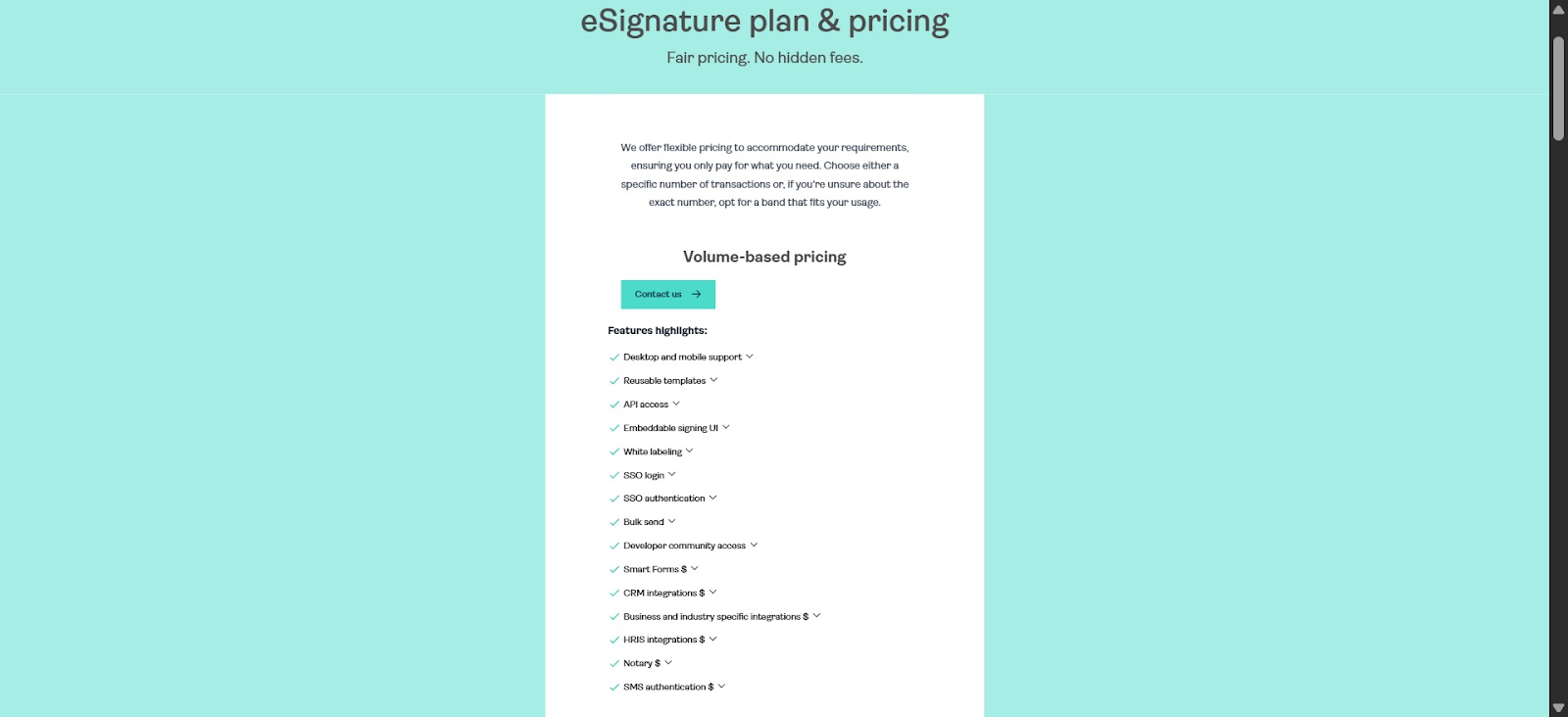
We started by visiting OneSpan's official pricing page directly. During that process, we discovered something worth noting: users outside the United States are redirected to an enterprise-only version of the pricing page that shows no figures whatsoever. More on this in detail later.
Beyond the pricing page itself, we reviewed real user feedback from G2 and Capterra. These were chosen because they have the largest volume of verified OneSpan reviews with specific pricing commentary.
These were chosen because they have the largest volume of verified OneSpan reviews with specific pricing commentary.
OneSpan vs. Docupilot: Pricing at a glance
Before we dig into OneSpan's pricing in detail, here's a quick side-by-side look at how it compares to Docupilot across plans, flexibility, and overall cost transparency.
**All prices as of 2026. OneSpan Enterprise pricing requires a sales call; Docupilot e-signature is billed separately at $1.50/envelope.
OneSpan pricing: what you need to know
OneSpan offers two e-signature plans. However, whether you see both depends entirely on where you access the page from.
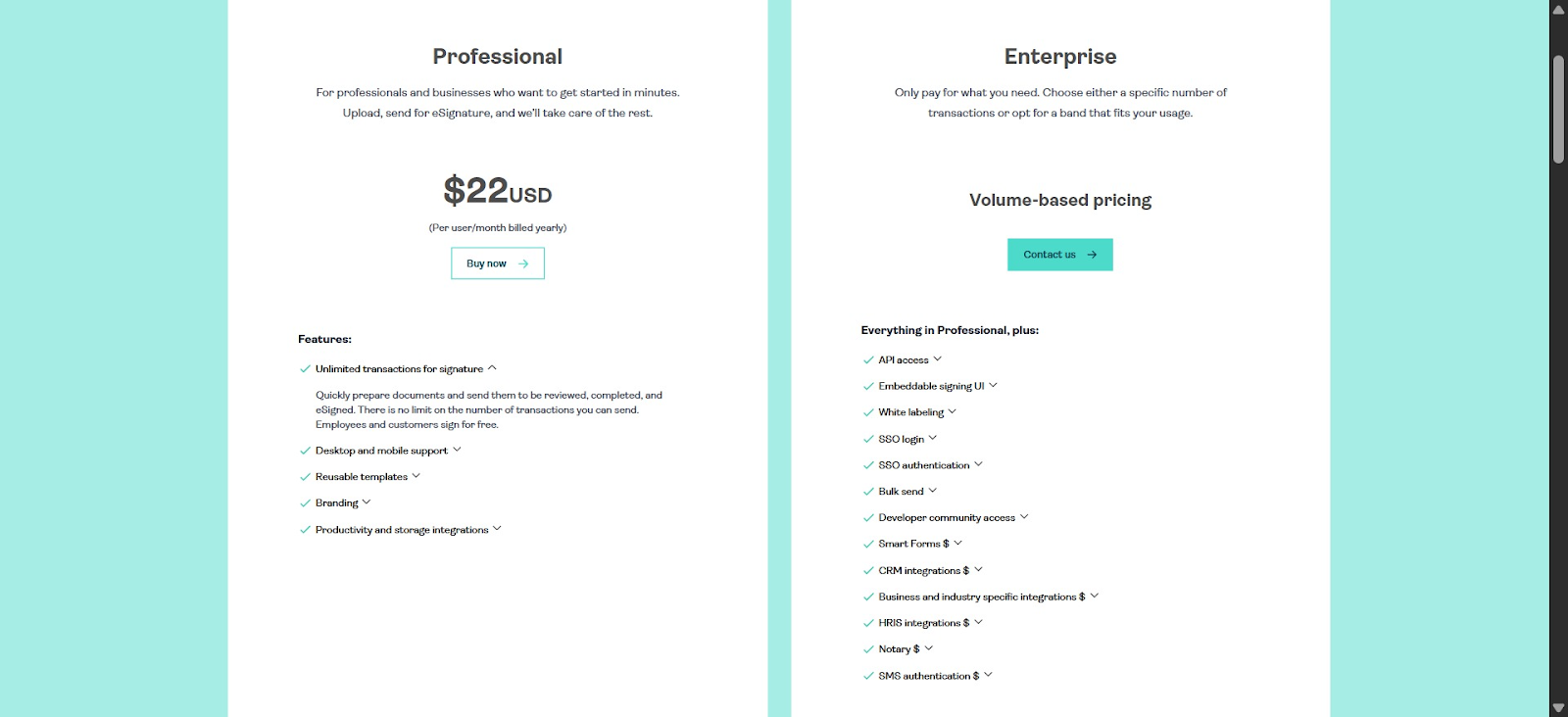
Professional plan — $22/user/month (billed yearly)
This is OneSpan's self-serve entry plan, designed for professionals and small-to-mid-sized businesses who want to get started quickly without going through a sales process. It includes:
- Unlimited transactions for signature
- Desktop and mobile support
- Reusable templates
- Basic branding (logo and brand colors)
- Productivity and storage integrations (Google Drive, Dropbox, OneDrive, Slack, SharePoint, Box)
It is worth noting that this plan is only visible to visitors browsing from the United States.
Alt text: OneSpan’s US pricing page
Non-US users who visit the same pricing URL are automatically redirected to the Enterprise page with no mention of this plan.
Alt text: OneSpan’s non-US pricing page
Enterprise plan — volume-based pricing (contact us)
This is a transaction-based plan built for organizations running high volumes of automated signing workflows. Price is not publicly listed. You have to contact their sales team for a quote.
It includes everything in Professional, plus:
- API access and SDKs
- Embeddable signing UI
- White labeling
- SSO login and authentication
- Bulk send
- Developer community access
On top of the Enterprise base price, several features cost extra and are billed as add-ons:
- Smart Forms
- CRM integrations (Salesforce, HubSpot, MS Dynamics)
- HRIS integrations (Workday, Greenhouse)
- Notary
- SMS authentication
- Business and industry-specific integrations
Note: both plans require an annual commitment.
What users say about OneSpan pricing
User sentiment on OneSpan pricing is mixed, and the split follows a clear pattern. Where you sit on the pricing question largely depends on your company size, industry, and what you are comparing OneSpan against.
What users like about the pricing
Several users on both G2 and Capterra praised OneSpan's pricing, particularly when coming from more expensive alternatives like DocuSign:
- "Same features, cost-effective or less expensive, and provides the ability to customize email messages, which is not available in DocuSign"-capterra
- "I heard that price can be negotiated, but when someone really likes the product, they don't even think of negotiation. e-sign Live falls under that category where you don't think of negotiating" — Capterra
What users criticize about the pricing
On the other side, a notable group of users, particularly those comparing OneSpan against newer, leaner alternatives, found the pricing harder to justify:
- "I feel they can reduce the price. As the competitors are providing for less price, I feel eSignLive needs to lower their prices" — Capterra
- "Price is always an issue, but overall i like OneSpan" — G2
- "The high cost is one of OneSpan Sign’s challenges. It certainly offers awesome security and a host of powerful features, but if your company is small and doesn’t need all of the more sophisticated stuff, it may be too much of a burden on your purse strings.” — G2
OneSpan cons pricing you may miss
Some aspects of the pricing experience are easy to miss, and some that could catch you off guard after you have already committed.
1. Non-US visitors don't see the full picture
This is not simply a case of pricing being adjusted based on location. OneSpan is hiding the only accessible pricing from a large portion of the global audience, which contradicts their claims on being fair.
2. Add-ons can significantly inflate your bill
The Enterprise plan's base price is already unknown. But on top of that, features like CRM integrations that many businesses would consider essential are billed as separate add-ons.
By the time you add what your business actually needs, the final bill can look very different from whatever base price you negotiated.
3. Annual lock-in with no refund policy
Both plans require an annual commitment, and OneSpan enforces this strictly, as confirmed by a Capterra reviewer.
“After using the platform for one document, and requesting a refund, OneSpan declined a refund, stating their contract signing terms are an annual commitment.”
What makes this particularly problematic is that none of this is mentioned on the pricing page. You only discover the full commitment terms during checkout, or worse, after signing up.
If you discover the platform is missing a critical functionality, you are committed for the full year regardless.
OneSpan pros worth acknowledging
In the interest of a fair review, OneSpan's pricing is not without genuine merit. There are real reasons why users, particularly in certain industries and regions, find it worth the cost.
1. Competitive against the big names
For businesses migrating from DocuSign or Adobe Sign, OneSpan consistently comes up as a more affordable option without a meaningful drop in core functionality.
Multiple reviewers specifically cited this as the reason they switched and stayed. If you are currently on one of the larger, more expensive platforms, OneSpan may save you some money.
2. Transaction-based enterprise pricing can work in your favor
For organizations running high volumes of automated signing workflows, paying per transaction rather than per user can actually be more cost-effective.
If your business sends thousands of documents for signature but has a small internal team managing the process, a per-transaction model means you are not paying for seats that do not generate proportional value.
3. Free trial available
OneSpan offers a free trial with no credit card required. Given the strict annual commitment policy, taking full advantage of the trial period to thoroughly test the platform before committing is strongly advisable.
Looking for a OneSpan alternative? Consider Docupilot
If OneSpan's pricing model does not align with your needs, whether because of the geo-gated experience, the annual lock-in, or simply because you need more than just e-signature, try Docupilot.
What Docupilot does differently
Docupilot is a document automation platform that combines document generation with e-signature in one place. Where OneSpan is built purely around the signing experience, Docupilot is built around the entire document workflow, from creating and populating documents automatically to getting them signed.
This makes it a strong fit for teams that are not just signing documents but generating them at scale. Think contracts, onboarding packets, proposals, NDAs, and invoices that need to be auto-filled and signed repeatedly.
Transparent pricing
Unlike OneSpan, Docupilot's pricing is publicly listed and accessible to everyone, regardless of where in the world you are browsing from. No geo-gated page, no sales call required, just to understand what you will be paying.
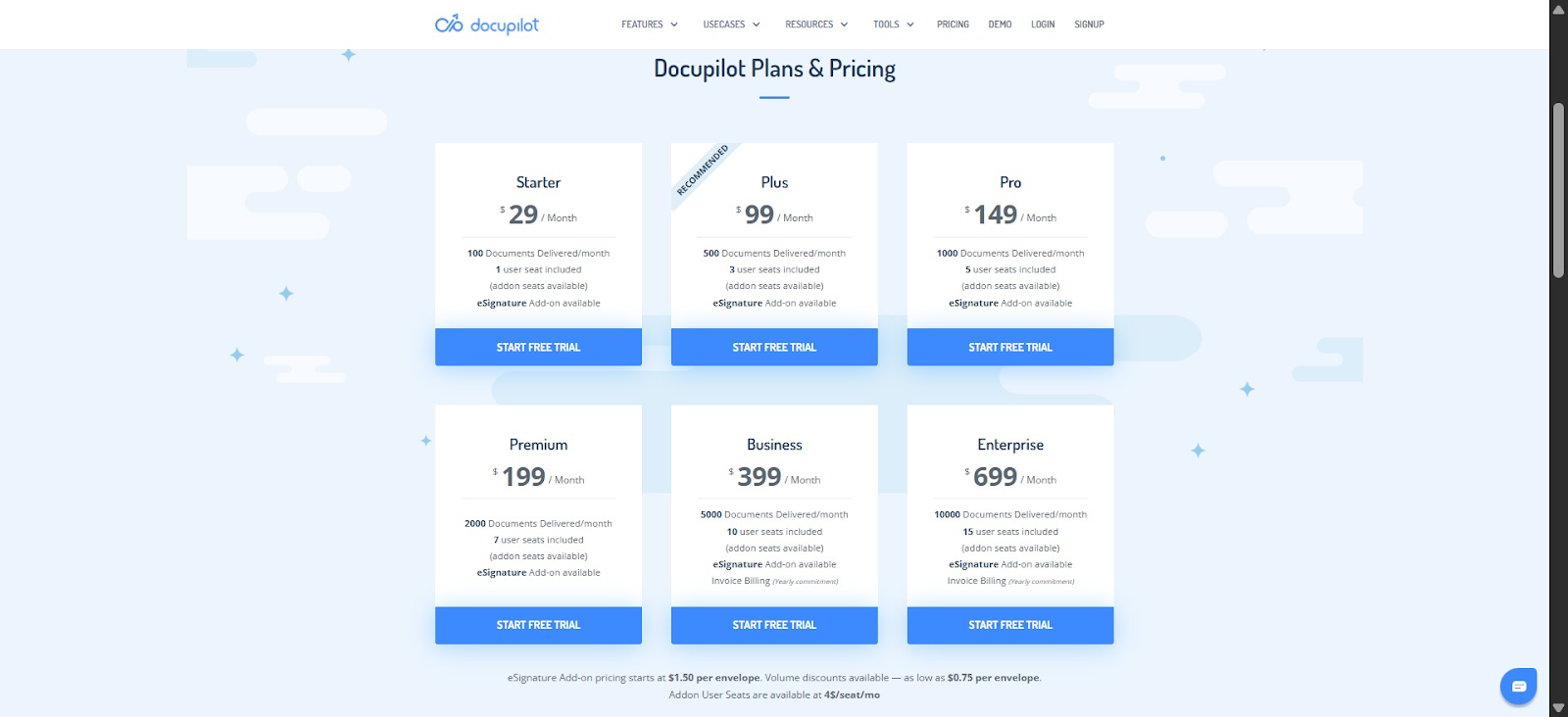
Here is exactly what each plan costs:
Alt text: Docupilot’s US pricing page
Docupilot offers five publicly listed plans:
- Starter — $29/month: 100 documents/month, 1 user seat
- Plus — $99/month: 500 documents/month, 3 user seats
- Pro — $149/month: 1,000 documents/month, 5 user seats
- Premium — $199/month: 2,000 documents/month, 7 user seats
- Business — $399/month: 5,000 documents/month, 10 user seats
E-signature is available as an add-on across all plans at $1.50 per envelope. This means you only pay for signatures when you actually need them, rather than committing to a fixed per-user or per-transaction model upfront.
No annual lock-in surprises
One of the clearest pain points in OneSpan's Capterra reviews is the strict annual commitment with no refund policy.
Docupilot offers a 14-day free trial with no credit card and no commitment required, so you can fully evaluate the platform before spending a single dollar. You are also free to upgrade or downgrade at any time based on your actual usage.
Who Docupilot is best for
- Teams that generate documents at scale and need signing built into the same workflow
- Businesses outside the US who want transparent, accessible pricing without jumping on a sales call
- Small to mid-sized businesses that need predictable, usage-based pricing
- Teams currently paying for e-signature features they rarely use
- First-time buyers who want to fully evaluate a platform before committing
Why Choose Docupilot over OneSpan?
OneSpan is particularly great for US-based enterprises in regulated industries like banking, insurance, and healthcare. Users migrating from DocuSign or Adobe Sign will likely find it a cost-effective step down without a significant drop in quality.
But for everyone else, the pricing experience creates friction points such as Geo-gated pages, add-on costs, and a strict annual commitment with no refund policy.
If you need document generation combined with signing, transparent pricing accessible from anywhere in the world, and the flexibility to start without committing, consider Docupilot. Plans start at $29/month with a 14-day free trial, no credit card required.
Sign up today and start creating secure and affordable documents and e-signatures.
Learn how to automate document creation with Docupilot


Contents
Stop rebuilding the same document by hand.

Generate and sign documents in one workflow
Save ~15 minutes per application




