




Key takeaways
- PandaDoc’s API pricing is separate from its app subscription pricing. So, make sure you check the correct pricing details.
- For API, PandaDoc offers three plans: Free, API Developer, and Enterprise.
- For its app subscription, PandaDoc offers four plans: Free, Starter, Business, and Enterprise.
- Estimate how many documents you’ll send each month, then confirm how your plan counts them.
- If PandaDoc’s pricing doesn’t fit your workflow, consider Docupilot. We include API access in every plan, and our plans are priced by the number of documents delivered.
PandaDoc’s API offers a free plan with minimal features. Its API Developer plan starts at $40 a month for 40 documents. After that, each extra document you send costs an additional $4. So, 1,000 documents a month costs about $3,880. Though the starting price is affordable, the $ 4 per document can increase your costs if your monthly volume increases.
This guide shows how much PandaDoc’s API will cost you based on the number of documents you send each month. We’ll also compare alternatives if you need to generate contracts, offer letters, or invoices in bulk while keeping costs down.
How much does the PandaDoc API cost?
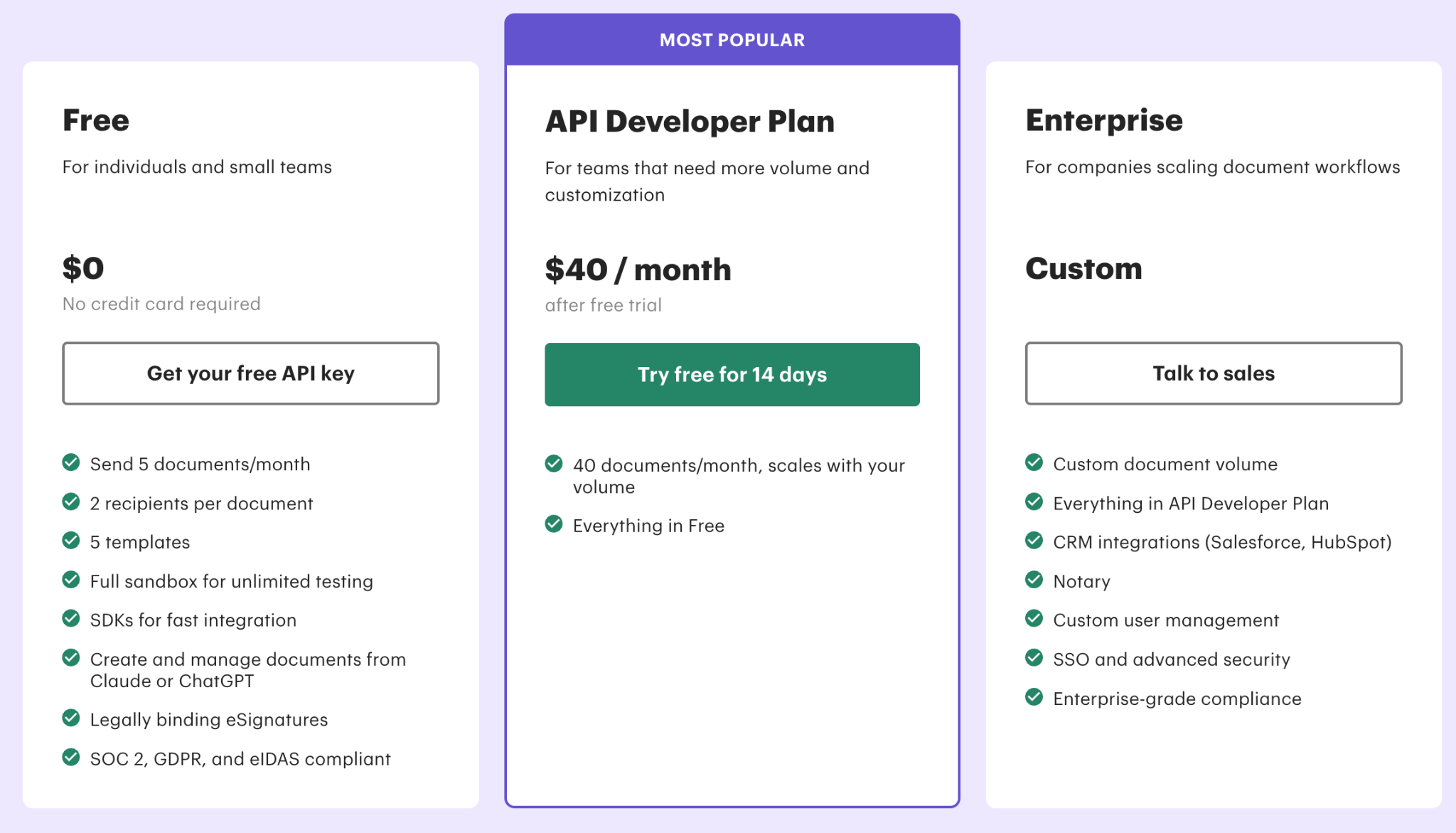
PandaDoc offers three API plans: Free, API Developer Plan, and Enterprise Plan.
1. PandaDoc Free API plan: $0 per year
The Free API plan allows 5 document sends per month, with a maximum of two recipients per document. It also includes unlimited sandbox testing.
This plan suits people who want to test an integration or handle occasional signing requests.
If you use workflows that send documents regularly, you'll use up the annual allowance quickly.
2. PandaDoc API Developer plan: $40 per month
The Developer plan includes 40 documents per month and comes with a 14-day free trial.
For additional documents, you would be charged $4 extra for every document sent.
Here’s what you’d pay each month with this plan.
- 40 documents: $40.
- 100 documents: $280.
- 500 documents: $1,880.
- 1,000 documents: $3,880.
If you have a higher volume, it's best to choose the Enterprise plan.
3. PandaDoc Enterprise API plan: Custom pricing
With the Enterprise plan, you can customize your document volume. You also get controls such as SSO and custom user management. This lets employees sign in through your company account and helps administrators control who joins or leaves.
This tier includes Notary and CRM integrations for Salesforce and HubSpot.
PandaDoc app pricing by plan options
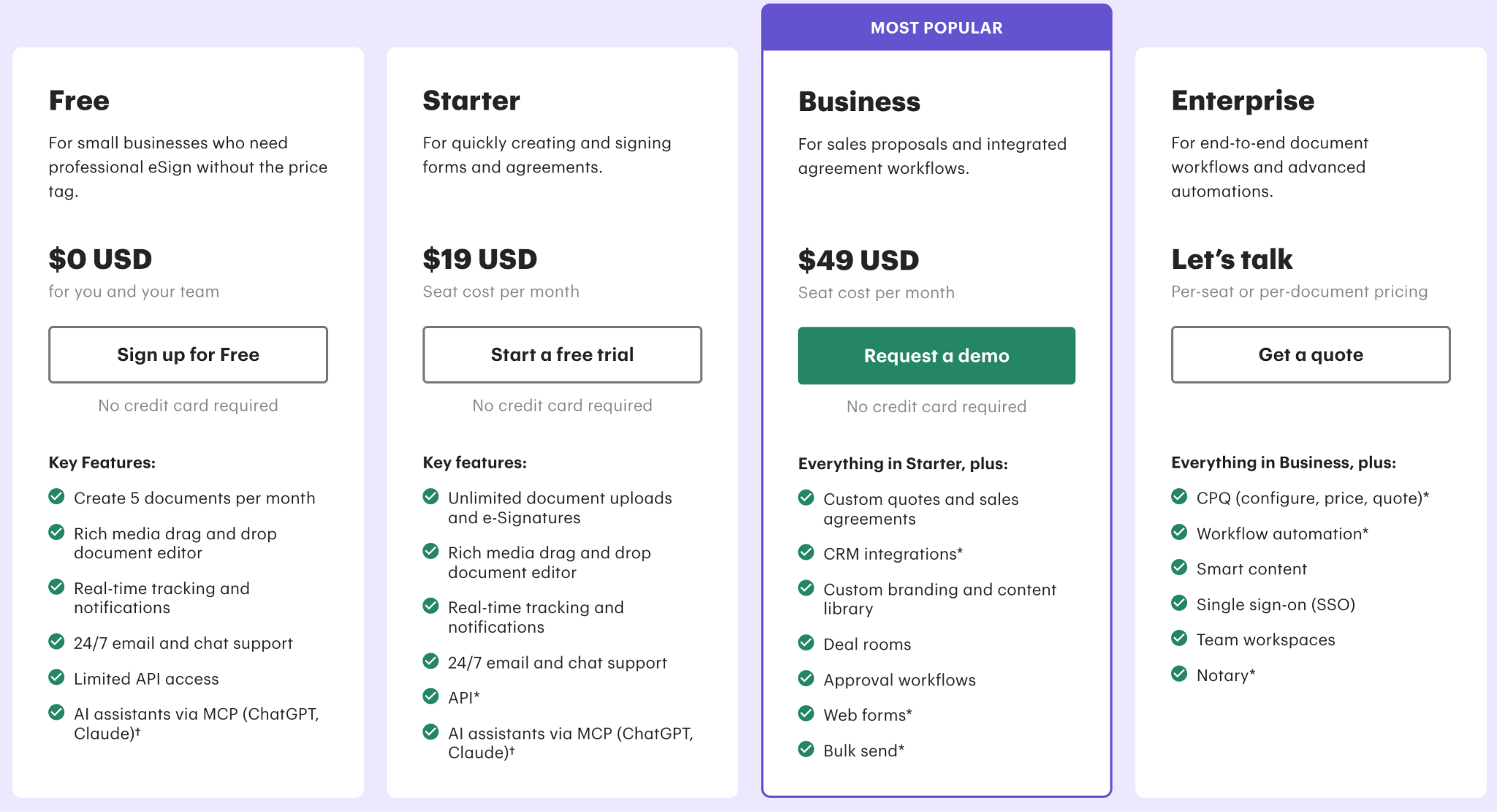
PandaDoc offers four standard pricing plans: Free, Starter, Business, and Enterprise.
PandaDoc has a separate API Developer plan, but its Free, Starter, and Business app plans can also include API access, subject to different limits or usage credits. Here’s a breakdown of each plan's cost and how many documents you can send.
1 PandaDoc Free plan: $0 per month
The Free plan lets your team create 5 documents per month.
The plan also includes a document editor, real-time tracking, up to five templates, API access with limits, and 24/7 customer support via email and chat. It may suit occasional agreements, but teams that send more than 5 documents can soon outgrow the monthly limit. In those cases, choosing a paid plan is better.
2. PandaDoc Starter plan: $19 per user per month
Starter plan includes unlimited document uploads and eSignatures. Templates are still limited to five.
For a team of five, the base subscription costs $95 per month, or $1,140 per year with annual billing.
Although this plan provides unlimited documents, it doesn't cover automated API and automation workflows. They require separate usage credits.
3. Business plan: $49 per user per month
Business plan includes a content library, approval workflows, custom branding, deal rooms, and CRM integrations.
The listed price is for annual billing. With five users, the base subscription is $245 per month, or $2,940 per year.
Some features add to the cost. For example, Salesforce integration is a paid add-on, and web forms and bulk sending require usage credits.
Your costs increase based on add-ons and usage charges.
4. PandaDoc Enterprise plan: Custom pricing
Enterprise pricing can be per seat or per document, depending on the agreement. This plan includes features such as SSO and team workspaces.
CPQ and workflow automation require additional credits or can be purchased as paid add-ons. One important thing to note is that all listed prices exclude taxes.
Hidden costs and additional API charges in PandaDoc
1. Seat charges and annual billing
PandaDoc charges per seat for users on Starter and Business plans. Though yearly billing lowers the monthly rate, it can still be complicated if you need to cut costs mid-term due to plan changes.
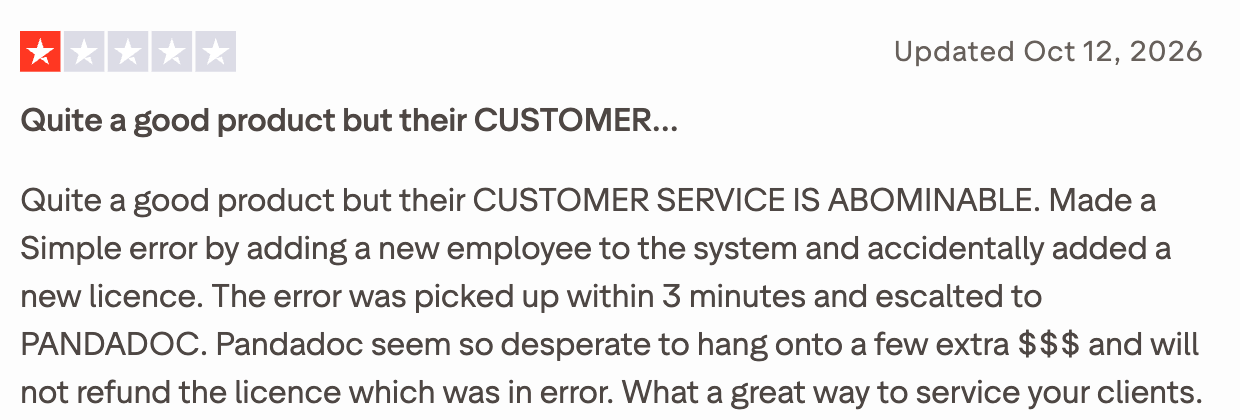
Some reviewers report unexpected annual charges after adding or removing seats, along with difficulty getting refunds.
2. Paid features and plan changes
Some features are limited by plan. PandaDoc currently lists custom branding, CRM integrations, and approval workflows under the Business plan.
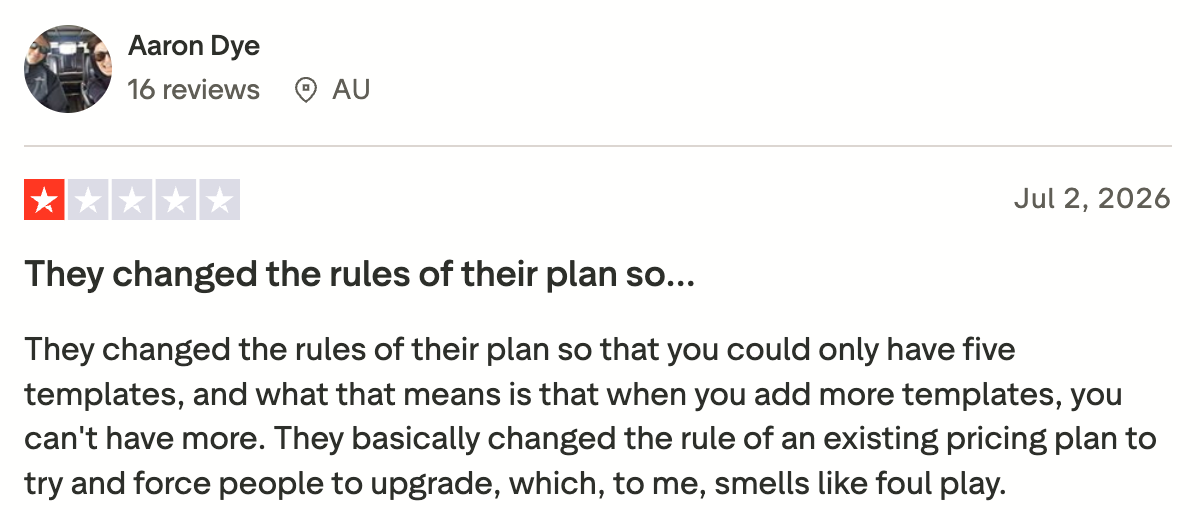
A reviewer reported that PandaDoc changed a plan's rules midway, forcing them to upgrade, leaving them with fewer templates and features for the same price.
3. API and automation credits on Starter and Business plans
On PandaDoc’s Starter and Business plans, creating a document through the live API, Zapier, Make, Forms, Automations, or Bulk Send uses a Usage Credit. Actions such as viewing, updating, or checking a document’s status do not use additional credits.
If you use all your credits, API document creation pauses until you add a recurring credit pack or upgrade your plan. Other workflows, including Zapier, Make, Forms, and Bulk Send, can continue and may incur overage charges based on your billing terms.
The Free plan works differently. It has its own document and API limits instead of Usage Credits. PandaDoc’s standalone API Developer plan also has separate volume-based pricing.
So, unlimited document sending on a Starter or Business plan does not mean unlimited API or automation use.
PandaDoc's key features and use cases
PandaDoc lets you create documents and collect signatures in the same platform. Here are its features and the plans that include them.
Pros and cons of using PandaDoc
Here’s what users like and dislike about PandaDoc.
Pros
- Easy document setup: The drag-and-drop editor is praised for being easy to use, and users report learning its features within a few hours.
- Scheduled follow-ups: Business and Enterprise plans support automated reminders for signing. PandaDoc also sends reminders for document payment requests with due dates. Users report that this has reduced the need to manually chase outstanding signatures and payments.
Cons
- Editing can require cleanup: The auto-align feature for dynamic fields on contracts is a constant pain. They misalign automatically and frequently, and changing or removing them after placement is complicated.
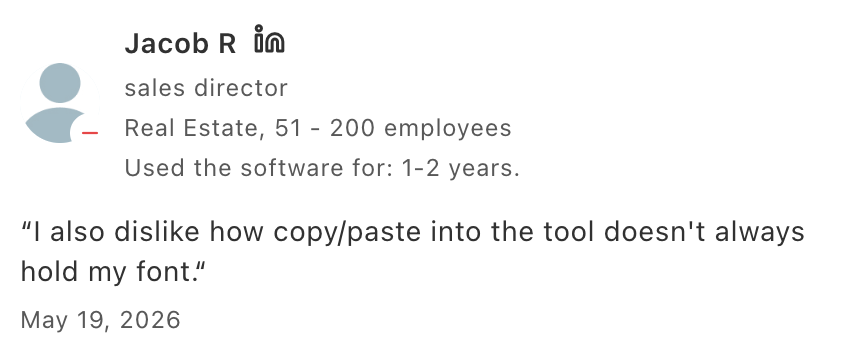
Reviewers also report that copy-pasting text into PandaDoc doesn’t always preserve the font.
- Annual billing and refund concerns: One Trustpilot reviewer said they believed they had canceled, but their account was downgraded instead. After an annual renewal, they requested a refund the same day and reported that PandaDoc declined to refund the unused term.
Docupilot vs. PandaDoc: Which fits your workflow?
If you’re considering a switch from PandaDoc, here’s how we work with your existing templates and data sources. We’ll explain where our approach differs and when we are a better fit for your team.
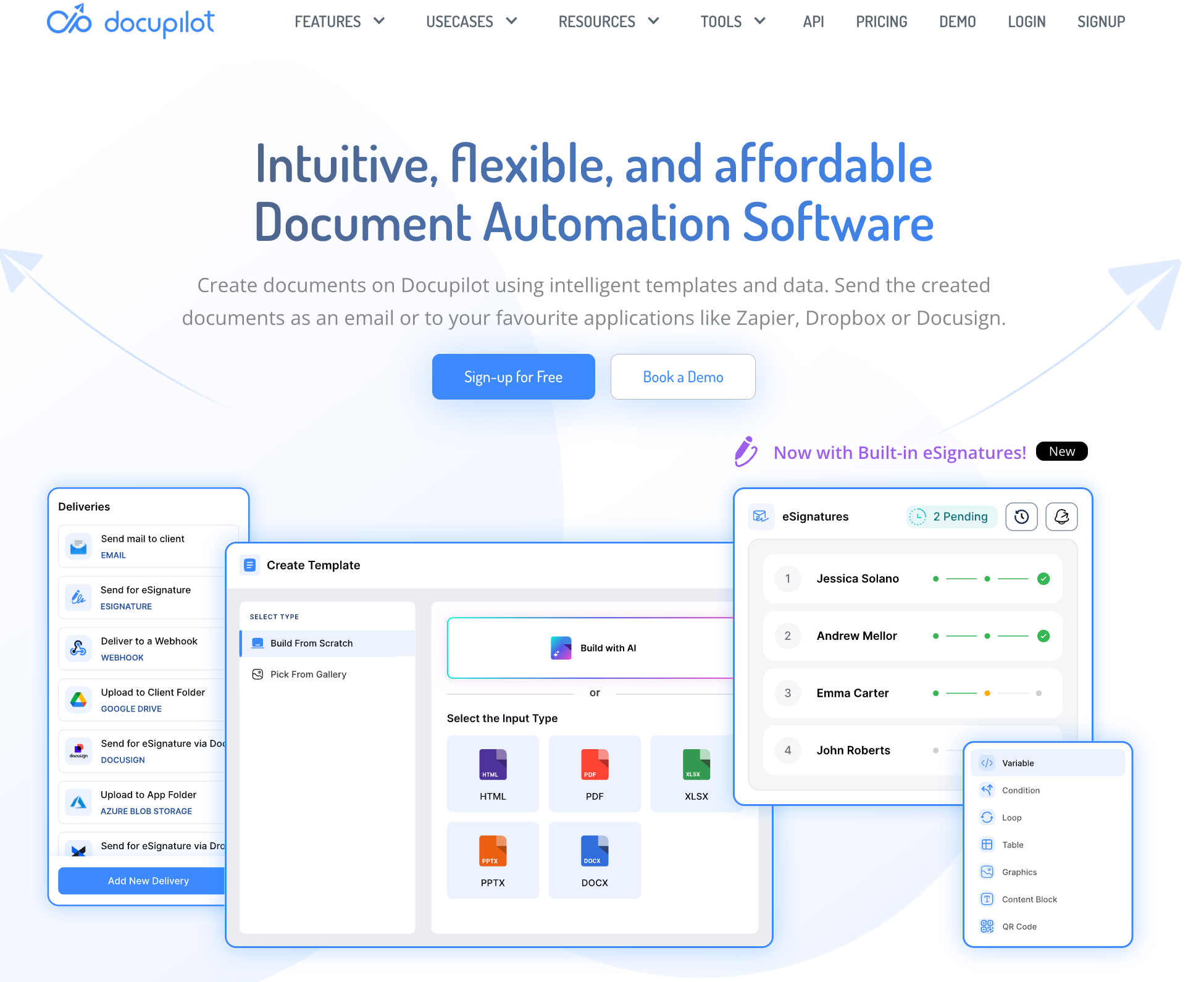
We built Docupilot for teams that create documents from business data, such as contracts, offer letters, invoices, and reports. Connect your data to a template to generate documents automatically. You can also automate how they’re processed and where they’re sent.
PandaDoc and Docupilot can both generate documents from business data and automate document workflows. The difference is in how we package and charge for those workflows.
- Our plans are based on document deliveries. We include API access and a set number of user seats for every plan. eSignature is offered as a separate add-on, since not all generated documents need a signature.
- PandaDoc includes eSignatures in its app plans, while API and automated document creation use plan-specific usage credits or charges.
Docupilot pricing and plans
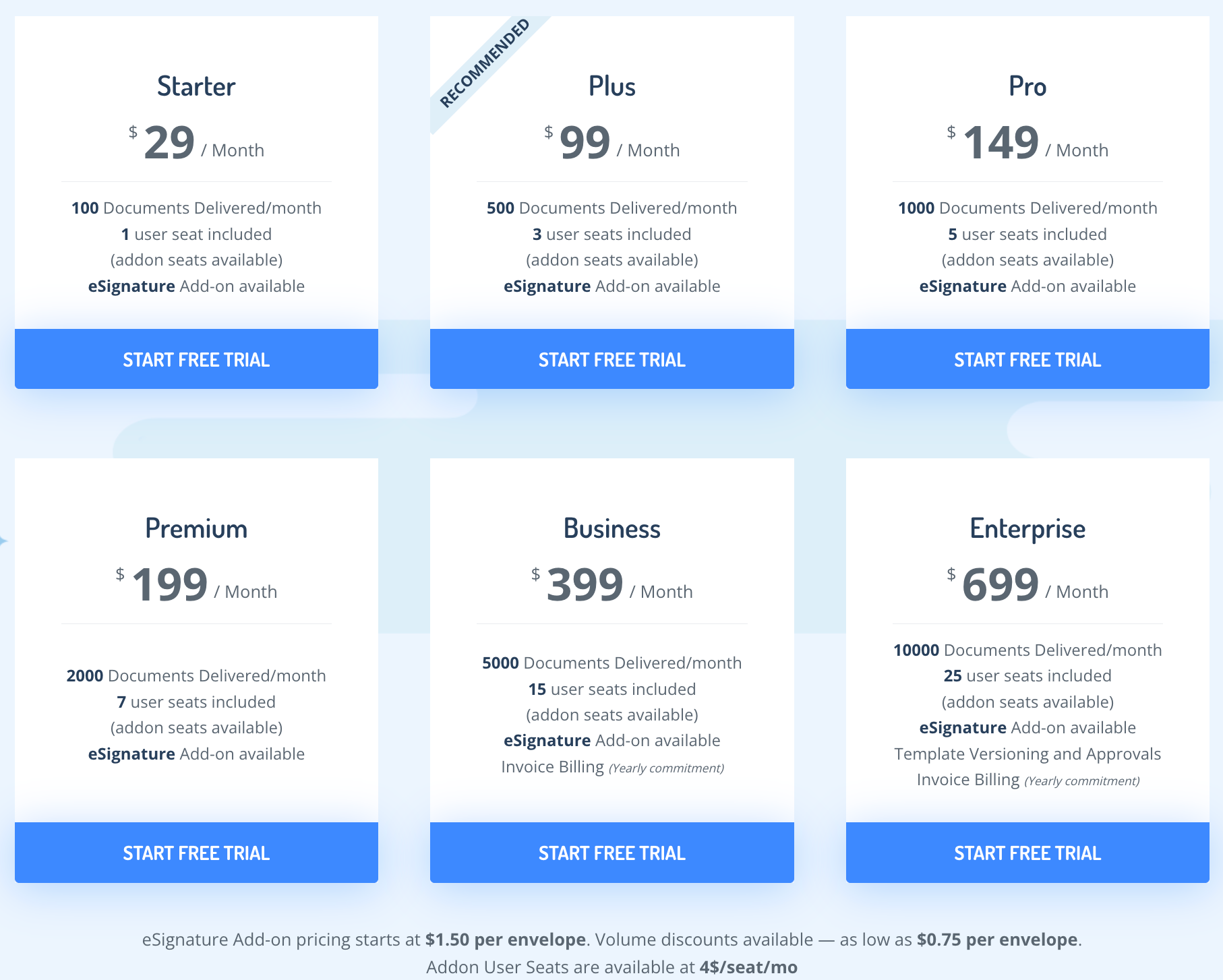
Our listed plans include:
Every paid plan includes API access, unlimited templates and testing, and integrations with Zapier, Make, and Airtable. Business and Enterprise plans also offer invoice billing with an annual commitment.
Our monthly allowance is based on document deliveries. For example, emailing a generated document and saving it to Google Drive count as two deliveries. If you reach your plan limit, document generation pauses by default until you upgrade or your monthly allowance resets. If overages are enabled for your account, you can continue generating documents and pay for deliveries beyond your included allowance.
For more information on our pricing, visit our pricing page.
Docupilot vs. PandaDoc: Pricing and workflow differences
- Pricing: Our plans are based on document deliveries and include a set number of seats. This suits teams with a fixed document volume that need more people to access it. Additional seats cost $4 per month.
PandaDoc’s Starter and Business plans are priced per seat. If you want unlimited seats, you must choose the Enterprise plan with document-based pricing.
- Templates and document logic: You can use our editor or upload a Word, PDF, PowerPoint, or Excel template. Conditions and repeatable sections let one template adapt to incoming data. For example, a line-item table can repeat for each item, and a clause can appear only when a data field meets a condition. Teams can update these document rules in Docupilot without changing their application integration.
PandaDoc also supports conditional content through Smart Content. Its rules can use variables or pricing-table values to insert content-library items, and conditional rules are available on Enterprise.
eSignature is an optional add-on
We offer eSignature as an add-on because not every generated document needs to be signed. If you mainly generate and deliver documents, you can choose a plan around that workflow without paying for signature envelopes you don’t use. When you do need signatures, the add-on starts at $1.50 per envelope, with volume discounts as low as $0.75. One envelope can contain one or more documents.
To send a document for signature, add signature fields to your template and set up the recipients, signing order, and reminders. When we generate the document, we create an envelope and email the signing invitation. You can then track the envelope’s status.
We’re a better fit for teams that need API-driven document generation, flexible templates, automated delivery, and eSignature in the same workflow.
See how Docupilot fits your workflow
PandaDoc may be a good fit for sales teams that want to create proposals and collect signatures in one app. At Docupilot, we help teams turn business data into finished documents and send them through automated workflows, with signatures added only when needed.
Our plans include API access, with pricing based on monthly document deliveries. You can track each document’s status from your own system.
Our 14-day free trial lets you test API access with your own templates before you commit. You can see how the workflow runs and what still needs manual attention. Book a demo to walk through our platform with our team.
FAQs
1. Does PandaDoc’s sandbox use paid credits?
No. Sandbox testing is free and unlimited. You can test your integration without consuming the credits used by live production workflows.
2. Does every PandaDoc API request use a credit?
Not on Starter and Business accounts. Their documented usage-credit system charges for creating documents through the live API. Reading documents and checking their status don’t consume additional credits.
3. Do unused PandaDoc usage credits roll over?
Monthly usage credits don’t roll over. Annual prepaid credit pools remain available for the annual term.
4. Do recipients need paid PandaDoc seats to sign?
No. People receiving documents for signature don’t need paid seats. Seat charges apply to internal users with licensed workspace access on seat-based plans.
5. Will Docupilot warn me before I reach my delivery limit?
Yes. We notify you at 80% and 90% usage, then again when you reach your full allowance. Overages-enabled accounts can continue beyond the plan allowance, so upgrading isn't always the only way to proceed.
Learn how to automate document creation with Docupilot


Contents
Stop rebuilding the same document by hand.

Generate and sign documents in one workflow
Save ~15 minutes per application