





Key takeaways
- A PDF generation API can turn application data into a finished PDF without requiring anyone to export a document and reformat it before sending.
- The basic workflow is straightforward: trigger the request, send the input, render the file, then store it or deliver it.
- The input model determines who owns the layout. Raw HTML keeps it in code, while a saved template lets business teams change wording without a deployment.
- Reliable generation requires more than a working render. Teams should also test multi-page output, confirm that a retry cannot produce the same document twice, define template ownership, and map storage and delivery.
- The best candidates for a PDF generation API are repeatable documents with predictable inputs, consistent structure, and a clear next step.
When you need to generate PDFs from your application data, you have a few ways to do it. You can build the PDF generation layer yourself, use an HTML-to-PDF service, or use an API that combines templates, data, and document workflows.
The right option depends on what you need the PDF generation process to handle. If you only need to convert existing HTML into a PDF, a rendering service may be enough. If you need to turn structured data into consistent, branded documents, you need a solution that can handle templates and data together. If document generation is part of a larger process, you may also need workflow automation.
This guide explains how PDF generation APIs work, what to look for when evaluating them, and where different approaches fit.
What a PDF generation API is, in plain language
A PDF generation API is a service that converts data or content into a PDF through an HTTP request. Your application sends the required input, and the service generates the document.
Depending on the API, you may receive the PDF directly, a download URL, or a job ID that you can use to retrieve the document later. The type of input you send also varies. Some APIs work with HTML or URLs, while others let you send structured data to a reusable template.
It is also useful to understand what a PDF generation API is not:
- HTML/PDF rendering API: Converts HTML, web pages, or application views into PDFs based on a fixed layout. It is useful when you need to create a PDF representation of existing content, but it does not typically manage templates, business rules, approvals, or document workflows.
- Template-based document automation platform: Uses structured data, templates, and workflow rules to generate documents. It can determine which template to use, apply conditional content, route documents for approval or signature, and return status updates as part of a broader workflow.
You can use PDF generation APIs to generate customer invoices, proposals, contracts, and certificates from data stored in your systems.
How a PDF generation API works, step by step
The exact flow can vary depending on the API, but most PDF generation workflows follow these steps:
Trigger → Send data/content→ Generate the PDF → Use/deliver the PDF → Track the result
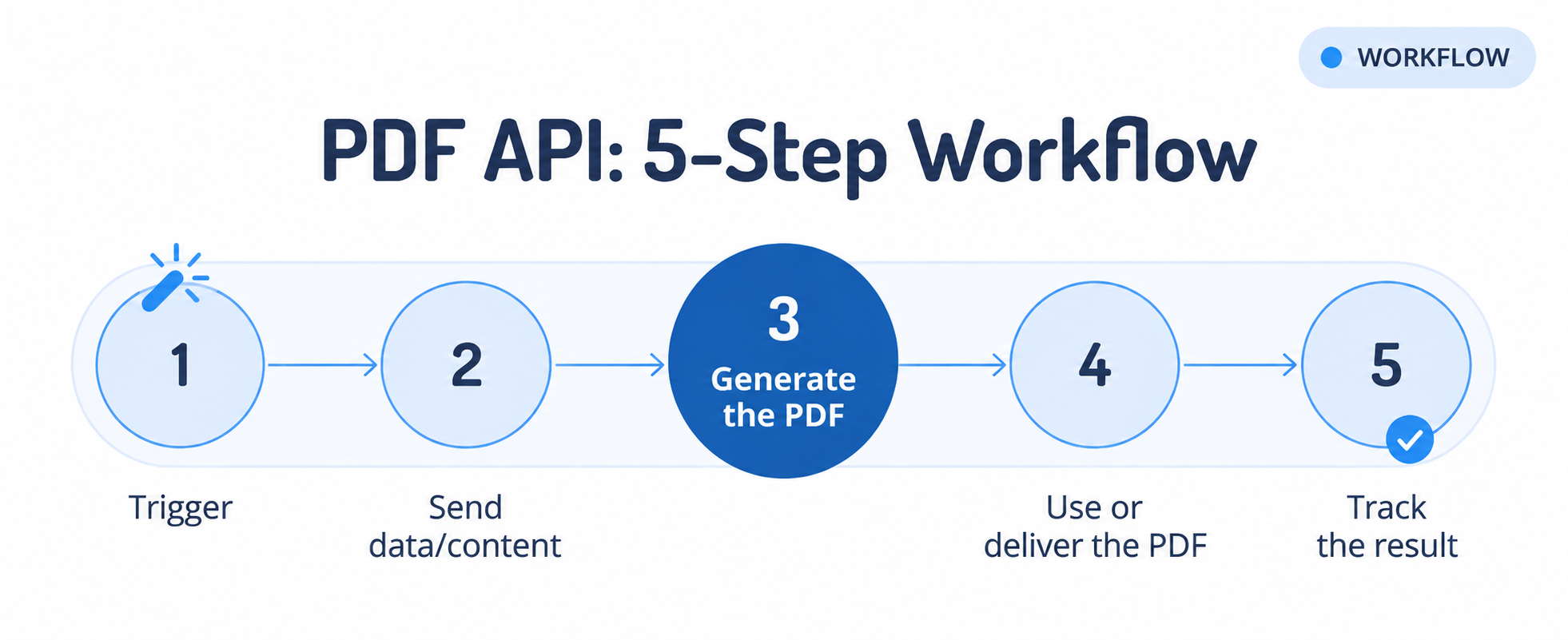
Here’s what happens at each stage:
- A trigger starts the process: An event in your application, such as an order, payment, form submission, or account update, starts the PDF generation request.
- You send the required data or content: Your application sends the information needed to create the PDF. This may include HTML content, a URL, a template ID, or structured data. The request also includes authentication details so the API can verify the source.
- The API generates the PDF: The service processes the request and creates the document using the provided input. Depending on the API, generation may happen immediately or as an asynchronous job.
- You use or deliver the PDF: Your application receives the generated file or a secure link to it. You can then store it, email it, send it for signature, or deliver it through another workflow.
- You track the result: Logs, status responses, or webhooks confirm whether the document was generated successfully and help identify failures that need attention.
Here is a vendor-neutral request that sends a template ID and a JSON payload.
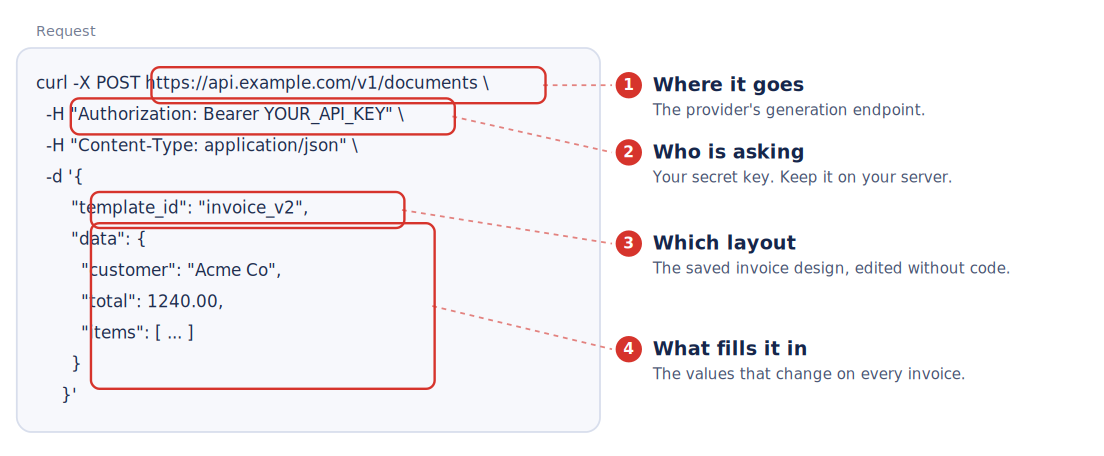
- The authorization header proves the request is yours.
- The body carries the template reference and the merge data.
- The response gives you the finished file or a pointer to it.
Generation time varies with the rendering engine, document complexity, page count, remote assets, and current load.
Treat any headline latency number with care until your own documents confirm it. Test with documents that match production, and check whether the service supports both synchronous and asynchronous generation.
What are your options for PDF generation? Build versus buy
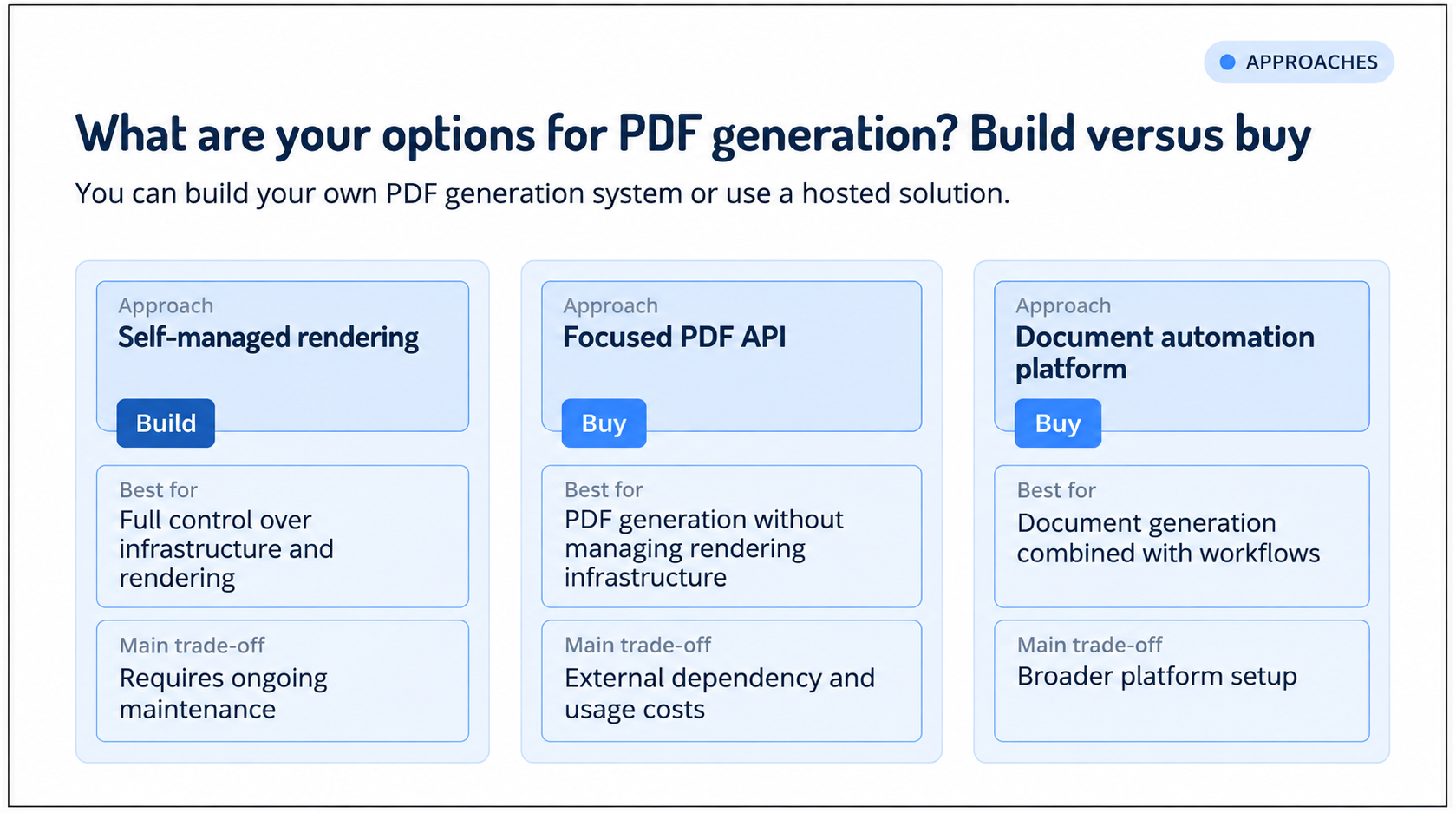
You can build your own PDF generation system or use a hosted solution.
Your choice can include self-hosted rendering, a focused PDF API, or a document automation platform.
How to choose a PDF generation API: 6 criteria that matter
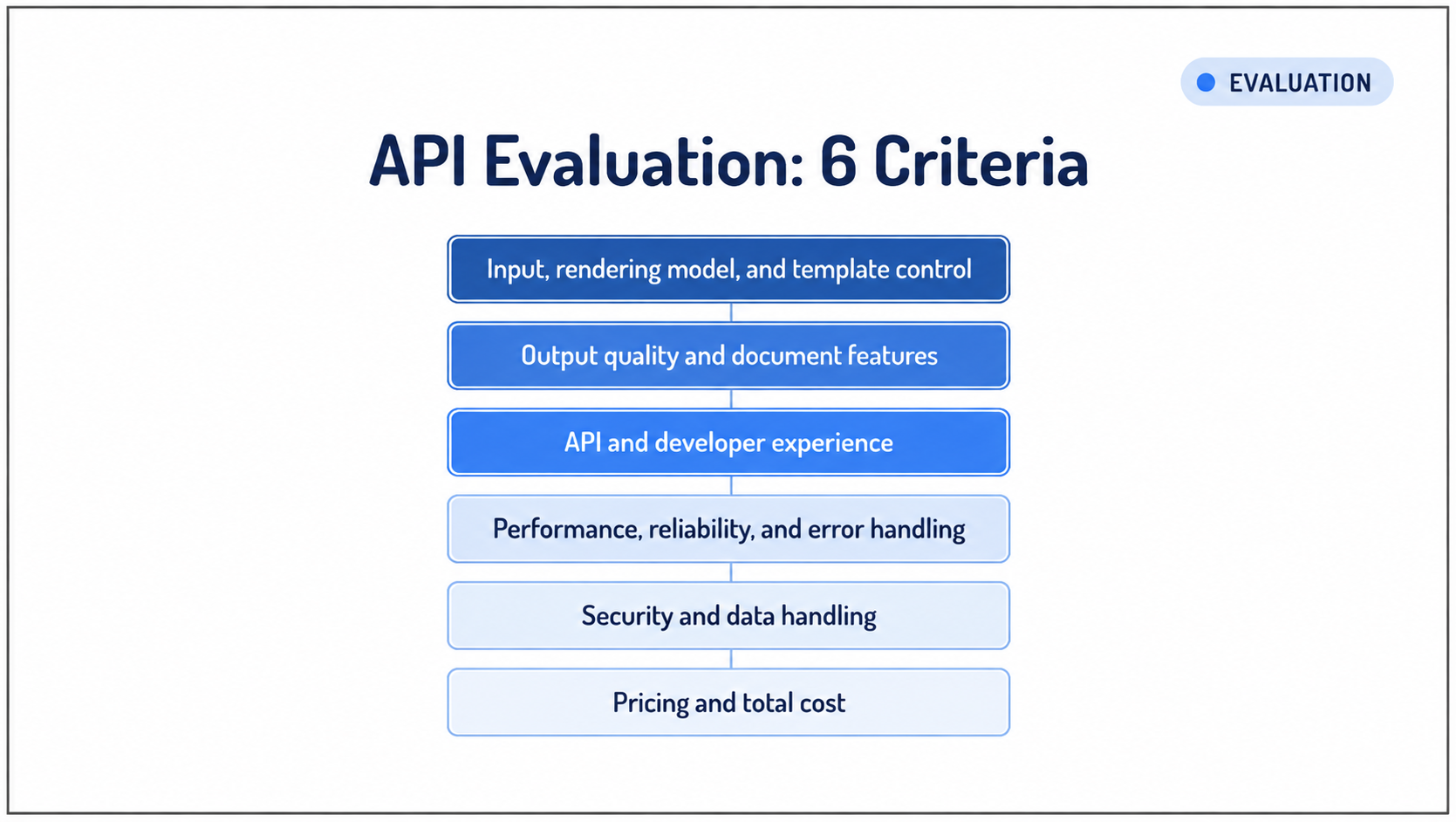
When choosing a PDF generation API, consider these six criteria:
- Input, rendering model, and template control
- Output quality and document features
- API and developer experience
- Performance, reliability, and error handling
- Security and data handling
- Pricing and total cost
Let’s look at each criterion below.
1. Input, rendering model, and template control
Check whether the API supports HTML, URLs, templates with structured data, Markdown, images, or office documents. Choose the input model that matches where your layouts are maintained and who manages document changes.
Code-based layouts work well when developers control every document change. Template-based approaches can give business teams more control over wording, formatting, and reusable content.
Check whether templates support variables, loops, conditions, reusable components, previews, versioning, approvals, and rollback. Consider who will maintain templates after implementation.
For example, if finance needs to update invoice wording without requiring a deployment, template governance becomes as important as rendering capability.
2. Output quality and document features
Test the API with your actual documents. Check for:
- Modern CSS and JavaScript support
- Custom fonts, Unicode, and right-to-left languages
- Headers, footers, page numbers, and page breaks
- Repeating table headers
- Charts, images, barcodes, and QR codes
- Links, bookmarks, and PDF metadata
- Password protection and encryption
- PDF/A, tagged PDF, and accessibility support where required
3. API and developer experience
Look for REST APIs, standard authentication, OpenAPI documentation, code examples, sandbox access, clear errors and status codes, API versioning, and webhook documentation.
If you are evaluating a platform, review its API documentation, examples, and testing tools. Our API documentation follows the OpenAPI Specification and includes an interactive Swagger UI in your workspace, where you can explore endpoints and test requests against your own templates.
4. Performance, reliability, and error handling
Check whether the API supports synchronous and asynchronous generation and batch processing at the volume you expect.
Review rate and concurrency limits, file and payload limits, timeout behavior, and uptime commitments.
For automated workflows, also check for:
- Idempotency keys to prevent duplicate generation
- Webhook signatures to verify callbacks
- Documented retry policies and exponential backoff
- Clear handling of failed and retried requests
- Usage or billing rules for failed requests
Test generation time and failure handling with your own documents and expected volume.
5. Security and data handling
Check encryption, API-key controls, data retention, automatic deletion, logging, storage location, data residency, access controls, SSO, security certifications, signed download URLs, and subprocessor documentation.
The key questions are where your data is processed, where it is stored, who can access it, and how long it is retained.
Ask for the certifications your industry requires rather than accepting a general security claim. You can review our security practices on our security page, including details about HIPAA, GDPR, ISO 27001, and SOC 2.
6. Pricing and total cost
Compare total cost at your expected volume instead of relying on a headline price.
A provider that charges per page can cost more than one that charges per document when your PDFs run several pages.
Why choose Docupilot for PDF generation and document workflows?
Docupilot is a programmable document automation platform for teams that need to generate repeatable documents from business data and manage the workflow around them.
You can trigger document workflows through our API, merge links, hosted forms, direct integrations, or bulk generation from CSV or Excel. We support 70+ direct integrations, along with Zapier and Make.
How Docupilot fits into your stack
Your application controls the business logic: collecting data, authenticating requests, defining the payload, triggering the workflow, and handling events.
We handle the document execution.
This separation lets your developers trigger document workflows without owning every template or formatting change. Your operations team manages those changes in the visual workflow builder without opening a pull request.
When Docupilot is the right fit
We fit workflows where developers control when a document is generated, and business teams control how it looks and what rules it follows.
With Docupilot, you can generate PDFs from templates created in HTML, Word, PowerPoint, spreadsheets, and PDF formats. You can also work with existing PDF files, including fillable PDFs, using file and conversion workflows.
If you need to generate documents from business data, manage templates, process files, deliver outputs, and track workflow status, you can manage those steps with Docupilot in one platform.
Where Docupilot is not the right fit
We are not a contract lifecycle management system or a general-purpose document repository.
Teams that require fully self-hosted or offline document generation should evaluate a self-managed approach.
The right PDF generation approach depends on four things:
- Your document volume
- Who manages templates
- Your security requirements
- How much of the document workflow you need to automate
If your application already produces complete content and you only need reliable PDF rendering, a focused PDF API may be enough. If you need to turn business data into governed documents and manage what happens after generation, a document automation platform can cover more of the workflow. Self-hosted or private deployments make more sense when infrastructure control, offline processing, or data residency is a requirement.
Before choosing a provider, test it with a real document. Use realistic data, a multi-page template, your expected volume, and a failed request. Check the complete flow from generation to storage, delivery, or signing.
Ready to test a document automation platform? Try Docupilot with a 14-day free trial, with no credit card required.
FAQs
1. What is the difference between HTML-to-PDF and template-based generation?
HTML-to-PDF converts supplied HTML or a webpage into a PDF output. Template-based generation starts with a reusable document template and fills it with structured data to create the final document.
2. Are PDF generation APIs secure for sensitive documents?
Security varies by provider, so verify the specific controls instead of trusting broad phrases. Check encryption in transit and at rest, data retention and deletion policies, whether request content appears in logs, access controls, and data residency. For strict compliance, some teams choose private-cloud or on-premises deployments where processing stays internal.
3. Can Docupilot generate PDFs from database data?
Yes. You pull the data from your application or database and send it to our API. We merge the structured data into a reusable template, generate the document, and continue with the workflow you configured for processing or delivery.
Learn how to automate document creation with Docupilot


Contents
Stop rebuilding the same document by hand.

Generate and sign documents in one workflow
Save ~15 minutes per application