







Key takeaways
- SignNow handles basic signing well, but it is not built for heavy automation or fast-growing teams
- Foxit follows the same pricing pattern, with low entry tiers that get expensive once you need real workflow power
- Costs rise quickly as workflows expand, users multiply, and automation becomes essential
- Docupilot gives you clarity and control at scale, with predictable pricing and automation built into the core
You've probably heard of SignNow. It's one of those e-signature platforms that seem to pop up everywhere when you're researching alternatives to DocuSign or Adobe Sign.
Starting at $8 per month (annual plan), the pricing looks simple and affordable at first glance. But on analyzing SignNow's structure and reading user reviews, a more complex picture emerges. While it can be cost-effective for small use cases like a solo consultant sending occasional proposals or NDAs, many businesses end up paying two to three times more due to overages, forced upgrades, and extra tools.
This guide will help you understand whether SignNow’s pricing fits your needs or if an alternative like Docupilot could save you more money while offering better functionality.
Understanding what SignNow does
Before diving into pricing, it’s important to be clear about what SignNow actually is.
SignNow is purpose-built for e-signatures. You upload PDFs, Word files, or other common formats, add the required fields, and send them out for signing by email. The platform includes basic template management to speed up repeat e-signing workflows.
Key capabilities include:
- Uploading documents and placing signature fields
- Sending files to one or multiple recipients
- Creating reusable templates for common agreements
- Tracking signature progress in a central dashboard
- Allowing signers to complete documents from any device
- Supports both mobile and desktop signing
In short, if your process involves creating documents elsewhere and using a dedicated tool to collect signatures, SignNow fits that role well.
SignNow pricing breakdown
Here are SignNow’s four pricing tiers:
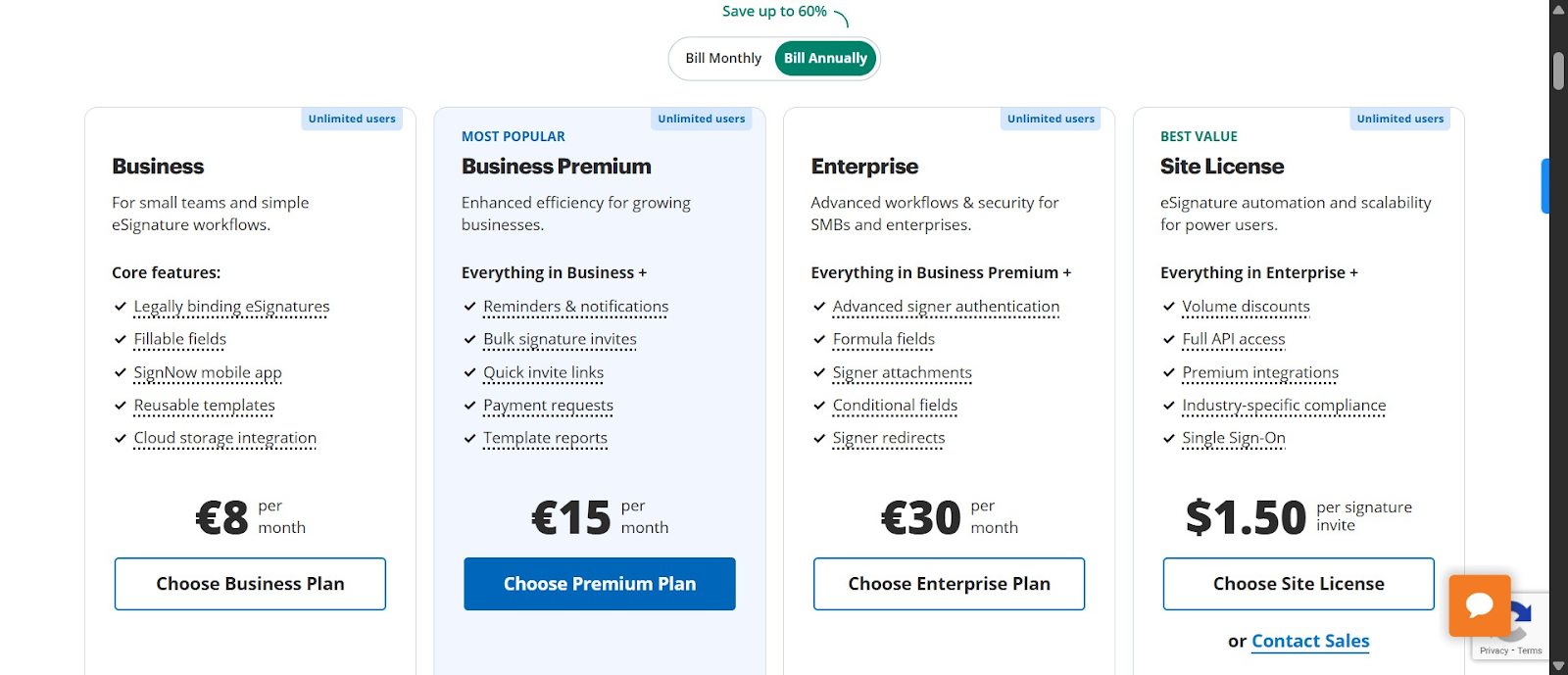
Let’s see what you get and don’t get from each tier
Business plan: $20/month or $8/month (annual)
This entry-level plan includes basic e-signature functionality: document signing, mobile app access, cloud storage integration, and unlimited templates.
Each user is limited to 100 signature invites per year, which works out to roughly 8 signatures per month. Once you exceed that limit, additional signature invites are billed separately, typically at around $1.50 per invite.
Missing features include bulk sending, advanced authentication, custom branding, workflow automation, and conditional logic.
Best for: Freelancers and solo consultants sending five to six contracts per month.
Business premium: $30/month or $15/month (annual)
This is SignNow’s most popular plan. It adds bulk sending, automated reminders, signing links, document groups, and payment requests.
However, the 100 signature invites per year limit still applies. Essentially, you only need this plan if you require the extra features. If you need additional signatures beyond the limit, you’ll still have to pay per invite.
Missing features include custom branding, advanced workflow automation, and API access.
Best for: Small teams of five to ten users that consistently stay under the per-user signature limit.
Enterprise plan: $50/month or $30/month (annual)
At this tier, you finally unlock custom branding, advanced authentication, calculated fields, signer attachments, conditional fields, and redirect options after signing.
Despite the higher price, you are still limited to 100 signature invites per year, and you still do not get API access, business suite integrations, or HIPAA compliance.
Best for: Medium-sized teams that need a professional, branded signing experience but only moderate signature volume.
Site license: $1.50 per signature
This plan works differently from the others. Instead of paying per user with a fixed annual signature cap, you pay per signature invite.
What’s surprising is how this pricing actually plays out in practice. While the plan is marketed as starting at $1.50 per signature with volume discounts, generating a quote tells a different story.
In the quote below, the rate increased to $1.75 per signature with a minimum commitment of 1,000 invites.
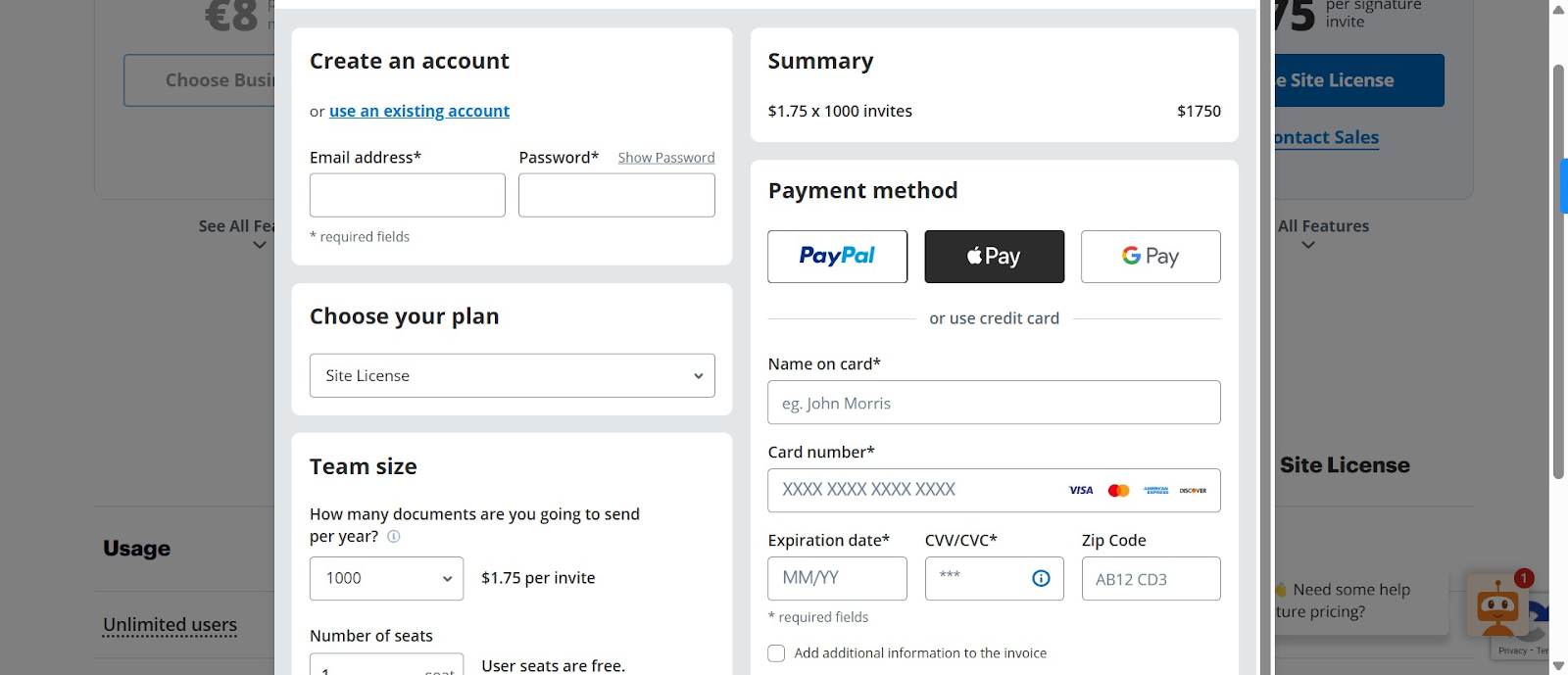
The $1.50 per signature rate only applies if you commit to 2,000 invites, and the volume discount begins at 3,000 invites. This lack of transparency, combined with the minimum-volume requirements, makes the plan more expensive and less flexible than it appears.
On the positive side, this is the only plan that includes everything: full API access, business and CRM integrations, and HIPAA compliance.
Best for: High-volume enterprises that require compliance, integrations, and API access.
Here’s the pricing comparison summary:
What are the Cons of SignNow pricing?
Now that you understand the pricing breakdown, let’s go over the main disadvantages.
The 100 signature trap
Every subscription plan limits you to 100 signature invites per year. To put that in perspective: if you’re an HR manager handling 15 new hires per month, and each hire requires 3 documents, that’s 45 signatures per month or 540 per year (and that doesn’t include signatures from other departments).
With SignNow’s Business Premium plan at $15/month, you might think you’re paying $180 per year. But after your first 100 signatures, every additional signature costs $1.50. For our example, the extra 440 signatures cost $660, bringing the actual annual cost to $840, not $180—a 366% increase over the advertised price.
To make matters worse, this limit is buried in the FAQ, so most users discover it only after being surprised, as this reviewer experienced:
“The service works, but be careful. We were just charged $198 on a $30/month subscription because we exceeded a 100-contract limit, which was hidden in the FAQ and not mentioned anywhere in the subscription plan description.”
Feature gating forces expensive upgrades
Suppose you start with the Business plan because $8/month seems affordable. Within a few weeks, you realize you need to send the same document to 20 people at once. Bulk sending isn’t included in your plan, so you must upgrade to Business Premium.
A few months later, you want to put your company logo on client-facing documents. Custom branding requires the Enterprise plan, bringing your monthly cost to $30.
Then your CTO requests CRM integration so that proposals automatically go out for signature when deals reach a certain stage. API access is only available on the Site License plan, which uses usage-based pricing at $1.75 per signature.
Each of these features feels essential, not optional. But SignNow’s pricing structure forces you to keep upgrading to access them. What began as an $8/month plan can quickly balloon to $1750 per month (the minimum rate for the licensing plan).
The "unlimited users" is not favorable for small teams
Higher tiers don’t increase the number of signature invites. So you’re simply spreading the same number of signatures across more people. For example, a team of 5 users still pays the same monthly cost as a company with 30 users. Small teams end up overpaying because they could achieve the same signature capacity with fewer users.
So who does it actually benefit? The “unlimited users” feature benefits organizations with many users primarily. For most businesses, it does not reduce costs. A more meaningful benefit would be scaling the number of signature invites, rather than just offering unlimited seats.
Documented price increases
Perhaps the most concerning aspect of SignNow’s pricing is the reports of massive price increases for existing customers. These aren’t gradual 10–15% annual adjustments; users describe shocking jumps.
One customer recounted:
“We have been a customer for 2 years, and all of a sudden, they changed their pricing structure to 'benefit' their clients. 30x price increase for us with no warning.”
While a 30x increase sounds almost unbelievable, another user noted a similar experience:
“We've been loyal customers of SignNow since 2021. They recently got acquired by AirSlate, which is trying to profit off of the old customers. I've been quoted a rate that is over 5x our current pricing, and told that there is no flexibility on this. We are being forced to explore other options, though we didn't particularly want to do so.“
This unpredictable pricing creates enormous budget uncertainty. So, even if SignNow works perfectly for you today at today’s price, consider what may happen in 12 months when your card needs updating. You could face a 3–10x increase unexpectedly.
Unreliable customer support
SignNow’s support experience can be hit or miss. Some users praise it, but an almost equal number report slow responses, email-only communication, or unresolved technical problems. One reviewer shared:
“I contacted them seven times, and nothing worked to get a real person vs an automated response, so I gave up.”
Many products in the e-signature space have simpler pricing that wouldn’t require relying on support to explain charges.
What are the Pros of SignNow pricing?
Despite the concerns, SignNow offers some advantages:
Unlimited users
For organizations with multiple departments and team members managing different tasks, unlimited users can be genuinely valuable. Especially when no single person is a power user, the cost savings in this scenario can be significant.
If you have lots of team members who need frequent access, especially if each person only sends a few documents, unlimited users can be genuinely valuable. Each user can have their own templates and permissions, which keeps things organized without worrying about cost.
It also helps with compliance. Since every action is tied to an individual account, the audit trail shows exactly who created, edited, or sent a document.
Affordable entry point
At $8 per user per month (annual billing), SignNow is inexpensive for small teams with modest needs. A solopreneur sending five to six contracts per month pays roughly $96 per year, which is reasonable for peace of mind and professional presentation. The downside is that most businesses quickly outgrow this tier and face sticker shock when upgrading.
Visible pricing
Unlike tools like DocuSign, which hide enterprise pricing behind “contact sales,” or Adobe Sign, which requires lengthy sales calls, SignNow displays all pricing tiers upfront.
You can calculate expected costs yourself without needing to speak to a salesperson. This level of transparency makes initial decision-making easier, allowing direct comparisons with alternatives using actual numbers rather than vague “starting at” claims.
Effective signing experience
SignNow provides a smooth and efficient signing workflow. Users often commend it:
“It is really an amazing software to manage and sign documents with a good collection of sign texts. It is easy to manage and share signed documents with people and companies. Also very helpful in keeping track of new PDFs and getting signatures from other people.”
Some users, however, find the interface slightly clunky or outdated, but overall, the signing experience is effective and reliable.
Docupilot: A better pricing alternative to SignNow
After seeing the shortcomings of SignNow's pricing, you’re probably wondering what a genuinely better option is. Try Docupilot.
Docupilot isn’t just an e-signature tool; it’s also a document automation tool. It’s the best alternative to SignNow if you need a platform that generates documents automatically and routes them for signing with little to no effort after the initial configuration.
Docupilot’s pricing is straightforward. It offers six tiers based on document volume:
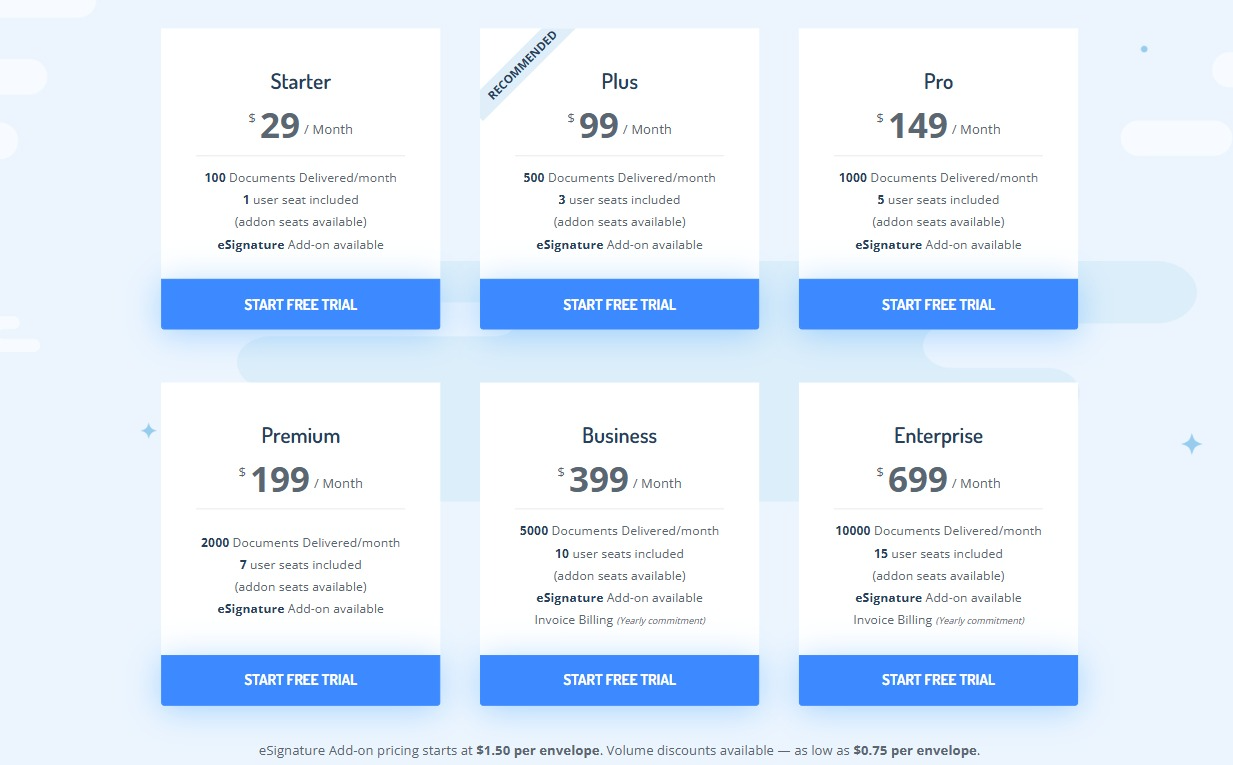
- Starter: $29/month for 100 documents (includes 1 user)
- Plus: $99/month for 500 documents (includes 3 users)
- Pro: $149/month for 1,000 documents (includes 5 users)
- Premium: $199/month for 2,000 documents (includes 7 users)
- Business: $399/month for 5,000 documents (includes 10 users)
- Enterprise: $699/month for 10,000 documents (includes 15 users)
Once you subscribe to any paid document automation plan, you get access to the e-signature tool, which charges $1.50 per envelope and drops as low as $0.75 with volume discounts. And No! There are no surprises at checkout. Additional users cost $4 per seat per month.
Here’s the best part: instead of giving you unlimited users in exchange for tiers with signature invites that don’t scale, Docupilot gives you something far more useful across various team sizes: access to all features across all plans. These include unlimited templates, API access, all integrations (Zapier, Make, Airtable, etc.), conditional logic, workflow automation, and document generation from Word, Excel, PowerPoint, and PDF templates.
You’re probably thinking: at $1.50 per signature envelope rate plus original plan rate, is Docupilot really a better price? Let’s do the math.
Let’s compare SignNow’s Site License rate that comes with all features and a minimal 1,000 signature invite, versus Docupilot’s Pro Plan, which gives you the same number of documents:
- SignNow at 1,000 signatures = $1,750
- Docupilot Pro: $149 (plan price) + 1,000 × $1.50 = $1,649
That’s $101 lower than SignNow’s cost. Consider that Docupilot is two tools in one: document automation and e-signature. That’s enormous value.
What you get with Docupilot that SignNow can't provide?
- Document generation & automation: Create contracts, invoices, reports, or proposals from templates, pulling dynamic data from spreadsheets, databases, or CRMs. One template can generate hundreds of personalized documents automatically
- API access on all plans: Even the $29 Starter plan includes full API access. You can build custom integrations immediately
- No feature gating: Conditional logic, workflow automation, calculated fields, custom branding—all available on every plan. You only pay for volume, not capabilities
- Unlimited testing: Test templates and workflows freely so you know they’ll work before using credits on actual deliveries
- Superior integrations: Native integrations with 70+ platforms, including Airtable (SignNow doesn’t have this), plus Zapier and Make for thousands more
- Exceptional support: Users consistently praise Docupilot’s support. Here’s one of many:
“I can’t recall getting this high-quality customer service from any provider in any field. It’s refreshing… the customer service is just incredible—seriously unbeatable. I had questions or needed help multiple times a week at some points. Unfailingly, they’ve gone way above and beyond to help us meet our goals.”
Compared to SignNow’s inconsistent support, Docupilot has built a reputation for genuinely caring about customer success.
Evaluate Docupilot firsthand before committing to SignNow
You don’t have to take our word for it. Here’s a simple way to see how Docupilot fits your workflow and budget.
- Sign up for Docupilot’s 14-day free trial (no credit card required). Unlike SignNow’s 7-day trial, this gives you plenty of time to test the platform
- Build templates for your most common documents. For example, if you’re sending employment agreements, create a single template with merge fields for name, salary, start date, etc. Upload a spreadsheet with your data, and watch Docupilot generate all documents automatically
- Test the e-signature add-on. Send documents for signature and compare the experience directly to SignNow
- Calculate your projected costs. Count the documents you generate monthly, find the Docupilot plan that fits, and add e-signature costs if needed. Compare this to SignNow’s published pricing, including potential overages, feature limitations, and the 100-signature cap per user
- Make an informed decision. If Docupilot meets your workflow needs at a lower or more predictable cost, it may be the better choice. If SignNow offers specific features you need and the seven-day trial is enough to test them, then it could still be a fit, but at least you’re basing the decision on actual numbers and capabilities, not assumptions
If you run into any issues while trying Docupilot, don’t hesitate to use the in-app live chat. You’ll get a real human response in under 8 minutes.
Here’s Alex S., a real estate expert’s experience using Docupilot:
“Price plans are well structured and suitable for a variety of businesses and cases, so thank you for that. Support is outstanding - they have developed a new custom integration that we needed in a matter of days and provided outstanding documentation that is easy to follow. Very simple and intuitive interface.”
Making the right choice between SignNow and Docupilot
SignNow is an effective product. But when it comes to pricing, you’d quickly figure that the right e-signature tool choice isn’t about the lowest advertised price.
It’s affordable for low-volume use with simple needs. The problem is that most businesses don’t stay in that lane for long.
As soon as volume increases or you need features like bulk sending, branding, or integrations, SignNow’s pricing becomes difficult to predict. Signature caps, overage fees, and feature gating can turn an $8 or $15 plan into a much larger expense. Combined with inconsistent support and reports of sudden price increases, the risk adds up quickly.
Docupilot takes a simpler approach. Pricing scales with document volume, core features are included on every plan, and document generation and e-signatures live in one platform. That makes costs easier to forecast and workflows easier to scale.
If you’re still deciding, don’t rely on assumptions. Try Docupilot’s 14-day free trial, model your real workflows, and calculate actual costs. Compare that with what SignNow would cost once limits and overages are factored in.
Learn how to automate document creation with Docupilot


Contents
Stop rebuilding the same document by hand.

Generate and sign documents in one workflow
Save ~15 minutes per application




