





Key takeaways
- API-powered forms can turn customer-submitted data into finished documents without requiring an employee to manually copy information into a template.
- The basic workflow is straightforward: collect the data, map it to an approved template, generate the document, then deliver it or send it for signature.
- Rules can determine which template, clauses, recipients, and delivery steps apply based on the submitted data.
- Reliable workflows require more than document generation. Teams should also test field mappings, define template ownership, handle failures, and track delivery or signing status.
- The best candidates for automation are repeatable documents with predictable inputs, structure, and next steps.
- Docupilot turns data from forms, CRMs, and help desks into documents, then automates delivery, eSignature, and status updates through APIs and webhooks.
How can a customer request a document and receive it immediately?
Connect the request form to the document workflow behind it. A customer or partner submits the information you need through your website, portal, or support flow. That data is passed to an approved template, used to generate the correct document, and then returned for download, delivery, or signature.
This guide explains how API-powered forms turn customer requests into finished documents, which workflows are good candidates for automation, and what keeps these processes reliable at scale.
Why automate customer service documents with an API?
Customer service systems already hold much of the information needed to create customer-facing documents. The common details include account information, case details, plan data, dates, pricing, and contact information.
An API lets that data move into the document workflow automatically. Instead of an agent copying the same information into a template, the workflow can use the submitted or stored data to create the required document directly.
Moving document creation closer to the point of request changes four things:
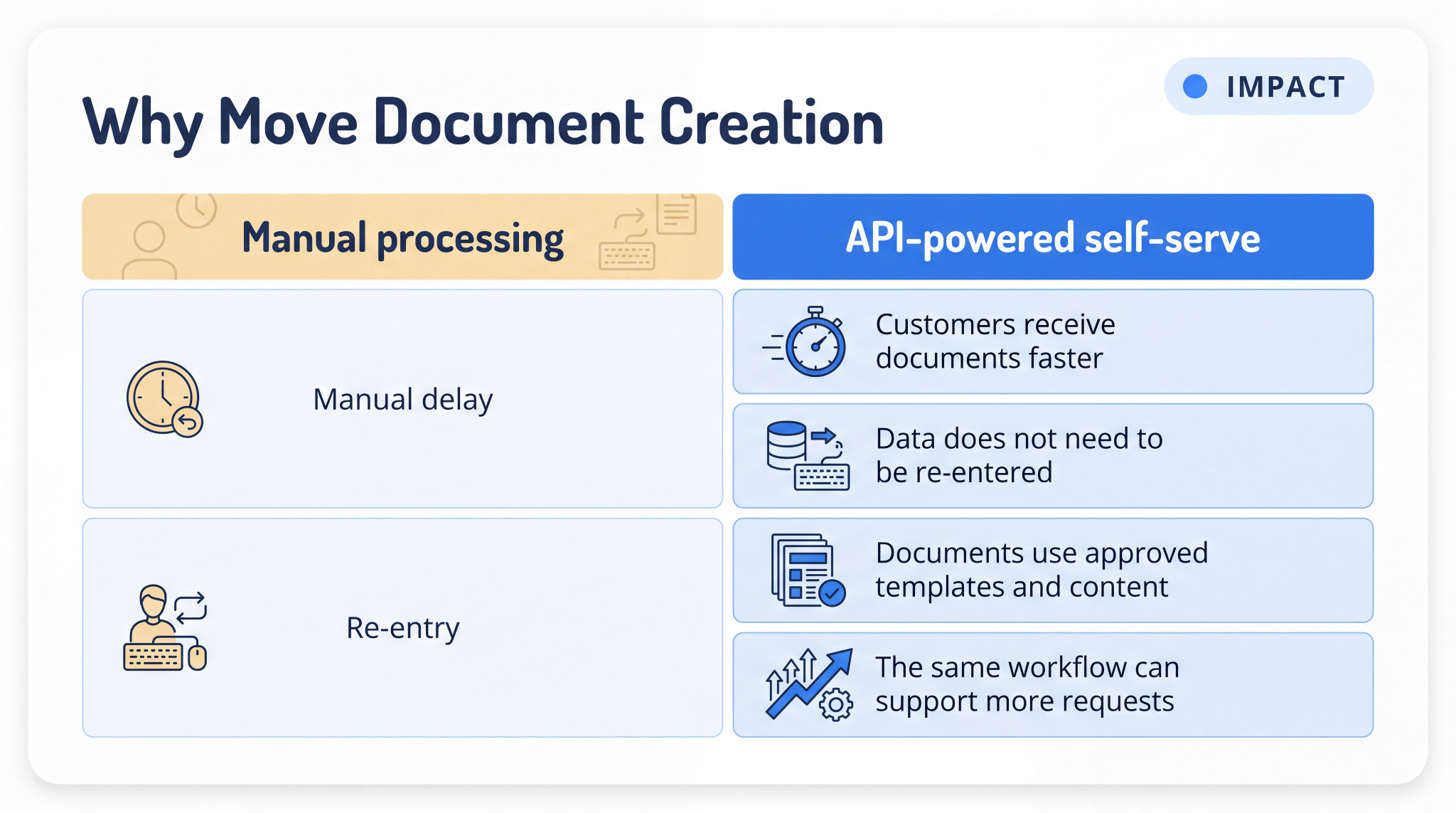
Customers receive documents faster
When an employee has to prepare a document manually, delivery depends on when that request reaches the top of their queue. An automated workflow can generate the file as soon as the required information is submitted, reducing unnecessary waiting time.
Data does not need to be re-entered
Copying customer information from a ticket, CRM record, or form into another document creates another opportunity for errors. Field mapping lets the workflow use the existing data directly, so names, dates, account details, and other values do not have to be typed again.
Documents use approved templates and content
Saved local copies create version-control problems. An employee opens an older file, and the document goes out with outdated pricing or superseded legal language. Generating documents from a managed template helps ensure everyone uses the approved version. In regulated industries such as insurance and healthcare, that consistency also covers required disclosures.
The same workflow can support more requests
Once the workflow is configured, customers, partners, or internal teams can use the same process repeatedly without creating a new manual document task every time. This makes repeatable document requests easier to support as volume increases.
How an API-powered form becomes a finished document
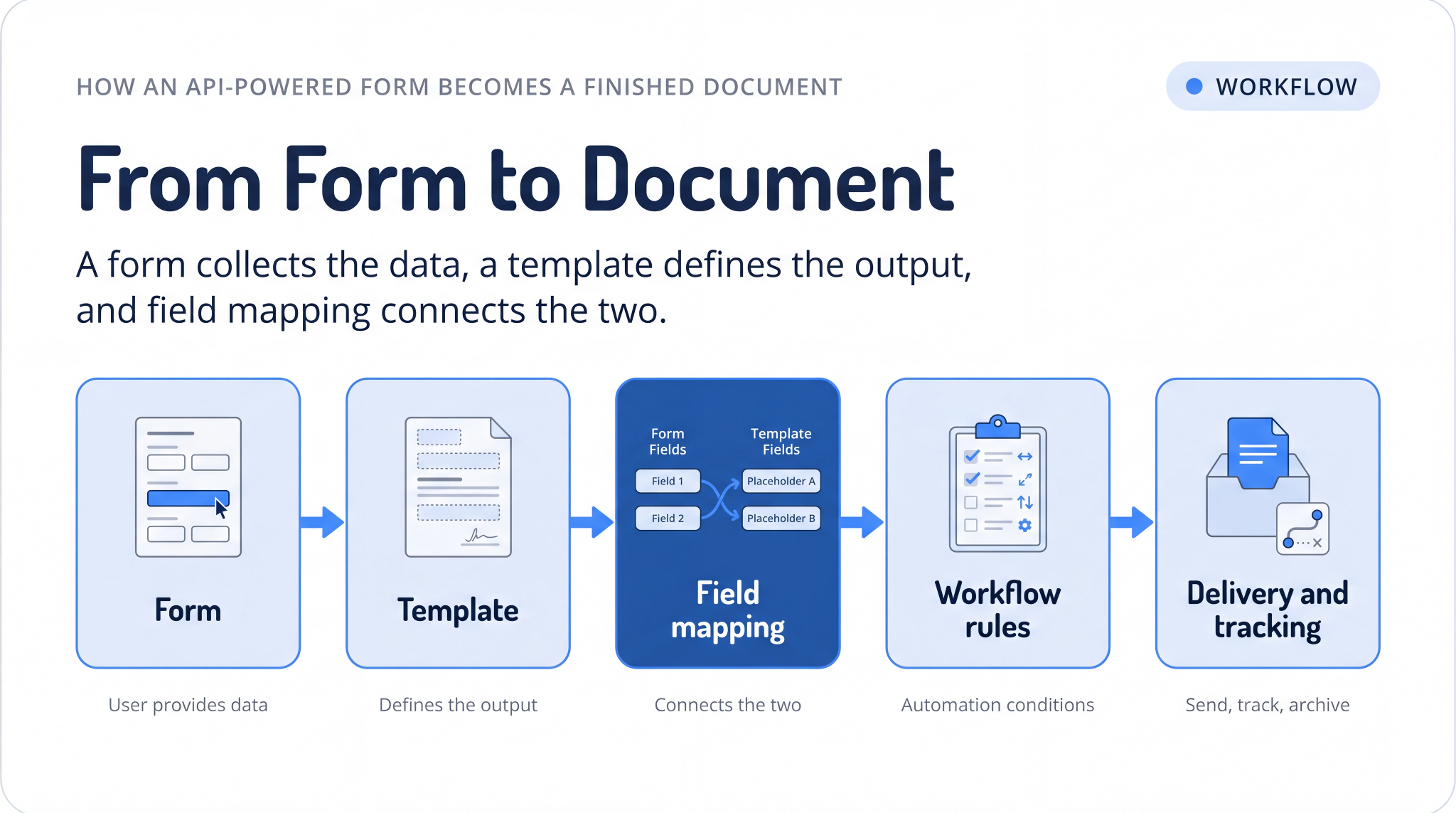
A form collects the data, a template defines the output, and field mapping connects the two. Once the data is mapped, workflow rules determine what document to generate.
Here is a basic example of the data your application sends to the document workflow:
json
{
"template_id": "renewal_confirmation",
"data": {
"customer_name": "Alen Wilbur",
"company": "Northwind Logistics",
"plan": "Pro",
"renewal_date": "2026-04-01",
"seats": 12
}
}
The template holds the layout and the approved wording. The payload supplies the values. The response returns the generated file or a link to it.
The table below shows the core building blocks of an API-powered document self-service workflow.
Customer service document workflows you can automate with APIs
API-driven document generation works best for customer service workflows where the trigger, required information, document format, and next step are predictable.
Once the integration is in place, teams can use the same approach without creating separate manual processes for each use case.
Here are some common workflows:
- Customer support: Generate confirmation letters, resolution documents, or case summaries when a ticket reaches a specific status, and attach the completed document to the case automatically.
- Sales: Let customers request a quote through a web form and receive a personalized, branded proposal without requiring a sales representative to create it manually. The same workflow can be used for order forms.
- Legal and partner operations: Allow partners to generate non-disclosure agreements or reseller contracts through a portal using approved templates and standard terms.
- Customer success and renewals: Generate renewal agreements using the customer’s plan, dates, and account information, then send the completed agreement for signature.
How Docupilot fits into your customer service document workflow
We help you automate the document workflow after a customer submits a request. You can connect your helpdesk, CRM, or application with our APIs to generate, process, and deliver documents without building the workflow from scratch.
A typical workflow works like this:
- Your application sends data: Your helpdesk, CRM, form, or internal system sends customer and document details to us through an API request.
- We generate the document: We use your selected template, apply the provided data, run workflow rules, and create the final document.
- You receive the result: We return the completed file, delivery status, or workflow updates through API responses or webhooks, allowing your system to trigger the next action.
Our public APIs follow the OpenAPI Specification, with copyable request examples for cURL, Python, Java, Node.js, and Ruby.
The workflow can also expand as your requirements change over time. A basic setup can start with generating a single document and later add steps such as approvals, multiple document generation, eSignature, or automated delivery.
The trade-off worth knowing
Setup cost sits at the front. Each document type needs its template built and its recipient roles defined before anything runs automatically. That work pays back on repeatable, high-volume documents. A one-off document that changes shape every time is usually faster to write by hand.
More complex workflows can generate multiple files, combine them into a packet, send documents for signature, and return signing and delivery events to the connected system. This lets teams start with a basic document workflow and add steps as needed.
Why should you partner with Docupilot for customer service operations?
Connected forms help you move document creation closer to the moment a customer needs it. Your existing systems provide the data, the form collects the required information, and the workflow generates, delivers, and tracks the final document.
This means customers spend less time waiting for documents, and your team spends less time creating them manually. Every document follows the templates, branding, and content standards your team has already approved.
Start with the document your team creates most often from information you already collect. If the trigger, required data, and destination are predictable, it is a strong candidate for automation.
When you're ready to test the workflow with your own templates, you can start a 14-day free trial of Docupilot, no credit card required.
FAQ
Can customers generate documents without logging into your product?
Yes. The form can sit on a public web page, inside a partner portal, or as an embedded intake form, and the workflow generates the document from the submitted values. Customers only need access to the form, not to your internal systems.
What happens when a customer submits incomplete information?
That depends on how the workflow is configured. You can mark fields as required at the form level so the submission never reaches the API, apply conditional rules that produce a different version of the document, or return an error your application handles. Deciding this before launch prevents documents with blank sections from reaching customers.
Can one form submission generate more than one document?
Yes. A single workflow can produce several files when a request requires multiple forms, disclosures, or agreements. Docupilot can combine or process those files into one packet before delivering it or sending it for signature.
Do you need a developer every time a template changes?
No. Developers build the integration and define the data being passed, then operations teams maintain wording, formatting, branding, conditions, and recipients through the platform. A new trigger, a new data source, or a significant workflow change still involves engineering, but routine document edits do not.
How does this work alongside an existing helpdesk or CRM?
The workflow connects through APIs, events, and webhooks, so your existing systems keep managing customer interactions and records. The document layer sits alongside them, receives the data it needs, and returns the finished file to whichever system should hold it.
Learn how to automate document creation with Docupilot


Contents
Stop rebuilding the same document by hand.

Generate and sign in one workflow.
Fifteen minutes back, per application.