







Key takeaways
- Document generation capabilities include contracts, clinical reports, leases, and HR documents
- The exact capability you need depends on your use case, but the underlying mechanism is always the same: your data, your template, and your trigger
- Docupilot supports all of these by connecting your templates directly to your data source and generating documents automatically
At some point, every growing team hits the same wall. Your data is in your CRM, your HR system, your property management platform, or spreadsheet. Someone then needs to copy that data into a template, format it, convert it to PDF, and send it out every single time.
That manual step delays contracts, invoices, onboarding documents, and reports, and creates errors that should not exist in the first place.
Document generation removes the step by turning the data you already have into personalized, ready-to-send documents automatically.
However, the types of documents involved vary by industry, which makes it hard to know whether the capabilities actually apply to your document workflow.
This article breaks down document generation capabilities by industry: the problems teams run into, how document generation solves them, and what it looks like when it works.
Top 6 Document generation capabilities by industry
Industries with high-volume, repetitive documents can benefit greatly from document generation. They include:
Contract and agreement generation
Every business that handles money or formal relationships creates contracts. The process looks simple until you are doing it repeatedly.
You open a template, search for the client details, copy them in, check names and dates, convert to PDF, send it for signature, and follow up when nothing comes back. Multiply that by every new client, renewal, and hire, and a large part of your week disappears into admin work.
Sales teams face this exact problem with proposals and contracts, and this is precisely what sales process automation solves by pulling client data from your CRM and automating the routing and signature workflow.
This usually includes engagement letters, NDAs, service agreements, employment contracts, and contract renewals. Each document type comes with its own fields and requirements, making manual generation tedious and error-prone.
Contract generation connects your templates directly to the place where your client, tenant, or employee data already lives. When a new record is created or a deal moves forward, the contract fills automatically with the correct name, dates, and terms. Instead of building documents, you only review and approve them.
Legal and Ops
Legal and Ops is a five-person law firm serving startups with fixed-fee legal work. Their promise was speed and predictability, but routine contract generation was pulling lawyers away from real legal work.
After automating their document workflows with Docupilot, repetitive data entry disappeared. Turnaround times dropped, and the team could take on more clients without hiring more staff.
Medical document and report generation
Medical documentation carries more weight than paperwork in most industries. A mistake in a lease is an inconvenience. A mistake in a medical assessment, patient form, compliance report, or certification can create serious compliance issues.
The pressure to get every document right sits on top of a process that is still largely manual in many practices.
When staff rely on Word templates with macros, manually linked fields, and spend up to 30 minutes per form, errors such as wrong dates, missing fields, or incorrect patient data are inevitable
Document generation in medical settings solves this by connecting patient or applicant data directly to form templates. Dynamic field mapping places information in the correct fields automatically. When a template needs updating, it is updated once instead of in multiple places. Forms generate cleanly and are ready to send without manual intervention.
Flight Medicals
Flight Medicals handles aviation medical certifications for Australian pilots and air traffic controllers, where accuracy is critical. Before Docupilot, the team was spending up to an hour per form working through Word macros, linking template fields manually, and correcting errors such as wrong email addresses or missing fields.
After automating their documents, they saved more than 1,000 hours over two years, reduced their annual workload by around 200 hours, and eliminated the class of human errors that had been creating client friction.
Academic and institutional document management
Document management is manageable when you operate a single campus. When you operate thirty, it becomes a logistics problem. Certificates, enrollment records, attestations, student transcripts, and staff contracts grow with every student enrolled, every staff member hired, and every cohort that graduates.
Bulk document generation makes managing documents at scale possible. Instead of creating each document individually, an entire cohort can be generated in a single run. Data is pulled directly from student or staff records, automatically populating each document with the correct information and producing a consistent output for every recipient.
Holberton School
Holberton School operates across more than 30 campuses worldwide, including 12 in France. Their administrative teams were creating every certificate, contract, and enrollment record manually, and as the student base grew, so did the errors. Birthdates were wrong, enrollment periods were incorrect, and small mistakes started to multiply at scale.
After implementing Docupilot, their document workflows connected directly to student records. Certificates that once took days to produce are now generated in a single bulk run, and the error rate has dropped to near zero.
Finance and billing document automation
In finance and billing, documents directly affect money and business operations. A contract sent late delays a client's signing. An invoice with the wrong amount delays payment. A renewal notice that isn’t generated risks missing revenue.
For businesses with recurring billing or high-volume onboarding, these manual steps quickly become bottlenecks.
Event-triggered document generation solves this by connecting your billing or CRM system directly to your templates. When a trigger fires, such as a new customer signing up, a subscription renews, or a deal closes, the relevant document is generated and sent automatically.
Billwerk+
Billwerk+ is a subscription management platform whose entire value proposition is helping businesses streamline recurring billing. Internally, their own contract process told a different story. Manual field entry into third-party systems was creating backlogs and slowing down new customer onboarding.
After connecting Docupilot to their existing systems, contract templates now populate automatically the moment a new customer comes through. The manual step between data and a ready-to-sign PDF is gone entirely.
HR document automation
Hiring and employee management involve many moving parts and documents that formalize every step of the process, from offer letters and employment contracts to onboarding forms and policy acknowledgments.
Managing these manually for dozens or hundreds of employees turns signature tracking into a spreadsheet nightmare, causes follow-ups to slip through the cracks, and leaves HR teams stuck in administrative work instead of focusing on people.
HR document automation solves this by connecting templates directly to HR system data, generating documents, and tracking signature status automatically.
Morristown Beard School
Morristown Beard School prepares over 160 employment documents each hiring cycle. Before Docupilot, the HR team built each one manually, tracked signatures through disconnected tools, and managed the inconsistencies that came with no standardized system.
After automating with Docupilot, documents now generate directly from HR data, go out consistently formatted, and the team has full visibility into signed and pending items.
Real estate document automation
Real estate runs on paperwork. Every property listed, tenant onboarded, lease signed, or renewal processed generates documents that must be accurate, compliant, and sent on time. Manual handling of leases, addenda, custom clauses, and signature workflows quickly becomes a bottleneck as portfolios grow.
Real estate document automation connects your property management data directly to templates. Tenant details, lease terms, property addresses, and state-specific clauses populate automatically. When forms change, you update the template once, and every document stays consistent.
Sunnon & Charlotte Property Management
Sunnon & Charlotte Property Management, a fast-growing residential property management firm, previously spent hours manually populating leases and updating templates, often producing poor-quality PDFs.
After switching to Docupilot, lease generation takes a fraction of the time, PDF quality improved, and template updates became a simple one-step process.
How to use Docupilot to For Document Generation?
Every use case in this article runs on the same underlying process: data that exists somewhere, a document that needs to reflect that data, and a workflow that connects the two with little to no ongoing manual effort. Docupilot is built to connect the process.
Here's how it works in practice.
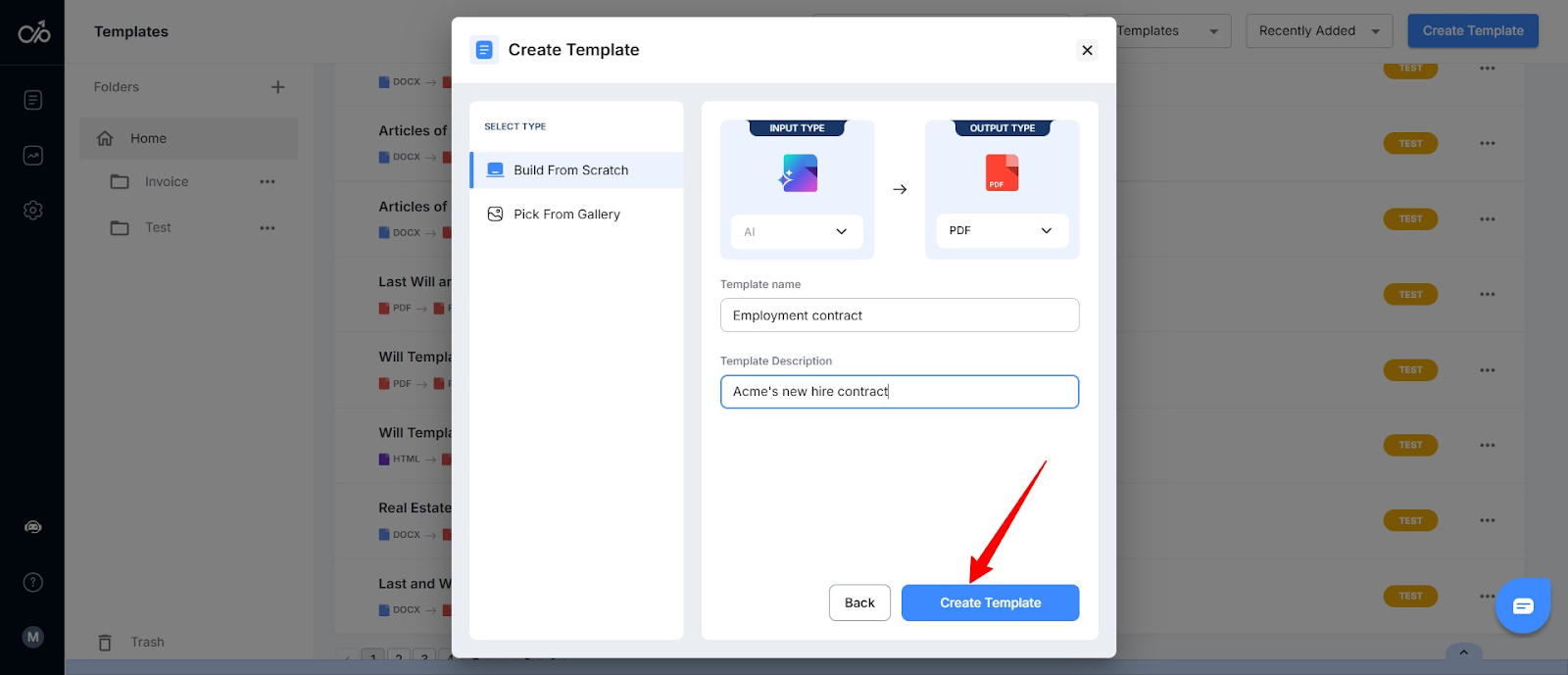
Step 1: Build your template
Start by identifying the documents you want to automate, such as your leases, clinical reports, employment contracts, or medical assessment forms.
You can create a template from scratch, upload an existing Word, PDF, or HTML document, select one f
rom the template library, or use the AI Builder for a faster start.
Step 2: Add merge fields and conditional logic
Once your template is ready, insert merge tags for any variable data. For example, use {{client_name}}, {{property_address}}, {{contract_dates}}, and {{certification}} wherever the information should appear in the document.
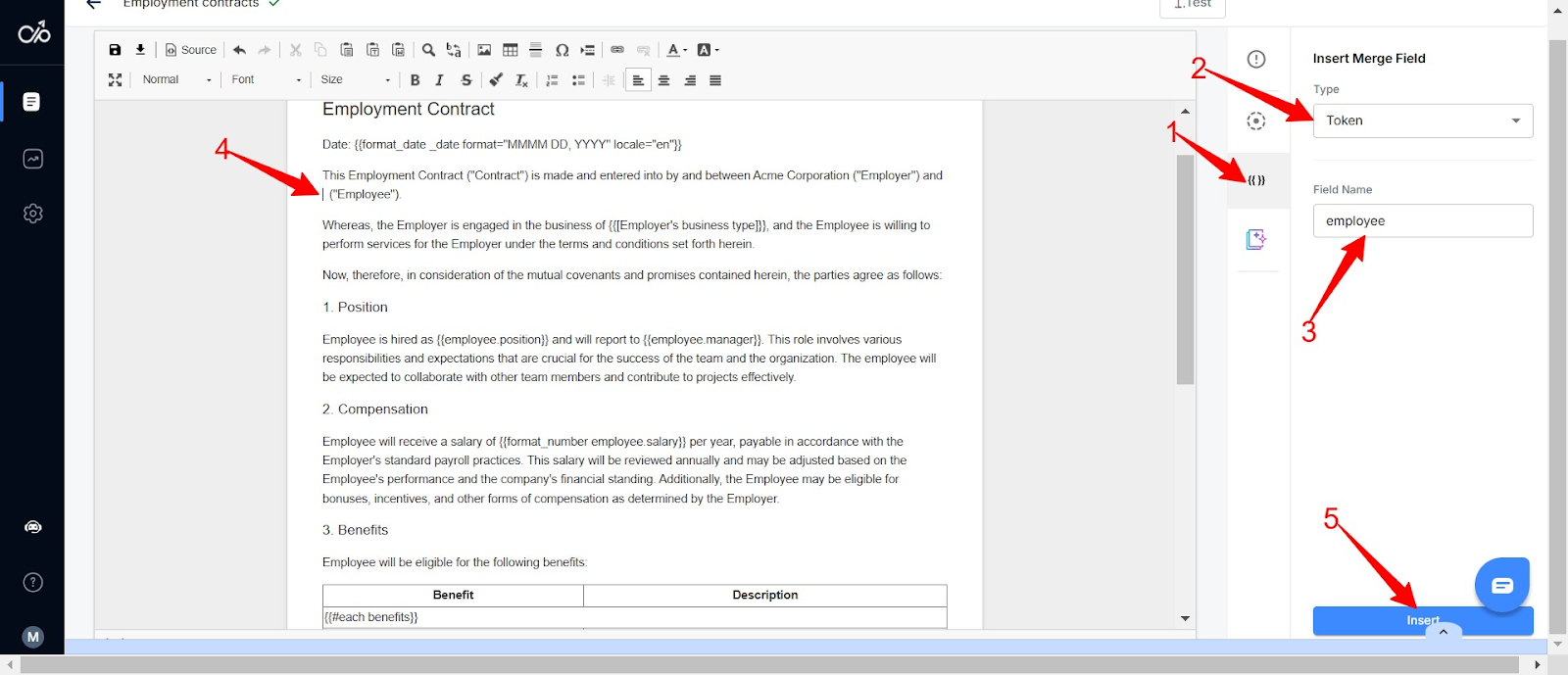
For documents that change structure depending on the case, clinician, property, or document type, use advanced conditions. This lets a single template adapt to different scenarios, eliminating the need for multiple versions while keeping the document accurate.
Step 3: Connect your data source
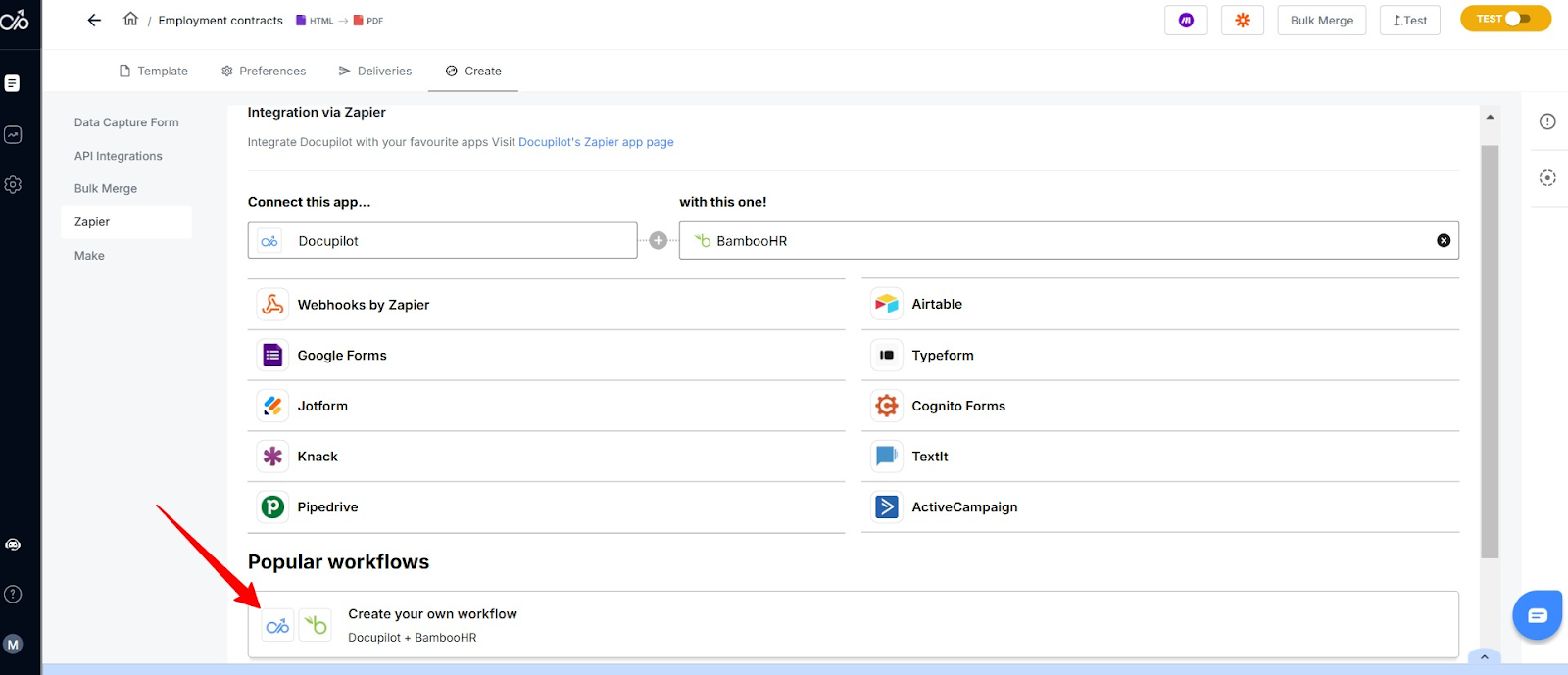
Docupilot integrates with over 1,000 tools, including BambooHR, Salesforce, HubSpot through Zapier and Make. Set your triggers to pull data directly from your systems and generate documents automatically, on a schedule, or on demand.
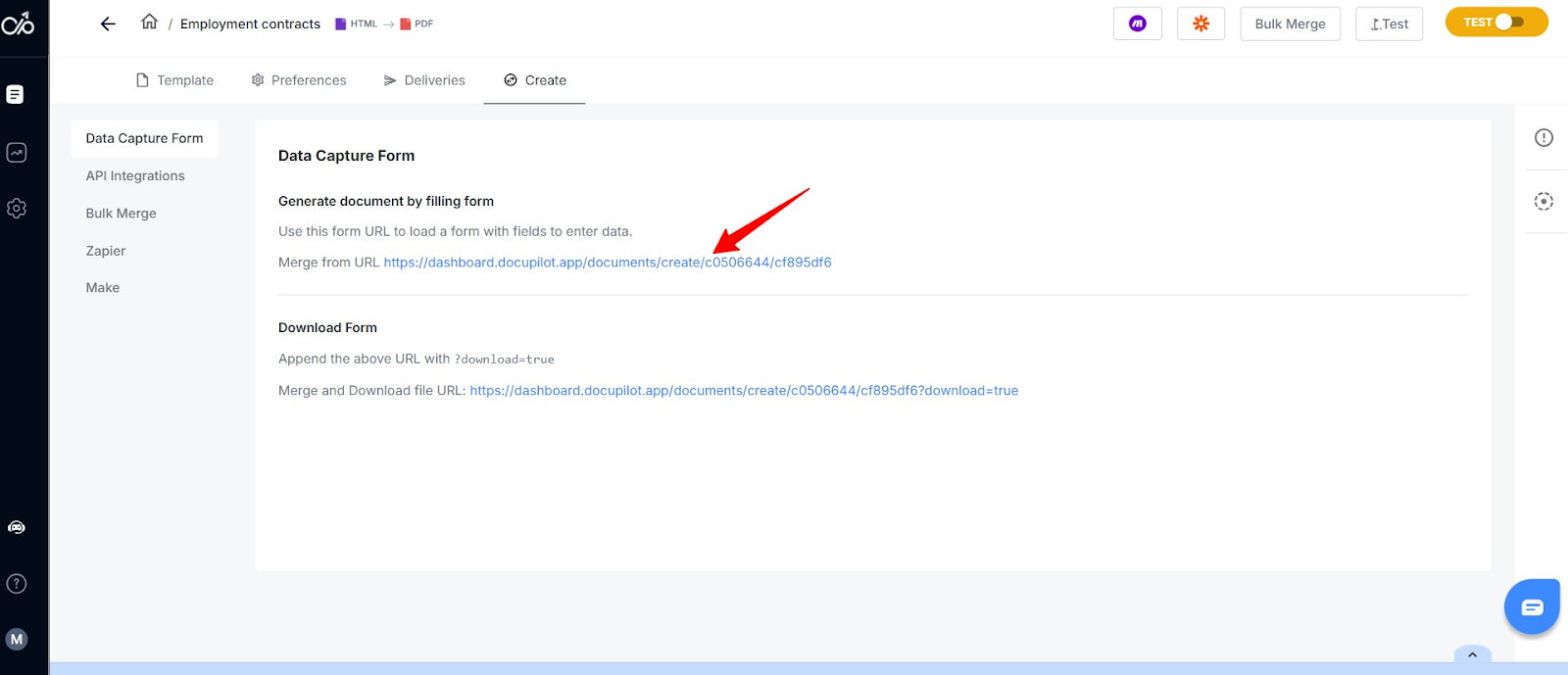
If someone needs to provide the data, rather than pulling it from an existing system, share a Data Capture Form link. Their input automatically populates the template.
Step 4: Deliver and sign
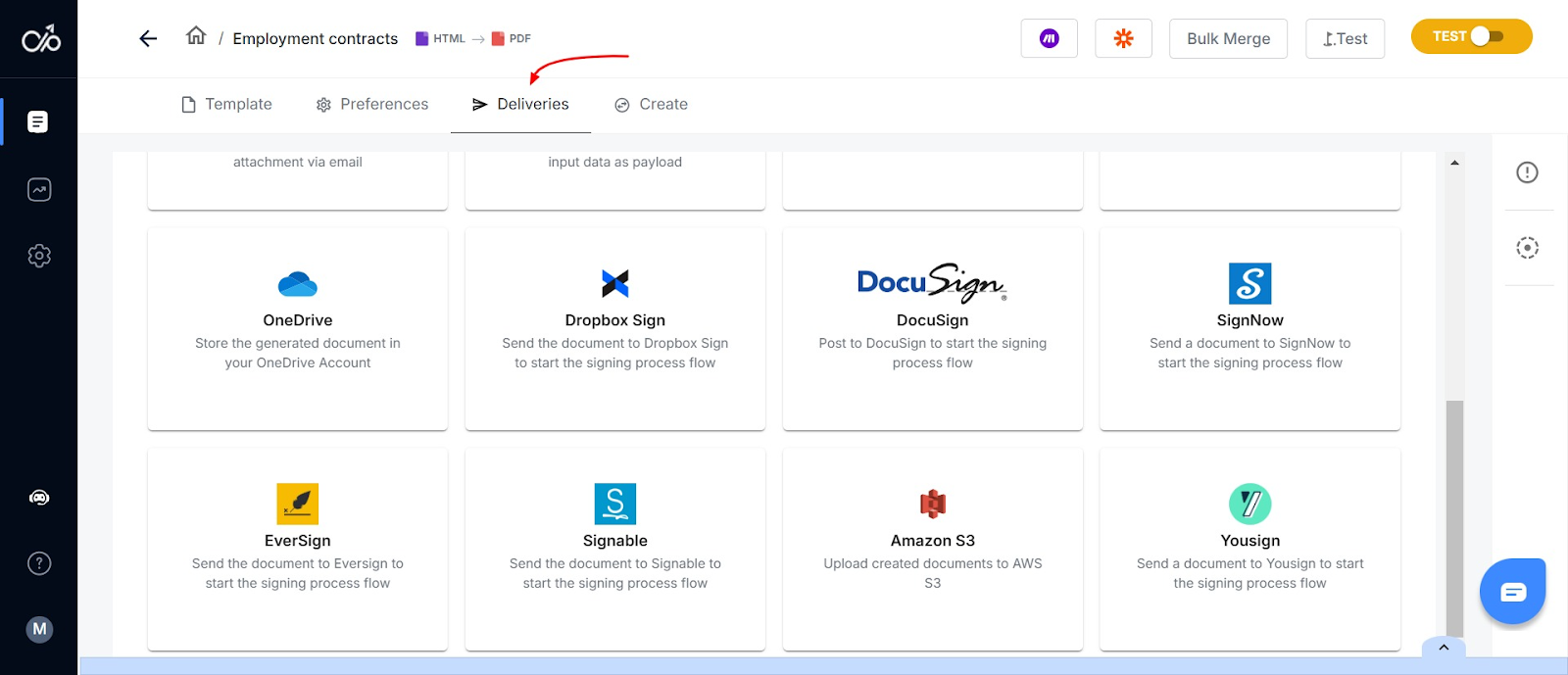
Now, whenever there’s a trigger or filled form, Docupilot automatically creates a document and sends it via email, stores it in connected cloud services, or routes it for signing through Docupilot’s built-in e-signature workflow.
Why Partner With Docupilot For Your Document Generation Operations?
The teams in this article: a law firm, a property manager, a psychologist, a school, a subscription business, an HR department, a medical certification provider, don't have much in common on the surface.
But they all hit the same wall: data that existed, documents that needed to be created, and a manual process sitting between the two that was costing them more than they realized.
Document generation isn’t a tool you need to justify. If you recognized your workflow in any of the sections above, the case is already clear. The question is just where you want to start.
With Docupilot, you can build your first template, connect your data source, and generate your first document for free. Sign up for a 14-day trial, no credit card required.
If you prefer a handheld experience, book a demo with the team.
FAQs
What are document generation capabilities?
Document generation capabilities let you automatically create accurate, formatted documents by combining your data with templates, reducing manual work and errors.
How can document generation help my business?
Document generation helps your business save time, improve accuracy, and ensure consistent documents like contracts, invoices, and HR forms.
Which industries benefit most from document generation?
Industries like legal, medical, education, HR, finance, and real estate benefit most because they handle high-volume, compliance-heavy documents.
What features make document generation effective?
Effective document generation relies on templates, dynamic data mapping, conditional logic, bulk generation, and integration with your existing systems.
How do I implement document generation in my workflow?
To implement it, identify documents to automate, create templates, connect your data source, apply conditional logic, and set triggers for automatic generation.
Learn how to automate document creation with Docupilot


Contents
Stop rebuilding the same document by hand.

Generate and sign in one workflow.
Fifteen minutes back, per application.




